


If you’re searching for how to unhide memories on Facebook, you’re not alone. Hidden dates, people, or posts can quietly remove years of Memories from your feed. The good news is that most of them can still be recovered. Find out with Video Download Free in the News article below.
Quick Guide
To unhide memories on Facebook, go to the Memories section, tap the gear icon (settings), then Memories Settings, and adjust preferences like turning off “Allow AI restyle memory suggestions” or managing hidden people/dates; for specific hidden posts, use the Activity Log to find them under “Hidden from your profile” and move them back to your profile
How to unhide memories on Facebook
Before diving into the steps, it’s important to understand how hidden memories work on Facebook and why certain posts may no longer appear in your Memories feed. This section will guide you through un-hiding Memories so you can revisit past moments you previously chose to hide.
Unhide General Memories & Fix Missing Ones
If some Facebook Memories are hidden or suddenly missing, they can often be restored by adjusting a few simple settings. Below is a quick guide to unhide general Memories and troubleshoot missing ones directly from Facebook’s Memories settings.
- Go to Memories: Open Facebook, tap the Menu icon (three lines), and find the Memories section (you might need to tap “See More”).
- Access Settings: Tap the gear icon (⚙️) in the top right corner of the Memories page.
- Adjust Settings:
- Memories Settings: Check here to manage preferences like “Allow AI restyle memory suggestions” or to exclude specific people/dates.
- Notifications: Change how often you get memory notifications (All, Highlights, None).
- Troubleshooting: Try toggling settings off and on, or even shaking your phone if memories are missing, as suggested in this Reddit thread.
>>> See Also: How to see all memories on Facebook and never miss one again

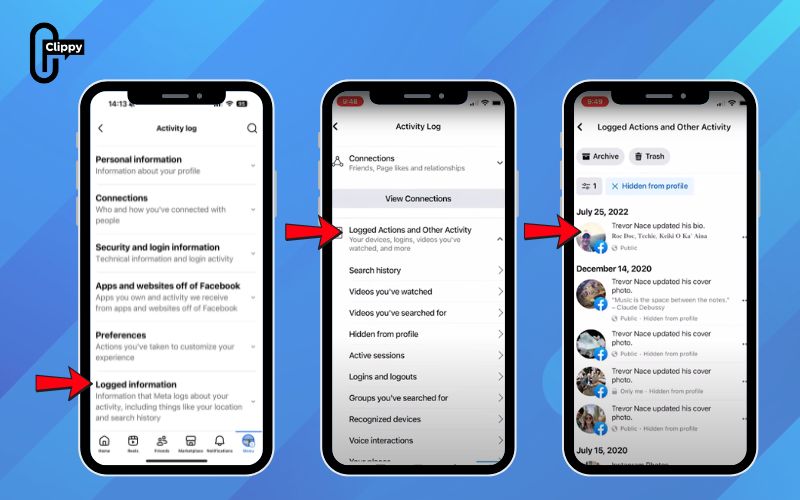
Unhide specific hidden posts (Via Activity Log)
If only certain posts are hidden from your Memories or profile, you can restore them individually through the Activity Log. This method helps you quickly find specific hidden posts on Facebook and add them back to your profile with just a few taps.
- Open Activity Log: Go to Menu > Settings & Privacy > Activity Log (under “Your Activity”).
- Find Hidden Posts: In the Activity Log, look for Logged Actions and Other Activity, tap the filter/categories, and select Posts hidden from your profile.
- Unhide: Tap the three dots next to a post and select Add to Profile to unhide it.
Unhide Memories in Messenger Chats
Some Memories may be hidden specifically within Messenger chats rather than on your main Facebook profile. Follow the steps below to unhide chat-related Memories directly in Facebook Messenger and bring those conversations back into view.
- Go to Menu & Settings: Tap Menu > Settings in Messenger.
- Find Hidden Chats: Scroll down and tap Memories, then Chats with hidden memories.
- Unhide: Tap Unhide next to the chat you want to see again.
How to fix Facebook Memories not showing up
If your Memories aren’t showing up, it’s usually caused by hidden settings, app issues, or temporary glitches. Below are the most effective ways to troubleshoot and restore missing Memories on Facebook.
- Check date & people exclusions: Facebook allows you to hide Memories from specific dates or people. If these filters are enabled, related Memories won’t appear in your feed.
- Turn Memories notifications on: Disabled notifications can make it seem like Memories are missing. Re-enabling them helps Facebook resurface past posts automatically.
- Update the Facebook app: Outdated app versions often cause Memories to load incorrectly. Updating ensures bug fixes and full feature compatibility.
- Clear cache (Android/iOS): Corrupted cache files may prevent Memories from displaying. Clearing cache refreshes stored data without deleting your account.
- Log out & log back in: Session-related issues can stop Memories from syncing properly. Logging out resets the connection and reloads your data.
- Known Facebook glitches & temporary bugs: Sometimes the issue comes from Facebook’s servers, not your settings. In these cases, Memories usually reappear once the glitch is resolved.

Why can’t I unhide some Facebook Memories?
Not all Facebook Memories can be restored, even if you follow the correct unhide steps. In some cases, the limitation comes from deleted content, privacy rules, or platform-level restrictions on Facebook.
- Deleted posts cannot be restored: Once a post is permanently deleted, Facebook removes it from all systems. Deleted content will never reappear in Memories, even if settings are changed.
- Memories hidden permanently by Facebook: Facebook may automatically hide certain Memories it considers sensitive. These are often excluded to protect users and cannot be manually unhidden.
- Memories from deactivated accounts: Posts from friends who deactivated or deleted their accounts may disappear. Without an active account, those Memories can’t be restored.
- Privacy restrictions (Friends/Only Me): Memories respect the original post’s privacy settings. If a post is set to “Only Me” or limited audiences, it may not show up again.

FAQs about unhiding Facebook Memories
Below are expert answers to the most common questions users ask about restoring Facebook Memories.
These explanations reflect how Facebook actually stores, filters, and resurfaces Memories based on user settings and platform rules.
Can you unhide Memories on Facebook?
Yes, Facebook allows you to unhide Memories that were hidden through settings or activity controls. You can restore them by adjusting Memories preferences or unhiding related posts from your Activity Log. However, permanently deleted or restricted content cannot be recovered.
How do I see hidden Facebook Memories?
Hidden Memories can be found by reviewing your Memories settings and Activity Log. Check for excluded dates, people, or posts hidden from your profile. Once restored, eligible Memories will reappear in your Memories feed over time.
Why are my Facebook Memories missing?
Missing Memories are usually caused by hidden filters, notification settings, or app glitches. Outdated apps, cache issues, or privacy changes can also prevent Memories from loading. In rare cases, Facebook temporarily hides Memories due to system updates.
Can I unhide Memories from years ago?
Yes, as long as the original posts still exist and aren’t permanently hidden or deleted. Facebook can resurface Memories from any year once restrictions are removed. The timing of reappearance may vary depending on system refresh cycles.
Do hidden posts reappear in Memories automatically?
Hidden posts do not reappear automatically unless you manually unhide them. Once restored to your profile, Facebook may include them in future Memories. Visibility still depends on privacy settings and content eligibility.
Understanding how to unhide memories on Facebook helps you take back control of your digital past. Most missing memories are not gone; they’re simply hidden by filters or settings. With the right adjustments, meaningful moments can resurface again. A few clicks may be all it takes to bring your Memories back.

Clippy – A free tool for downloading TikTok, Douyin, Instagram Reels, and Facebook videos in high quality with no watermark – fast, simple, and works on both mobile and desktop. Save your favorite social media videos in just a few clicks, with multiple formats supported and no account required.