

Missing friends’ birthdays on Facebook can feel awkward especially when notifications suddenly stop. If you’re searching for how to get Birthday notifications on Facebook, you’re in the right place. This News guide explains why alerts disappear and how to turn them back on correctly. Follow along with Video Download Free to never miss another birthday reminder.
Quick Guide
To get Facebook birthday notifications, you need to enable them in your Facebook settings for both the app and your phone’s system, ensuring you turn on ‘Allow Notifications’ for Birthdays under your profile’s Settings > Notifications, and check your phone’s general settings to make sure Facebook isn’t blocked from sending alerts. You can choose push, email, or SMS alerts, but remember that your friends must also share their birthdays (not hide them with “Only Me”) for you to get notified.
How to get Birthday notifications on Facebook
Birthday notifications help you remember important dates and stay connected with friends on Facebook. This section explains how to turn on birthday notifications so you never miss a celebration again.
On Mobile
If you want to receive reminders when your friends’ birthdays are coming up, you can easily turn on birthday notifications in the Facebook mobile app. Follow the steps below to make sure you never miss a birthday again.
Step 1: Open the Facebook app
Launch the Facebook app on your phone. From the home screen, tap the Menu icon (three horizontal lines) in the top-right corner.
Step 2: Go to Settings & privacy
When the menu opens, scroll down and tap Settings & privacy to expand more options.
Step 3: Open Settings
From the dropdown menu, tap Settings to access your account preferences.
Step 4: Find Notifications
Scroll through the Settings page and tap Notifications to manage how Facebook alerts you.
Step 5: Select Birthdays
Under the Notifications section, tap Birthdays to view birthday-related settings.
Step 6: Turn on birthday notifications
Toggle the Birthdays switch on. When enabled, it will turn blue. You can also customize how you receive birthday reminders—via push notifications, email, or text messages by selecting your preferred notification method.

On Computer
Turning on birthday notifications on Facebook using a web browser is just as simple as enabling them on the mobile app. Follow the steps below on your desktop or laptop to make sure Facebook reminds you of upcoming birthdays.
Step 1: Open Facebook and access your profile menu
Go to facebook.com and log in to your account. Click your profile icon in the top-right corner to open the menu.
Step 2: Open Settings & privacy
From the dropdown menu, select Settings & privacy, then click Settings.

Step 3: Go to Notifications
In the Settings menu, find and click Notifications to manage how Facebook sends alerts.
Step 4: Select Birthdays
Under the Notifications section, click Birthdays to access birthday-related notification settings.
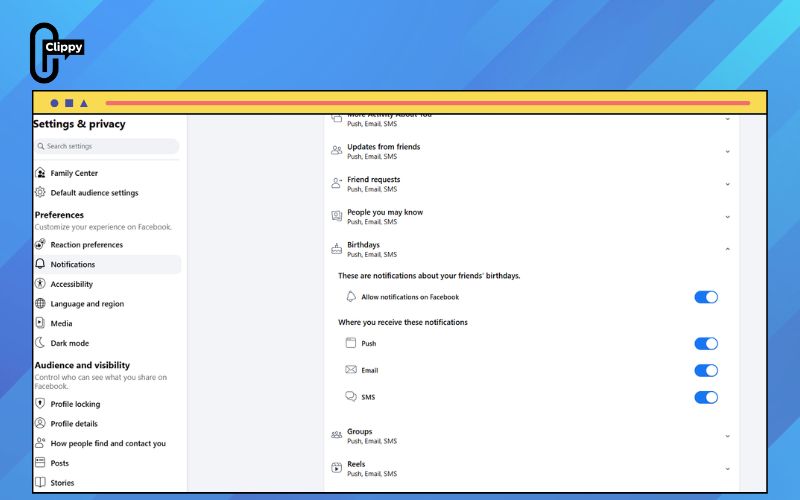
Step 5: Enable birthday notifications
Turn on the toggle for Allow Facebook notifications. You can also customize how you receive birthday alerts, such as through on-site notifications or email, based on your preferences.
Important Things to Know When Enabling Birthday Notifications on Facebook
Before turning on birthday reminders, there are a few important details that can affect whether notifications actually appear. Understanding these points will help you avoid confusion and make sure birthday alerts work as expected.
- Friends’ privacy settings matter: You’ll only receive birthday notifications if your friends have set their birthday visibility to Friends or Public. Hidden birthdays won’t trigger alerts.
- Check your own birthday visibility: If you want others to be notified about your birthday, make sure your birthday is shared in your profile’s About section.
- Notification preferences must be enabled: Birthday alerts won’t appear if Facebook notifications are turned off globally or muted on your device.
- App vs. web settings should match: Make sure notifications are enabled both in the Facebook app and on desktop for consistent reminders.
- Timing can vary: Birthday notifications may appear on the day itself or slightly before, depending on your notification and time zone settings.
FAQs about Facebook Birthday notifications
Birthday reminders help you stay connected, but notification issues are more common than you might think. Below are answers to the most frequently asked questions about Facebook birthday notifications and how they work.
Why am I no longer receiving birthday notifications on Facebook?
This usually happens when birthday alerts are turned off in your notification settings. Check both the Facebook app and desktop settings to make sure birthday notifications are enabled and not muted at the system level.
Does Facebook notify my friends when it’s my birthday?
Yes but only if your birthday privacy is set to Friends or Public. If you hide the day and month of your birthday, your friends won’t receive any birthday notifications.
Can I choose how I receive birthday notifications?
Yes. Facebook allows you to receive birthday reminders via push notifications, email, or both. You can customize this in the Notifications > Birthdays section of your settings.
Why do I see some birthdays but miss others?
You’ll only be notified about friends who have chosen to share their birthday with you. If a friend hides their birthday, Facebook won’t send you a reminder.
Do birthday notifications appear before or on the exact day?
In most cases, Facebook sends birthday notifications on the day itself. However, timing may vary slightly depending on your time zone and notification preferences.
Now that you know how to get Birthday notifications on Facebook, staying connected is easier than ever. By checking notification settings and privacy options, you can restore missed alerts quickly. Small adjustments make a big difference. Never miss another birthday and keep your friendships strong.

