


If you’ve ever found yourself obsessed with a catchy TikTok sound and wished you could make it your ringtone, you’re not alone. In this guide, we’ll show you how to make TikTok sounds ringtones easily on both iPhone and Android, even if you’ve never edited audio before. Together with Video Download Free, let’s explore simple apps and tools that let you save your favorite TikTok audios and turn them into custom ringtones in just a few minutes.
How to make TikTok sounds ringtones by Clippy
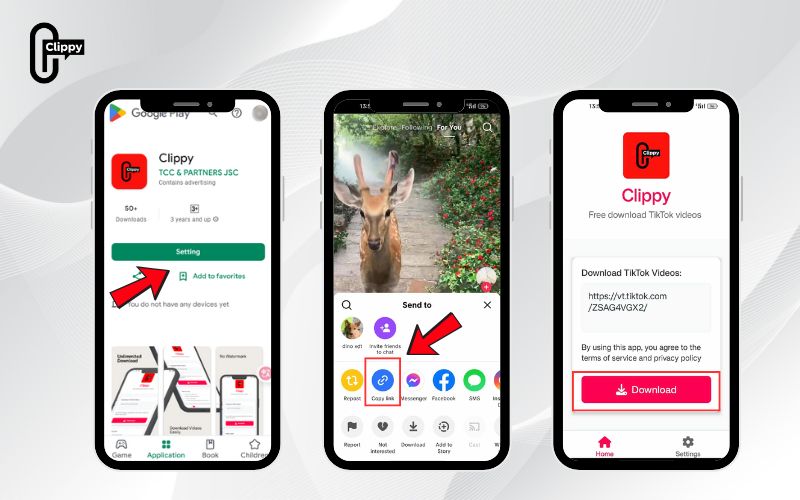
Before using any audio editing app, you need a clean way to extract TikTok sounds from videos. One of the easiest and safest tools for this is Clippy, an online video downloader that supports both video and audio extraction from TikTok.
Step 1: Copy the TikTok Video Link
Open TikTok and find the video with the sound you love. Tap the Share button and then Copy Link. This saves the video URL to your clipboard.
Step 2: Paste the Link into Clippy
Go to Clippy in your browser. Paste the copied TikTok link into the input box, then press Download. Clippy will automatically fetch the TikTok video for you.
Step 3: Choose “Audio Only” to Download the Sound
Clippy gives you the option to download either the full video or just the audio (MP3). Select Audio Only, and it will instantly process and prepare your TikTok sound as an MP3 file.
Step 4: Save and Use It as a Ringtone
Once downloaded, open your phone’s Settings > Sounds & Vibration > Ringtone, and choose the MP3 you just saved.
- On Android, you can set any MP3 directly as your ringtone.
- On iPhone, you’ll need to import the file into GarageBand first (we’ll cover that below).
That’s it, Clippy lets you download, extract, and use your favorite TikTok audios in just a few taps. It’s completely free, doesn’t watermark your files, and works on any device.
By starting with Clippy, you have the base audio ready to use in the next steps as we explore other tools for more customization. With this method, you’ll quickly master how to make TikTok sounds ringtones on both iPhone and Android.
How to make TikTok sounds ringtones using Kapwing (Android Method)
If you’re an Android user, the process is simple, flexible, and can be done right on your phone. Kapwing is a free online editor that makes it easy to convert any TikTok video into an MP3 and trim it for your ringtone.
Step 1: Copy the TikTok Video Link
Find a video with the sound you want. Tap Share → Copy Link on TikTok to get the video’s URL.
Step 2: Upload the Video to Kapwing
Head to Kapwing’s Video Converter in your mobile browser. Paste your TikTok link, and the video will automatically load into the editor.
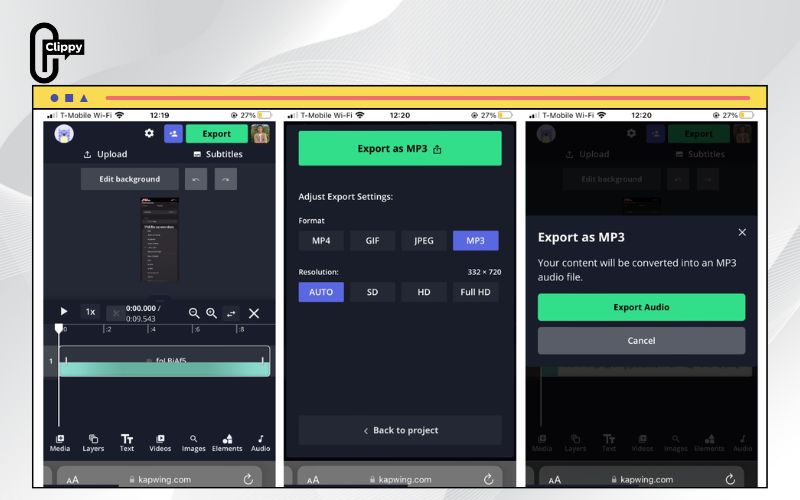
Step 3: Trim and Export as MP3
If you only want a specific part of the sound – like the chorus or a punchline, drag the playhead in the timeline to trim the section you want. Then tap Export → MP3.
Step 4: Set the TikTok Sound as Your Ringtone or Alarm
Now that you have your MP3 file:
- Go to Settings → Sounds → Ringtone → Add new ringtone.
- Browse to your downloaded MP3 file and select it.
>>> See Also: MP3 TikTok download – Best way to save TikTok audio fast
To use it as an alarm, open your Clock app → Alarm → Sound → Choose from files.
Android makes it incredibly easy to personalize your device. With Kapwing, you don’t even need to install extra apps – everything happens in your browser.
How to make TikTok sounds ringtones using GarageBand (iPhone Method)
Creating custom ringtones on iPhone takes a few extra steps, but once you’ve done it once, you’ll be able to make as many as you like. The combination of Clippy and GarageBand gives you full control over how your ringtone sounds.
Step 1: Download the TikTok Sound
Using Clippy, download your chosen TikTok video as an MP3 (as described above). You’ll then have the audio file saved in your Files app or iCloud Drive.
Step 2: Import the Sound into GarageBand
- Open GarageBand on your iPhone. If you don’t have it yet, download it from the App Store for free.
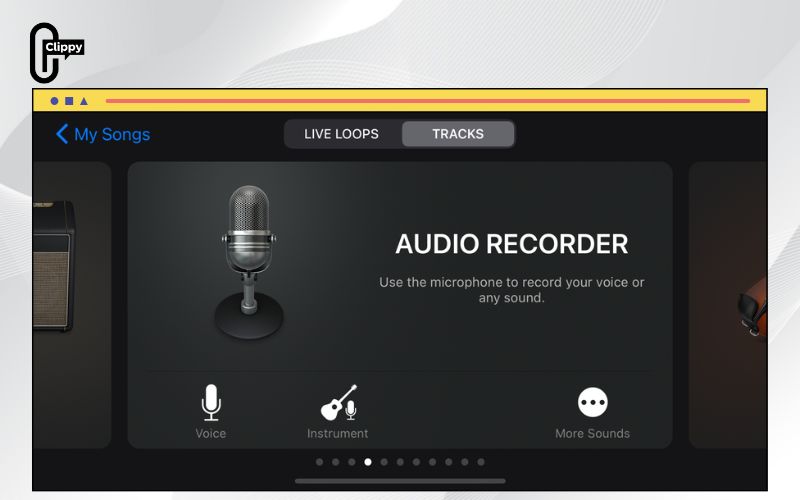
- Tap + to start a new project → Choose Audio Recorder under the “Tracks” tab.
- Next, tap the Track view icon (stacked bricks) → Tap the Loop icon → Choose Browse items from Files → Find and import your TikTok MP3 file.
>>> See Also: Does TikTok Notify When You Save a Video? Full Answer
Step 3: Trim and Extend the Audio
Remember: iPhone ringtones must be 30 seconds or shorter.
If your TikTok sound is shorter, you can copy and paste the clip multiple times in GarageBand until it reaches 30 seconds. This helps the sound loop naturally.
Step 4: Export and Set as Ringtone
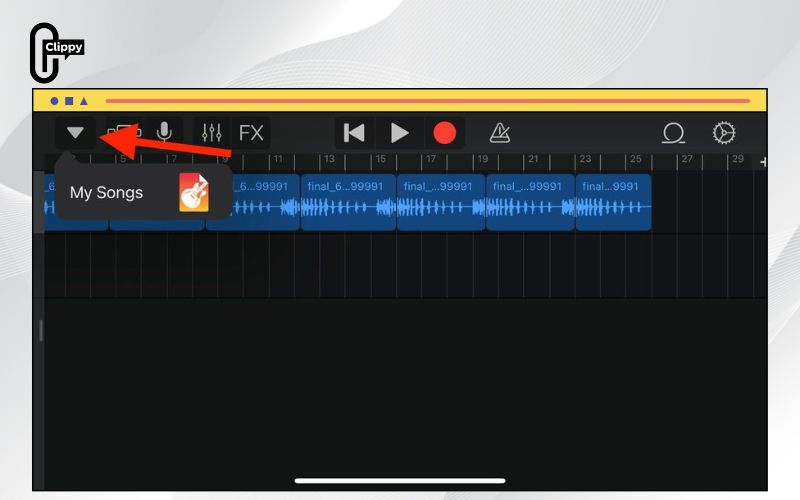
Tap the Arrow (top left) → My Songs → Long press your project → Share → Ringtone.
Rename it if you want, then tap Export. When it’s done, you’ll see an option that says Use Sound As → Standard Ringtone.
That’s it! You’ve successfully learned how to make TikTok sounds ringtones on your iPhone using GarageBand and Clippy together.
>>> See Also: Suggest 5+ free tools to save TikTok video without username
Tips for Better TikTok Ringtone Quality
Here are a few quick optimization tips for the best results when learning how to make TikTok sounds ringtones perfectly for your device:
- Choose high-quality videos: Avoid TikToks with too much background noise.
- Trim precisely: Focus on the most recognizable or catchy part of the sound.
- Normalize volume: Make sure the ringtone isn’t too loud or too quiet.
- Keep it under 30 seconds: Especially for iPhones, longer files won’t work.
- Test before setting: Play it in your media player first to confirm quality.
By following these small tweaks, your ringtone will sound crisp, professional, and distinctly “you”.
Why Clippy Is the Best App for TikTok Ringtones
While tools like Kapwing and FlexClip are excellent for editing, Clippy remains the simplest and fastest solution for extracting TikTok audio without watermarks or limitations – a must-have if you’re exploring how to make TikTok sounds ringtones easily.
Here’s why users love it:
- 100% free and online – no installation needed
- Works for both video and audio extraction.
- Compatible with all devices and browsers.
- Delivers instant MP3 downloads with clear quality.
>>> See Also: How to download TikTok videos without watermark for free

Turning viral TikTok audios into your ringtone is easier than ever. Whether you use Clippy, Kapwing,.. each tool helps you extract, edit, and personalize sounds in just a few steps. Now you know exactly how to make TikTok sounds ringtones on both iPhone and Android from downloading your favorite TikTok video to setting it as your phone’s alert tone.
So, what are you waiting for? Try Clippy today to download your favorite TikTok audios instantly and transform your phone’s ringtone experience forever. Visit Clippy now and start mastering how to make TikTok sounds like a pro!

