


Douyin (the TikTok version in China) is packed with creative content and millions of fun videos every day. Yet, when you wish to download them, the videos are marked with a watermark that affects their appeal? Don’t stress! You can discover numerous simple solutions for how to download Douyin videos without watermark. Check out the News article below from Video Download Free for more details.
How to download Douyin videos without watermark on a computer
If you want to download Douyin videos without a logo directly to your computer, there are many simple ways that do not require installing software. Below is a detailed guide to help you download Chinese TikTok videos with just a few quick steps.
How to download Douyin videos without watermark with Clippy
Are you looking for a way to download Douyin videos without a logo, in high definition, and without needing to install an app? With Clippy – a tool developed by TCC & Partners – saving high-quality videos becomes easier than ever. With just a few simple steps, you can download the original video without any watermark.
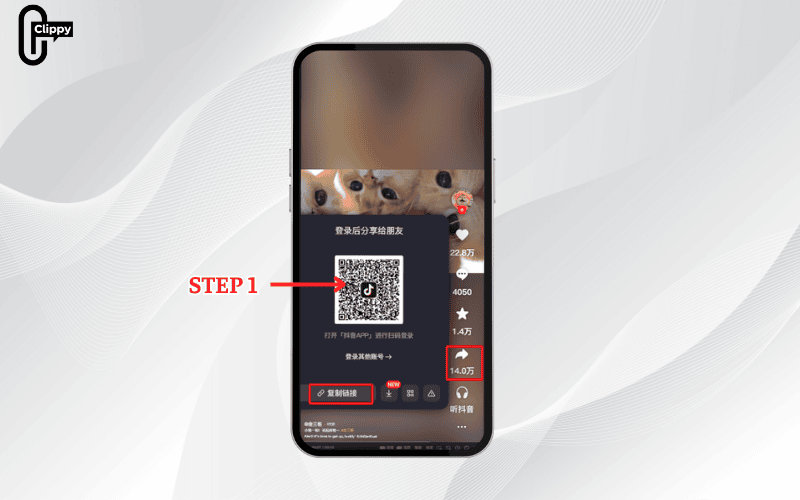
Step 1: Copy the Douyin video link
Visit www.douyin.com, open the video you want to download, and copy the link in the address bar. (Note: you should remove any extra characters to ensure the link is accurate).
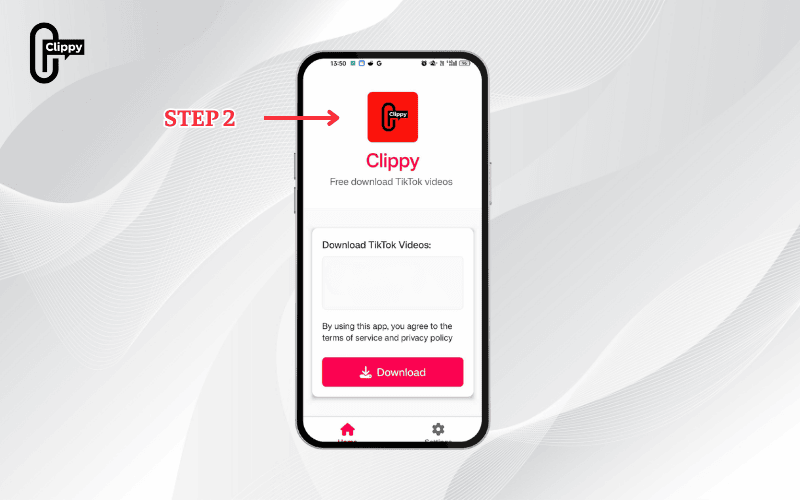
Step 2: Launch Clippy
Open the Clippy app on your device—your all-in-one solution for downloading Douyin videos without watermarks.
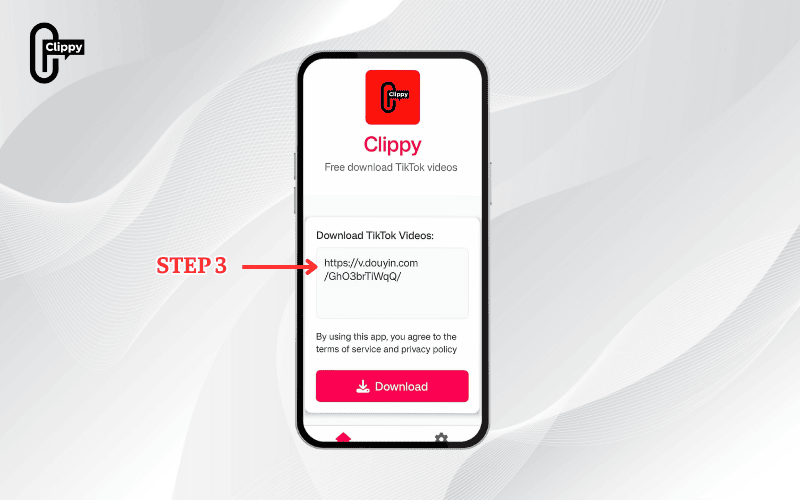
Step 3: Paste the Video Link
Return to Clippy, paste the copied link into the search bar, and you’re ready to go. No extra steps, just a simple way to save TikTok or Douyin videos without watermarks.
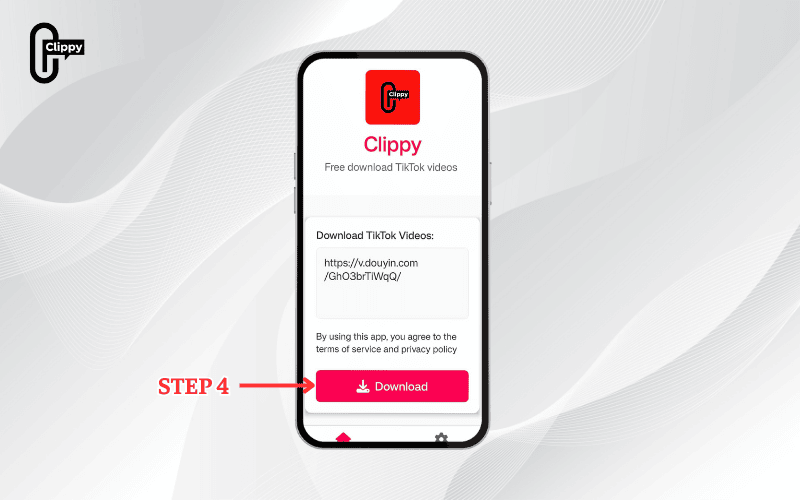
Step 4: Download Instantly
Select your preferred format and resolution, then hit Download. In seconds, your video will be saved to your device, completely logo-free and ready to share or edit. Clippy works seamlessly on both Android and iOS.
How to download Douyin videos without watermark using SO9
SO9 Douyin Down is another great tool for downloading watermark-free Douyin videos for free:
- Step 1: Open Douyin, choose the video, tap “Share” > “Copy Link”.
- Step 2: Go to so9.vn/9downloader/douyin using any browser.
- Step 3: Paste the link into the input box and click “Download.”
- Step 4: Tap the download icon to save the video to your device.
How to download videos from Douyin without watermark using the Cốc Cốc browser
In addition to downloading Douyin videos with online tools, you can also download videos directly to your computer using the Cốc Cốc browser. However, this browser only supports downloading the first video on the Douyin page, so you need to follow the instructions below precisely to download any video:
- Step 1: Open the Cốc Cốc browser on your computer, visit Douyin.com, and find the video you want to download. Click the share icon on the video.
- Step 2: Click the white-text, red-background button in the share menu to copy the video link.
- Step 3: Open a new tab, paste the copied link into the address bar (Ctrl + V). When the video appears, highlight the text that is not Chinese characters, right-click, and choose Copy.
- Step 4: Hover the mouse over the video area; at this time the Cốc Cốc browser will display the “Download” button – you just need to click that button.
- Step 5: The video will begin downloading and will appear in the bottom-left corner of the screen; you just need to wait a few seconds to complete.
>>> See Also: Chinese TikTok video downloader for iOS & Android users
UnduhTikTok – A tool to download Douyin videos without a logo
Would you like to save the original quality of videos you download from Douyin (Chinese TikTok) without a logo or device information? In a few easy steps, the UnduhTiktok.com tool will assist you in doing that quickly:
- Step 1: Launch Douyin, select the video you want to download, and click “Share” > “Copy link.”
- Step 2: Go to UnduhTiktok.com by opening your browser.
- Step 3: To allow the system to begin processing, paste the copied link into the tool’s box and click “Download.”
- Step 4: Select the Douyin video and save it without a watermark or device details.
How to download Douyin videos without watermark using SnapDouyin
SnapDouyin is a free and incredibly useful program if you’re seeking for a simple way to download Douyin films without a watermark. You may save your favorite high-quality videos to your device in a few easy steps.
- Step 1: Launch the Douyin app, pick the video you wish to download, click “Share,” and then choose “Copy link.”
- Step 2: Go to the SnapDouyin website by opening your browser. Click “Download” after pasting the link into the “Paste a video URL” box.
- Step 3: Select the preferred video format, give the system 10 to 30 seconds to process, then download it to your device.
How to download Douyin videos without a logo to your phone for free
Do you want to download Douyin videos to your phone without a logo, without paying a fee or installing cumbersome apps? Below is a detailed guide to help you save sharp, watermark-free videos with just a few simple methods.
How to download Douyin videos to your device without a logo with the Douyin Download tool
Want to save your favorite Douyin videos without the distracting logo? Follow this quick guide to use the Douyin Download tool for fast, high-quality, watermark-free downloads right on your device!
how to download Douyin videos without watermark with SnapVideoTools
Below is a quick guide to downloading Douyin videos without a logo to your device in just a few simple steps with the SnapVideoTools tool:
- Step 1: Visit Douyin on your phone, select the video you want to download. Press the “Share” button, then select “Copy link” to save the video URL to the clipboard.
- Step 2: Open the Douyin video download tool, paste the copied link into the input box. Then press the “Download” button for the tool to process the data.
- Step 3: Choose the download format such as MP4, MP3, etc., depending on your needs. Wait from a few seconds to half a minute and the video will automatically be downloaded to your device.
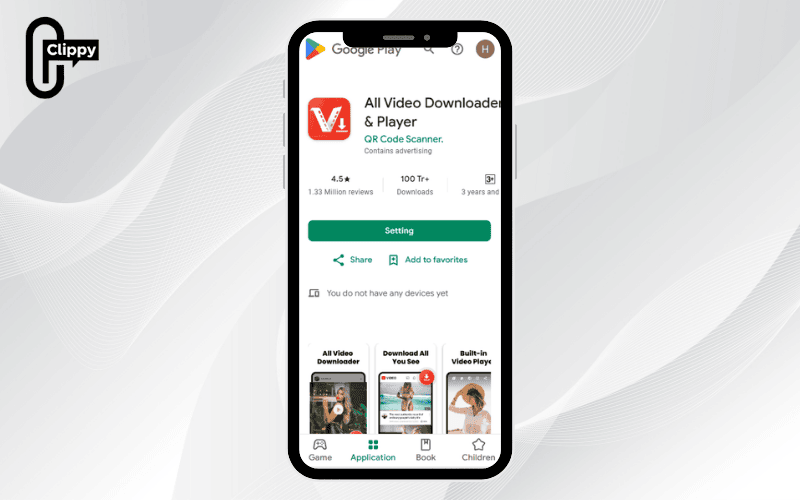
How to download Douyin videos without a logo on Android using All Video Downloader & Player
If you want to download Douyin (Chinese TikTok) videos without a watermark to your Android phone, All Video Downloader & Player is an extremely effective supporting application. Install it for free on Google Play and follow these simple steps:
- Step 1: Open Douyin, find the video you want to download, press “Share” and select “Copy link.”
- Step 2: Open the All Video Downloader & Player app, paste the copied link into the search box on the main interface, then press Enter.
- Step 3: When the video appears, press Play to preview, then select the download icon and press “Download” to save the video to your device.
>>> See Also: How to download Douyin video without watermark in 2025
How to download Douyin videos without watermark using Siri Shortcuts
If you are using an iPhone and want to download Douyin (Chinese TikTok) videos without a watermark, you can absolutely do that through the Shortcuts feature (Siri Shortcuts) on iOS. With the DouyinDL support tool, you can quickly download your favorite videos without installing additional external applications.
how to download Douyin videos without watermark:
- Step 1: Open the Safari browser on iPhone and enter the DouyinDL shortcut: https://www.icloud.com/shortcuts/0561352b97e046638d445126cf9e6f34. Press “Add Shortcut” to save it to your device.
- Step 2: Open the Douyin app, choose the video you want to download. Press the Share button and swipe right until you see the three-dot icon (…).
- Step 3: In the expanded menu, select the DouyinDL shortcut from the list. The first time you use it, the system may ask you to grant access – please accept to complete the download process.
Note: The steps may change slightly depending on the iOS version or Douyin updates. This guide is for reference only and you should check carefully before applying.
GoDownloader – App to download Douyin videos without a logo
Below is how to download Douyin videos without a logo using an online support tool, simple and without installing additional applications. With just a few steps, you can save high-quality videos to your device quickly:
Steps to take:
- Step 1: Visit Douyin, select the video you want to download, and copy the share link of that video.
- Step 2: Open the Google browser and go to the GoDownloader video download website.
- Step 3: Paste the video link into the link input box on the page.
- Step 4: Press the “Download” button and wait for the tool to process the data.
- Step 5: Choose the format and video quality (HD, MP4…) and then download the video to your device.
Pro tips for downloading Douyin videos in full HD without watermark
To successfully download Douyin videos without a watermark while maintaining Full HD or 4K quality, consider the following essential tips to ensure your video stays crisp and accurate:
- Opt for trusted tools: Choose reliable platforms or applications designed to remove watermarks without compromising video clarity – for example, Clippy tool.
- Use the direct video link from Douyin: Always ensure you’re pasting the exact video URL to help the tool process correctly, minimizing the risk of errors or broken downloads.
- Select the highest available video quality: Most tools now provide options to choose resolution before downloading. For the best visual experience, always pick the highest setting, such as Full HD or 4K.
Common questions about downloading Douyin videos without watermark
Many users have questions about copyright issues, download limits, or livestream availability when trying to download Douyin videos without a watermark. Below are some of the most frequently asked questions along with detailed answers to help you make better use of these tools.
Can I download livestreams that have already aired on Douyin?
If the livestream was not recorded, it cannot be downloaded. However, if a recording is available, you can use any of the previously mentioned methods to save the livestream to your device.
Is it a copyright violation to download and use Douyin videos?
You may face copyright issues in the following cases:
- Uploading the downloaded content to another platform without the creator’s consent.
- Using the videos for commercial purposes, such as advertising or monetized content.
- Reusing, editing, or distributing videos that contain copyrighted music, film clips, or television content.
Are there any restrictions on the number of Douyin videos I can download per day?
Tools like Clippy offer completely free, unlimited downloads of Douyin videos without watermarks. You can download as many videos as you like without any daily cap.

With the thorough instructions shared above, you should now know exactly how to download Douyin videos without a logo to your device with ease and speed. Keep following Video Download Free News section for more updates, tips, and Chinese TikTok trends. Plus, if you want a free, full HD option for how to download Douyin videos without watermark, don’t miss Douyin Download by Clippy!

