


Douyin, the Chinese version of TikTok, is growing rapidly with millions of short videos daily. Many users want to save them for offline use, but direct downloads often include watermarks. If you’re wondering how to download Douyin video cleanly, this guide has step-by-step instructions. With Video Download Free, you can save Douyin videos without watermark in just a few clicks.
Why Douyin makes downloading videos difficult
Douyin automatically adds watermarks to all videos to protect creators’ content. Even when using the official “Save video” option, the download often includes the watermark and is sometimes blocked by creators.
Many users frequently ask “how to download video from Douyin” or “how to download Douyin video without watermark”. Others are curious more generally how to download Douyin video for offline viewing or personal archiving. Clean, offline videos are often needed for educational purposes, editing, or private archiving, but Douyin’s system makes this difficult.
Furthermore, Douyin limits the official save function for certain videos, making third-party tools the only practical solution for users who want clean, high-quality videos.
>>> See Also: How to download Douyin videos without watermark fast, free

Common methods people try and their limitations
Screen recording is a quick solution that some users rely on to save Douyin videos. While it captures the video instantly, the quality is often lower than the original, and the original sound may be cut or reduced. Screen recording also becomes inconvenient when saving multiple videos, especially if you need high-quality output. Users who attempt this method often still ask themselves how to download Douyin video without losing quality or audio.
The built-in Save option on Douyin is convenient but has significant limitations. Videos downloaded this way always include a watermark, and many creators disable the save option for their content. Users frequently ask “how to save Douyin video” without a watermark, but unfortunately, the built-in tool cannot provide a clean version.
Online downloader sites offer another way to download Douyin videos without installing an app. These websites are easy to use but often cluttered with ads and pop-ups, which can be distracting and risky. The video quality is frequently compressed, and privacy can be a concern if the site requests your login credentials. Even when using these sites, many users still want to know how to download Douyin video safely and in full quality.
While these methods are quick, their limitations make them impractical for frequent or high-quality downloads. For the best results, using a dedicated mobile app remains the most reliable solution.

The best way to download Douyin videos
The most reliable method for users asking “how to download Douyin video” efficiently and without watermark is using a trusted mobile app. Apps designed for Douyin and TikTok can:
- Save videos directly to your gallery.
- Keep original HD or 4K quality.
- Remove watermarks.
- Preserve the original sound.
Example workflow with Clippy
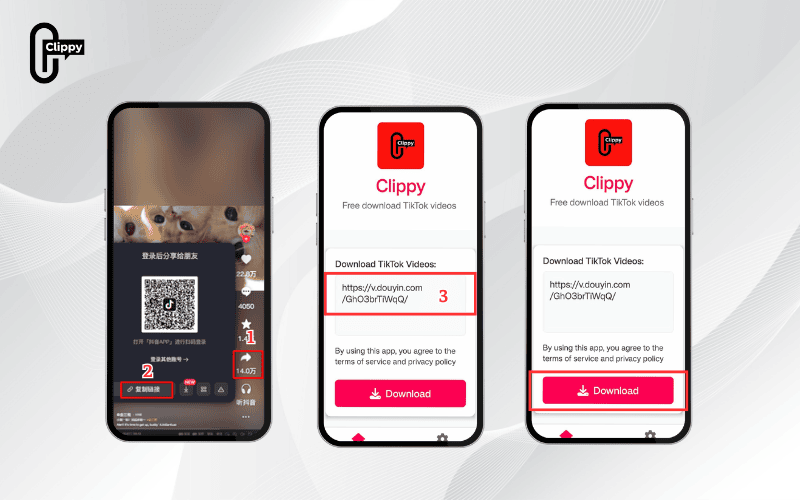
Clippy is a lightweight, trusted app for downloading Douyin videos. It allows users to save high-quality videos without watermarks in three simple steps:
- Step 1: Copy the video link from Douyin.
- Step 2: Open Clippy and paste the link.
- Step 3: Tap download → the video is saved cleanly to your gallery with original quality and sound.
Clippy works on both iPhone and Android, requires no login, and is designed for both Douyin and TikTok users. This app addresses common questions such as “how to download Douyin in iPhone”, “download video Douyin no watermark”, and “download video Douyin no logo”. By using Clippy, anyone can quickly save videos, including those from Chinese Douyin (the original version of TikTok in China), solving the common problem of how to download the Chinese TikTok easily.
Tips for safe and high-quality downloads
- Install apps only from official stores like App Store or Google Play to avoid malware.
- Avoid tools that request login credentials, as these may compromise your account.
- Choose HD or 4K downloads if available to maintain original video quality. Following these tips ensures anyone can safely download Douyin video in high quality without watermark issues.
- Respect copyright and use downloaded videos responsibly for personal purposes.
Following these tips ensures safe, high-quality, and watermark-free Douyin videos on any device, making it easier for anyone to download Douyin video reliably and securely.
>>> See Also: Chinese TikTok video downloader for iOS & Android users

FAQ about downloading Douyin videos
Can I download videos from private accounts?
No, you can only download videos from accounts you follow or approved followers. Respecting privacy settings is essential.
Is downloading Douyin videos legal?
Downloading for personal use is generally allowed, but redistribution may violate copyright laws and Douyin’s terms of service.
Can I download Douyin videos on iPhone and Android?
Yes, apps like Clippy and other trusted tools allow you to download Douyin video on both platforms safely and without watermark.
Will the original sound be preserved?
Yes, if you use reliable apps instead of screen recording, the original audio is saved along with the video.
Quick fixes like screen recording, the built-in save option, or online sites often reduce quality and add watermarks. If you’re searching for how to download Douyin video safely, using trusted apps is the best solution. Tools like Clippy let you save in HD or 4K with original sound, no watermark, and work on both iPhone and Android. This simple process makes offline viewing and archiving easy and reliable.

