


If you’re wondering how to create a Facebook hashtag and use it effectively to boost your post visibility, engagement, and brand reach, you’ve come to the right place. In this guide, we’ll explain everything you need to know about Facebook hashtags in 2025, how they work, and how to use them strategically to grow your online presence. Let’s explore it step by step together with Video Download Free and discover why hashtags still matter today.
What Is a Facebook hashtag?
A Facebook hashtag is a word or phrase preceded by the hash symbol (#), used to categorize content and make it discoverable to a wider audience. When someone clicks on or searches for a hashtag, they see a feed of public posts using the same tag. Learning how to create a Facebook hashtag is essential for anyone who wants to join trending conversations, promote events, or increase engagement.
Hashtags on Facebook work similarly to other platforms like Instagram and X (formerly Twitter). They help users find discussions about specific topics, brands, or campaigns from #FoodLovers to #TechTrends. In short, hashtags make your content searchable, connect you with your audience, and enhance your Facebook SEO.
A short history of Facebook Hashtags
Facebook first introduced hashtags back in 2013. At the time, users were excited, and brands quickly jumped on the trend. However, their popularity slowly declined over the years. Then in 2020, Facebook revived hashtags by recommending them in a drop-down list while users were typing their posts.
Since then, Facebook has emphasized hashtags as a key tool for boosting organic reach and improving visibility. The platform even notifies users that adding hashtags can increase discoverability and help their content perform better. In 2025, hashtags are more relevant than ever — so knowing how to create a Facebook hashtag gives your brand a valuable advantage.
>>> See Also: How to download Facebook messenger video fast in 1 minute

Step-by-Step: How to create a Facebook hashtag
Creating a Facebook hashtag is simple, but using it strategically requires thought. Follow these steps to get started:
Start With the Hash Symbol (#)
Begin by typing “#” before your chosen word or phrase — for example, #HealthyEats or #DigitalMarketingTips.
Choose Relevant Keywords
Pick words that relate to your topic, campaign, or brand. For instance, if you’re launching a product, create a unique hashtag like #LaunchWithStyle.
Avoid Spaces and Special Characters
Facebook only recognizes letters and numbers in hashtags. Use capitalization for readability — like #LoveYourSkin instead of #loveyourskin.
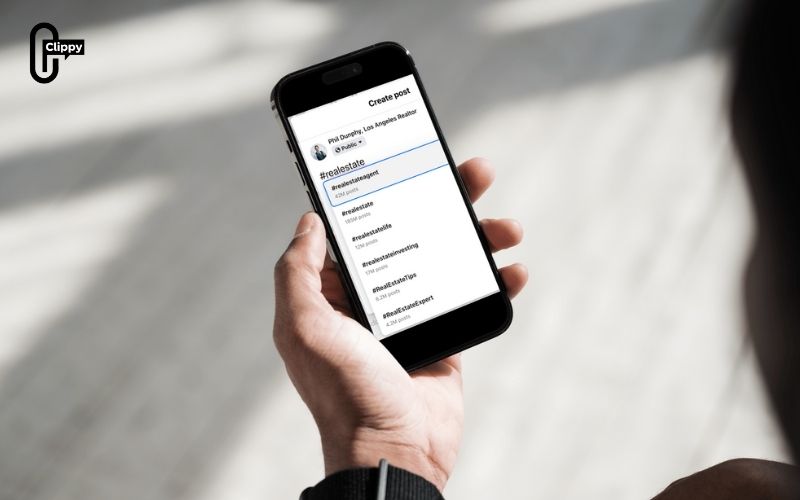
Use Facebook’s Suggestions
When you start typing your hashtag, Facebook will show related or trending hashtags. Choose those that fit your post to increase visibility.
Add Hashtags at the End (or Naturally in Text)
You can place hashtags at the end of your post or within the sentence itself — for example, “Can’t wait to #ShareACoke with my friends!”
That’s it! You’ve learned how to create a Facebook hashtag and make your post part of a larger, searchable conversation.
>>> See Also: How to download private facebook video without tools
Why use Hashtags on Facebook?
There are three main reasons why marketers and creators use hashtags on Facebook:
- Increase Discoverability: Hashtags make your content easier to find by people interested in similar topics. When you add a hashtag, your post becomes part of a larger conversation.
- Stay Consistent Across Platforms: If you run omnichannel campaigns, using the same hashtags across Facebook, Instagram, and TikTok keeps your brand voice and message consistent.
- Build Community: Hashtags can bring together users with shared interests. For example, using #EcoFriendlyLiving can help you connect with sustainability-minded audiences.
By understanding how to create a Facebook hashtag that aligns with your brand, you can reach new users, encourage interaction, and strengthen brand loyalty.
How do Facebook hashtags work?
Facebook hashtags function across various post types — personal profiles, business pages, groups, events, and even comments. Each hashtag has its own dedicated feed and URL. When someone clicks on a hashtag, Facebook redirects them to a list of posts using that tag.
For example, if you post “Join the fun! #SummerVibes2025”, anyone who clicks on #SummerVibes2025 will see other posts using the same hashtag. This helps spread your message to a wider audience.
To make the most of it, learn how to create a Facebook hashtag that is short, relevant, and easy to remember. Avoid overstuffing your post with tags — quality always beats quantity.
How many hashtags should you use on Facebook?
Unlike Instagram or X, where users often use multiple hashtags, Facebook works best with moderation. Studies show that posts with 1 – 3 hashtags perform the best in terms of engagement.
Too many hashtags can make your post look spammy or cluttered. Focus on one main branded hashtag and one or two trending or topic-related hashtags. Once you know how to create a Facebook hashtag effectively, consistency will help your audience recognize your campaigns more easily.

How to search for hashtags on Facebook
To find hashtags or track their performance, you can:
- Type the hashtag directly into the Facebook search bar (e.g., #DigitalMarketing).
- Visit facebook.com/hashtag/yourword (replace “yourword” with your chosen tag).
- Click any hashtag in a post to explore related content.
By using these methods, you can research which hashtags are trending or performing well. This is an important step when learning how to create a Facebook hashtag strategy that aligns with current trends.
How to measure the success of your Facebook hashtags
Peter Drucker once said, “If you can’t measure it, you can’t improve it.” The same applies to Facebook hashtags. Tracking performance is a key step after you’ve learned how to create a Facebook hashtag.
You can monitor:
- Engagement (likes, comments, shares) on posts using specific hashtags.
- Reach and impressions through Facebook Insights.
- Sentiment and keyword trends using social listening tools.
Regularly analyze which hashtags drive the most interaction. Adjust your strategy based on these insights to refine your future campaigns.
>>> See Also: Download Facebook Reel Video Free in HD & 4K Quality

By now, you know how to create a Facebook hashtag and why it’s a vital part of modern digital marketing. Hashtags help you expand your audience, strengthen your brand message, and join trending conversations. Remember to keep them relevant, simple, and consistent across all channels.
Ready to take your Facebook strategy even further? Download Clippy, the free app that lets you save and download Facebook videos effortlessly – perfect for creating engaging content that pairs beautifully with your hashtags.
Start applying what you’ve learned about how to create a Facebook hashtag today, and watch your engagement grow like never before.

