


If you’ve ever received a funny clip, an important tutorial, or a memorable moment through Messenger, you probably wanted to keep it forever. But figuring out how to download Facebook Messenger video isn’t always obvious. In this complete guide, you’ll learn every possible way to save Messenger videos on Android, iPhone, and desktop without losing quality or wasting time. Let’s dive in and explore together with Video Download Free how to make it effortless.
What Is Facebook Messenger and why you might want to download videos?
Facebook Messenger is a messaging app developed by Meta (formerly Facebook), available on Android, iOS, and web browsers. It allows users to send texts, photos, files, stickers, voice notes, and videos instantly. Besides chatting, you can make high-quality voice and video calls directly in the app.
Many users want to download Facebook Messenger video to keep memorable moments, tutorials, or clips shared in private chats. Whether it’s a friend’s birthday video, a funny meme, or an important work file, saving it ensures you can rewatch it offline anytime.
How to download Facebook messenger video on Android
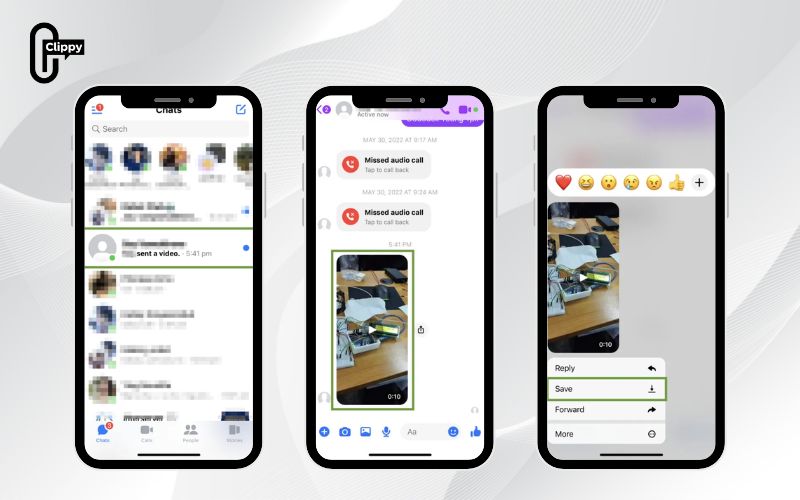
Downloading a video from Messenger on Android is straightforward. You can either long-press to save it directly or use the in-app download button. Here’s how:
Option 1: Save videos directly from the chat
- Step 1: Open Messenger.
- Step 2: Select the conversation containing the video you want.
- Step 3: Tap and hold the video until a menu appears.
- Step 4: Choose Save video.
The video will automatically be saved to your phone’s Gallery or Photos app. This method is ideal for smaller videos shared directly through Messenger.
>>> See Also: How to download Facebook videos to phone easily and quickly
Option 2: Use the download button while playing the video
- Step 1: Launch Messenger and open the desired chat.
- Step 2: Tap on the video to start playing it in full-screen mode.
- Step 3: Tap the download icon located near the playback bar.
- Step 4:Wait for the video to finish saving.
That’s it, you now know how to download Facebook Messenger video easily on Android.
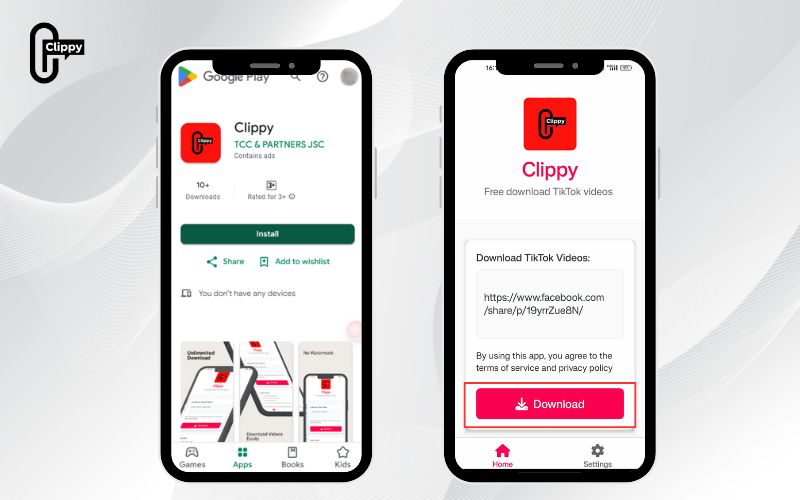
Option 3: Use the Clippy app for quick downloads
If you want a faster, more flexible method, use Clippy, a simple tool that works on any device and doesn’t watermark your videos.
- Step 1: Copy the video link from Messenger or Facebook.
- Step 2: Open the Clippy app on your phone or computer.
- Step 3: Paste the link and tap “Download”.
Within seconds, the video will be saved to your device in high quality. This option is perfect if you download Facebook Messenger video frequently and want an easy one-tap process.
How to download Facebook messenger video on desktop
You can also save Messenger videos directly on your computer without using any third-party extensions.
Follow these steps:
- Copy the video link from your Messenger or Facebook chat.
- Open your browser and go to Facebook Video Downloader.
- Paste the copied link into the search box.
- Click Download to save the video directly to your computer.
Once downloaded, you’ll find the video file in your computer’s Downloads folder. This method works on both Windows and macOS browsers.
By following these steps, you can easily download Facebook Messenger video from any chat to your computer in just seconds.
How to stop messenger from automatically saving videos
Messenger sometimes automatically saves photos and videos shared in conversations to your device. If you prefer manual control, you can turn this off.
Here’s how to manage auto-save settings:
- Step 1: Open the Messenger app.
- Step 2: Tap your profile picture in the top left corner.
- Step 3: Select Photos & media.
- Step 4: Turn off the switch next to Save photos and videos.
Once disabled, Messenger will stop automatically storing media to your phone. You’ll have to manually choose which videos to keep – a smart choice if you only want to download Facebook Messenger video selectively.
>>> See Also: Download Facebook Reel Video Free in HD & 4K Quality
Where are messenger videos saved?
Once you’ve saved a video from Messenger, it will be stored in your device’s default media folder:
- On Android, it’s usually under Gallery → Messenger or Videos.
- On iPhone, check Photos → Recents or Albums → Messenger.
- On Desktop, open the Downloads folder.
Knowing where your media is saved helps you organize and rewatch your clips easily – especially if you download Facebook Messenger video frequently for work or entertainment.
Why can’t I download messenger videos?
If you’re having trouble saving videos, check the following:
- Ensure the video isn’t over 25MB, as Messenger limits larger files.
- Check your internet connection and available storage space.
- Make sure the sender hasn’t deleted the video or restricted downloads.
- Update your Messenger app to the latest version.
These small checks can quickly resolve issues and allow you to download Facebook Messenger video successfully again.
>>> See Also: How to download private Facebook video without tools
Learning how to download Facebook Messenger video gives you full control over your favorite clips, memories, and media. Whether you use Android, iPhone, or desktop, the process is simple and safe if you follow the steps above.
If you want a faster way, Clippy is your best choice – a free, no-watermark app that helps you download Facebook Messenger video and Facebook videos in just one tap. Try it today and save every moment that matters.

