


Can someone see if you save their video on TikTok? The short answer is no, TikTok does not notify users when you save their videos. When you hit the “Save video” button or download a clip from someone’s profile, the creator will not receive any alert, notification, or message. TikTok keeps this action private, meaning you can save videos to your device without the owner knowing. Join Video Download Free to learn more in the following article!
What Happens When You Save a Video on TikTok
When you save a TikTok video, the app gives you two main options:
- Save video (Download) – This option downloads the video directly to your phone’s gallery or camera roll.
- Add to Favorites – This saves the video to your TikTok account so you can view it later, but doesn’t download it.
Here’s what happens behind the scenes:
- The downloaded video includes the TikTok watermark (username + TikTok logo).
- The creator’s analytics do not show who saved or downloaded their video.
- The only visible metric they see is the view count, likes, comments, and shares.
- Your download remains private and invisible to the uploader.
So again, if you’re asking “Can someone see if you save their video on TikTok?” – no, they can’t. Your activity is 100% private when it comes to saving or downloading content.
>>> See Also: How to download TikTok videos without watermark for free
Does TikTok Ever Plan to Add a Save Notification Feature?
At the moment, TikTok has not announced any plans to notify users when someone saves their video. This makes sense because millions of people use TikTok for educational, entertainment, or creative inspiration. Allowing downloads freely helps creators reach a broader audience and encourages content sharing — one of TikTok’s core values.
In contrast, some social media platforms like Instagram or Snapchat do notify users when someone takes screenshots or saves posts. But TikTok’s ecosystem is different: it’s designed around viral sharing, not tight privacy control.
That’s why the platform allows public videos to be downloaded freely (unless the creator disables downloads manually). So, once more — if you’re thinking, “Can someone see if you save their video on TikTok?” — no, and there’s no sign that this will change anytime soon.
Can TikTok Creators See If You View or Screenshot Their Videos?
TikTok does not show creators who viewed or screenshotted their videos. The only area where visibility applies is with TikTok Stories, where creators can see who viewed their Story (similar to Instagram). For regular feed videos, views are anonymous.
So, whether you watch, screenshot, or save – TikTok keeps your actions private. That means no, someone cannot see if you save their video on TikTok.
>>> See Also: How to download TikTok slideshow as video and share easily
How to Download TikTok Videos Without Notifications Using Clippy
Now that you know TikTok doesn’t notify creators when you save videos, let’s take it a step further. What if you want to download any TikTok video — even ones where the download option is turned off — without watermark and in high quality?
That’s where Clippy comes in. It’s a free, all-in-one downloader app that supports TikTok, Douyin, Facebook, Instagram, YouTube, and more. With Clippy, you can save your favorite videos to your device quickly, safely, and privately — without worrying about TikTok alerts or restrictions.
Why Choose Clippy?
- No notifications sent to creators
- Download any TikTok video, even with downloads disabled
- No watermark for a clean, professional look
- Fast and lightweight app with simple navigation
- Supports multiple platforms – TikTok, Douyin, YouTube, Instagram, Facebook, and others
>>> See Also: Top 15 app TikTok download to save videos without watermark
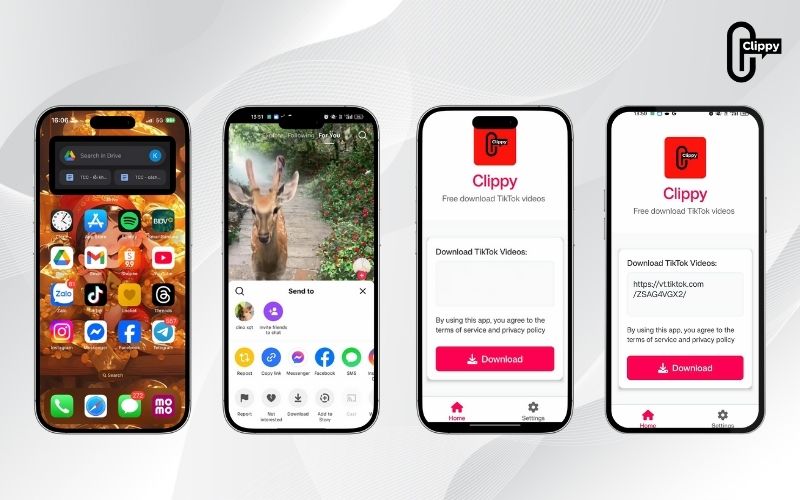
How to Download TikTok Videos with Clippy (4 Easy Steps)
Follow these simple steps to save any TikTok video directly to your phone:
Step 1: Open TikTok and copy the link of the video you want to download
Tap the Share icon and select Copy link.
Step 2: Open the Clippy app (available for Android and iOS).
Step 3: Paste the TikTok link into Clippy’s input bar. Clippy will automatically detect and load the video.
Step 4: Choose your preferred format and tap Download. Within seconds, your video will be saved to your phone, no watermark, no alerts, no problem!
That’s it! You’ve just downloaded a TikTok video safely and privately.
So, can someone see if you save their video on TikTok? The answer is a clear no — TikTok doesn’t send any notification, alert, or message when you save or download someone’s video. Your actions remain private, whether you use the in-app save feature or an external downloader.
If you want to download TikTok videos safely, quickly, and without watermark, try Clippy — the all-in-one app that makes downloading content easy and private.
Download Clippy today and enjoy saving your favorite TikTok videos without anyone ever knowing!

