


TikTok is full of viral and creative clips, but saving them without limits can be tricky. Many users search for how to download TikTok video for offline viewing, editing, or sharing. With Clippy, you can bypass watermarks and restrictions safely. This guide reveals of Video Download Free the smartest ways to download TikTok videos cleanly in 2025.
The real reason people want to download TikTok videos
With over 1.5 billion users worldwide (according to Statista), TikTok sets trends across music, fashion, and culture. But the app doesn’t meet every user’s needs. People search for how to download TikTok video because they want flexibility: watching offline on flights, sharing content to Instagram Reels or YouTube Shorts, or keeping their own clips for further editing.
Yet TikTok complicates the process. The watermark distracts from video quality, and many creators disable downloads entirely. This gap has created demand for alternative tools.
>>> See Also: How to save videos on TikTok without watermark free, full HD
Methods on how to download TikTok video
There are multiple ways to save TikTok clips, each with benefits and drawbacks.
Using TikTok’s save Button
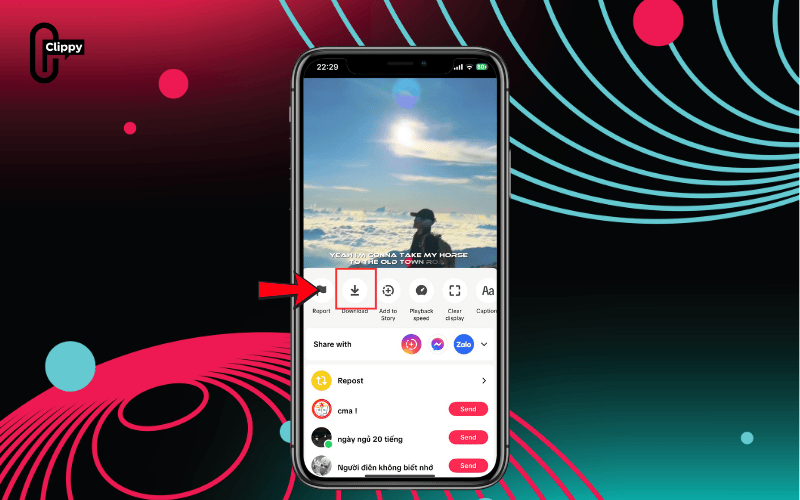
The simplest method is built into the app. Open a video, tap Share, then choose Save video. The clip goes straight to your gallery. But every file comes stamped with a watermark, and if the creator disables saving, the button won’t appear.
How to download your own TikTok video
Creators can save drafts before publishing or download videos after posting. Drafts preserve the original resolution, while the after-post option often lowers quality. For professional editing, storing your own files outside TikTok is the smarter move.
How to download TikTok video without save option
When the save option is missing, some turn to screen recording or third-party sites. While these may work, they risk poor resolution, intrusive ads, or even malware. Anyone serious about keeping videos clean should use a trusted TikTok video downloader instead.
>>> See Also: How to download TikTok videos without watermark for free
The three methods above are only temporary solutions; if you want to download videos quickly, without logos, and in high quality, check out the app introduced in the next section.
How to download TikTok videos without watermark using Clippy
If you want the cleanest solution to how to download TikTok video, the answer is Clippy. Clippy is available on Google Play and verified for safety. It automatically strips away watermarks, delivers HD, Full HD, or 4K quality, and saves directly to your gallery. It is lightweight, fast, and works on both Android and iOS devices.
Introduction to Clippy app
Unlike unsafe APKs or unstable sites, Clippy is 100% free and regularly updated. Its clean design makes it simple even for first-time users. Once installed, it instantly downloads videos without logos, giving you a professional result every time.
How to download and install Clippy app
Getting started with Clippy only takes a minute:
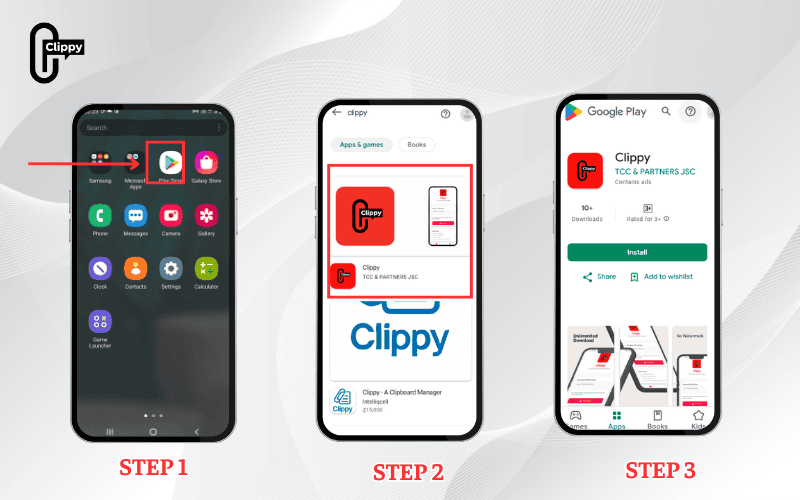
- Step 1: Open Google Play Store on your phone.
- Step 2: Search for “Clippy – Video Downloader”.
- Step 3: Select Install and wait until it completes.
- Step 4: Open the app and grant storage permission.
>>> See Also: Suggest 5+ free tools to save TikTok video without username
How to download TikTok video on phone with Clippy
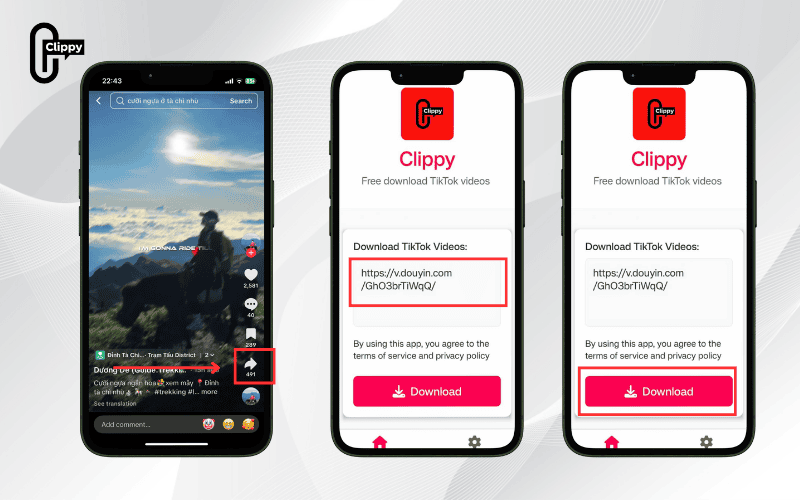
Using Clippy is effortless. Copy the TikTok link, paste it into the app, and hit download. The file saves instantly into your gallery – no watermark, no ads, and ready for offline playback. Whether on Android or iOS, the process works the same.
How to download TikTok live or private videos
Clippy also supports live sessions and private uploads. This feature is valuable for creators who want to archive streams or save clips privately before editing. TikTok’s native app doesn’t provide this flexibility, making Clippy a step ahead.
Advanced tips for downloading TikTok videos
When exploring how to download TikTok video beyond the basics, Clippy gives you options. Users can:
- Save in HD or 4K for sharp, high-quality playback.
- Download from the liked videos list or full creator profiles.
- Paste links directly for one-click downloads.
- Extract audio in MP3 format to keep music or sound effects separately.
These options make Clippy not only a TikTok video downloader but also a full media tool. Figuring out how to download TikTok video has become essential for millions of users. TikTok’s own tools are limited by watermarks and restrictions, while many unofficial services compromise on quality or security.
>>> See Also: How to download TikTok videos without watermark high quality

If you’re still wondering how to download TikTok video easily, the answer is Clippy. This app is fast, secure, and always watermark-free. In 2025, Clippy proves to be the most reliable tool for saving TikTok content in high quality. Download Clippy now and enjoy your favorite videos without limits.

