

If you’re searching for how to follow an Instagram hashtag, you’re likely trying to keep up with specific topics, trends, or communities on Instagram. In the past, Instagram allowed users to follow hashtags just like accounts, making it easy to see related posts directly in the feed.
However, Instagram has changed how hashtags work. Many users are confused when they can’t find the “Follow” button anymore or notice that hashtag content no longer appears in their feed.
This article of Free Download Video App explains what happened to hashtag following, why Instagram removed it, and how you can still explore hashtag content effectively in 2025, even without the follow feature.
Key Takeaways
- Instagram no longer allows users to follow hashtags, as this feature was officially discontinued on December 13, 2024.
- Any guides showing a “Follow hashtag” button are outdated and no longer work in 2025.
- Instagram removed hashtag following to reduce spam, improve feed quality, and rely more on interest-based algorithms.
- You can still view hashtag content manually by searching for a hashtag and browsing its hashtag page.
- Hashtag pages now show a curated mix of top and relevant posts, not a chronological feed.
- Engaging (like, comment, save, share) with hashtag content helps Instagram learn your interests and improve recommendations.
- Hashtags are still useful, but mainly for context and categorization, not mass reach
Can You Follow an Instagram Hashtag?
No, you cannot follow Instagram hashtags anymore. Instagram officially removed the hashtag-following feature on December 13, 2024. This means users can no longer tap a “Follow” button on a hashtag to receive posts from that hashtag directly in their feed. Any hashtags you followed in the past are no longer active or visible in your Following list.
>>> See more: How to hide following list on Instagram Step by Step

If you see older tutorials showing how to follow hashtags, those instructions are now outdated and no longer apply to the current Instagram app.
How Following Hashtags Worked Before
Before the feature was removed, Instagram allowed users to follow hashtags in the same way they followed accounts. When a hashtag was followed, selected posts using that hashtag could appear directly in the home feed alongside posts from friends and creators.
While this feature was useful for discovering content, it was often misused. Many posts using popular hashtags were irrelevant, repetitive, or spam-driven, which reduced the quality of users’ feeds over time.
Why did Instagram remove the hashtag follow feature?
Instagram removed the hashtag follow feature to improve content relevance and overall user experience. Over time, hashtags were widely misused, with many posts relying on popular keywords rather than meaningful or relevant content. As a result, users often saw spammy or unrelated posts in their feeds.

By removing hashtag following, Instagram shifted toward showing content based on genuine user interests and behavior instead of keyword popularity. This change allows the platform to prioritize what users actually engage with rather than what simply includes trending hashtags.
Key reasons behind the change include:
- Reducing spam and hashtag abuse
- Improving personalization in feeds
- Encouraging higher-quality captions and content
- Allowing the algorithm to rely on real engagement signals
This change aligns with Instagram’s broader shift toward interest-based discovery rather than keyword-based feeds.
>>> See more: Top 1000+ Instagram Username Ideas by Niche [New Edition]
How to View Hashtag Content on Instagram Now
Although Instagram no longer allows users to follow hashtags, you can still explore and interact with hashtag content manually. Searching and engaging with hashtags remains an effective way to discover posts related to specific topics, interests, or communities.
How to Search for a Hashtag on Instagram
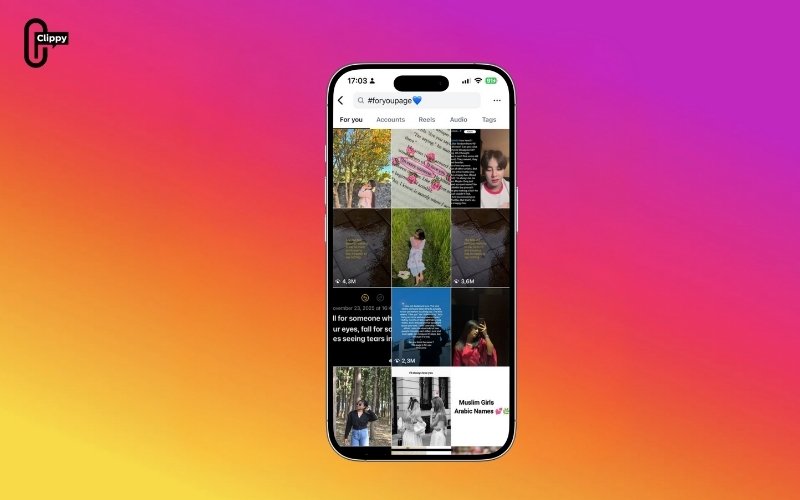
To find content associated with a hashtag, start by opening the Instagram app and tapping the search bar. Enter the hashtag you want to explore, making sure to include the “#” symbol. Once the hashtag appears in the search results, tap on it to open the hashtag page.
This page collects posts that have been tagged with that specific hashtag, allowing you to browse related content even without following it.
What You See on a Hashtag Page
Hashtag pages display a curated mix of content rather than a simple chronological feed. Typically, you will see highly engaged posts at the top, followed by additional photos, videos, and Reels that use the same hashtag.
The content shown on these pages can change frequently. Instagram updates hashtag pages based on factors such as post performance, relevance, engagement levels, and overall activity around the hashtag.
How Engagement Affects What You See
While hashtags can no longer be followed, interacting with hashtag content still plays an important role. When you like, comment on, save, or share posts from a hashtag page, Instagram uses these actions to learn more about your interests.
Over time, this behavior influences the content Instagram recommends to you, including posts on the Explore page, suggested Reels, and content that appears in your feed. In this way, actively engaging with hashtag content can serve a similar purpose to following hashtags in the past, but with more personalized results.
Are Hashtags Still Useful on Instagram?
Yes, hashtags are still useful on Instagram, but their purpose has changed significantly. Instead of acting as a primary discovery or distribution tool, hashtags now serve a supporting role that helps Instagram understand what your content is about.
Today, hashtags are mainly used to provide context around a post, signal relevance to a specific topic or community, and assist Instagram’s algorithm in categorizing content correctly. Rather than driving mass exposure, hashtags are more effective for niche discovery, where content is shown to users who already demonstrate interest in similar topics.
Because Instagram now relies more on engagement behavior and caption text, hashtags work best when they accurately describe the subject, industry, or location of the post instead of aiming for maximum reach.
>>> See more: On Instagram Who Has the Most Followers? Top 30 Updated Latest
Best Practices for Using Hashtags on Instagram
In 2025, hashtags on Instagram work best when they are used strategically rather than in large numbers. Focusing on relevance and clarity helps Instagram understand your content and connect it with the right audience.
- Use three to five highly relevant hashtags per post instead of long lists
- Choose niche-specific or location-based hashtags that accurately match your content
- Avoid overly broad hashtags, as they often attract spam and low-quality engagement
- Write clear, natural captions that explain what your content is about
- Use hashtags to support your caption, not replace meaningful text, since Instagram increasingly relies on caption language to understand and categorize posts
>>> See more: How to Reset Instagram Explore Page: Step-by-Step Guide
Conclusion
Following Instagram hashtags is no longer possible, as the feature was officially removed in late 2024. However, hashtags are still relevant when used correctly. By searching hashtags manually, engaging with related content, and using a small number of highly relevant hashtags in your posts, you can continue to discover and share content effectively. Understanding how hashtags work today helps you adapt to Instagram’s current algorithm and make the most of content discovery in 2025.

