


Unfriending someone on Facebook can feel like a small digital decision, but it often brings real clarity to your online space. In this guide of Video Download Free, you’ll learn exactly how to unfriend someone on Facebook without the confusion or drama. Clean up your connections and take control of your feed in just a few taps.
Key Takeaways
- Unfriending removes someone from your friends list but doesn’t notify them.
- They can still see your public posts unless you adjust privacy settings.
- The only way to “undo” an unfriend is to send a new friend request.
- Unfriending is different from unfollowing (hides posts) and blocking (cuts all contact).
- Use unfriending to clean up your feed, set boundaries, and protect your online space.
How to unfriend someone on Facebook app using your mobile device
Want to clean up your Facebook friends list but not sure how to unfriend someone on the mobile app? Don’t worry, the process is quick, simple, and only takes a few taps. Follow the steps below to remove someone from your friend list without any confusion.
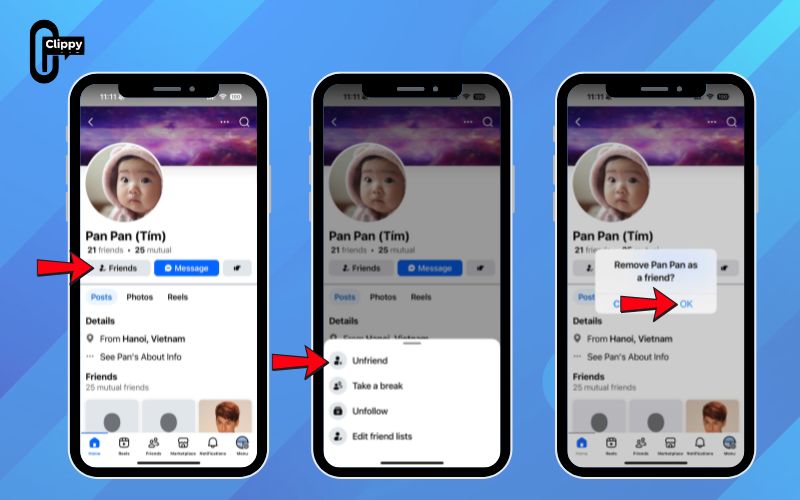
Step 1: Open the Facebook app
Launch the Facebook app on your phone. If you’re already logged in, you’ll land on your News Feed. If not, just enter your email/phone number and password to continue.
Step 2: Go to the person’s profile
Tap the search bar at the top, type their name, and select the correct profile from the results to open their page.
Step 3: Tap the “Friends” button
On their profile, find the Friends button (the icon with a person and a checkmark) located under their profile picture.
Step 4: Select “Unfriend”
A small menu will pop up. Choose Unfriend from the list.
Step 5: Confirm your action
Tap OK to confirm. The person will be removed from your friends list, and you’ll see less of their content on Facebook moving forward.
>>> See Also: How to block someone on Facebook without them knowing 2025
How to unfriend someone on Facebook using computer
Unfriending someone on Facebook is a quick, clean way to create distance stronger than simply unfollowing, but far less intense than blocking. Once you unfriend someone, they’ll no longer see posts you share with your Friends list, and any future messages they send will land in your Message Requests for approval.
They can still view your public posts and follow you if that option is enabled, but the direct connection is gone.
Here’s how to do it in just a few taps:
Step 1: Open Facebook (on mobile or desktop) and log in if needed.
Step 2: Go to your profile and tap Friends.
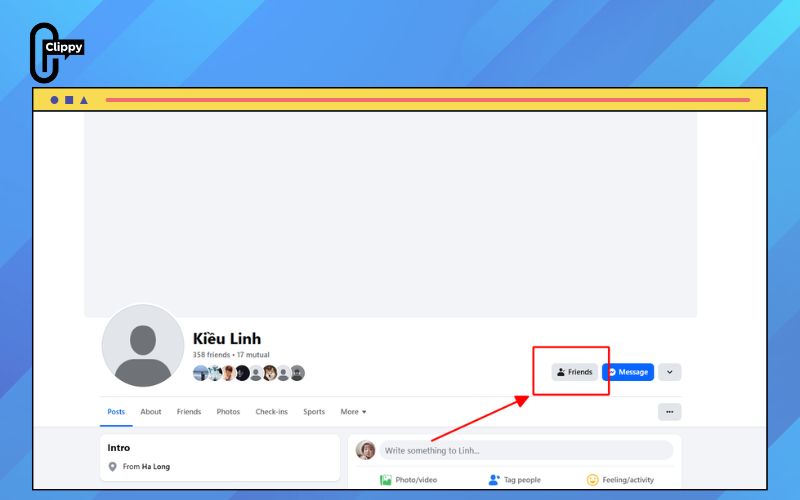
Step 3: Search for or select the person you want to remove to open their profile.
Step 4: Tap the Friends button at the top of their profile.
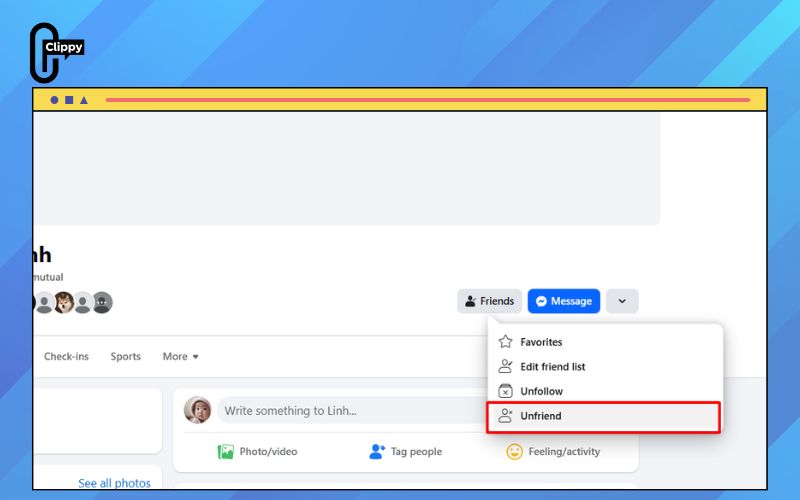
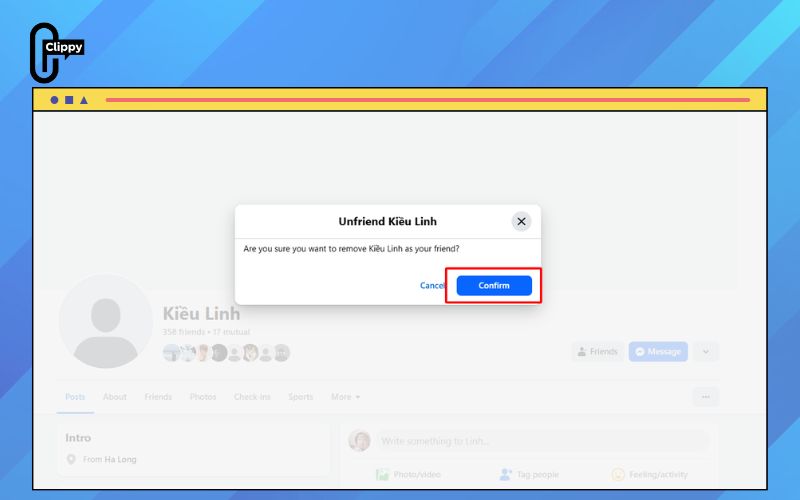
Step 5: Choose Unfriend from the menu.
When should you unfriend someone?
Unfriending someone on Facebook isn’t just a digital action, it’s a boundary-setting tool. It quietly cuts the social tie without triggering a notification, yet still leaves room for awkwardness if the other person notices you’ve disappeared from their feed. That’s why it’s worth thinking about who truly deserves a spot in your online circle.
Your ex after a difficult breakup
Staying connected with an ex online can make the healing process drag on. Seeing what they post, who they’re with, or how quickly they move on can reopen wounds you’re trying to close. If you’re ending the relationship in real life, there’s rarely a reason to keep a virtual relationship alive.
The old friend who shares offensive or harmful content
Some people treat Facebook like a place to post jokes or memes they’d never say aloud. If their content regularly clashes with your values or makes you uncomfortable, removing them is a simple way to protect your space. Unfriending helps filter out negativity so your feed stays respectful and aligned with what you care about.
>>> See Also: How to know who unfriended you on Facebook easily, safely

Someone who constantly spreads misinformation
Endless posts about conspiracy theories, politics, or false claims can drain your patience and damage trust. Even if you care about the person offline, seeing them share inaccurate information can create frustration and unnecessary conflict. Instead of fighting online battles you won’t win, unfriending keeps your mental well-being intact.
A relative who ignores your privacy boundaries
If someone repeatedly posts photos of you or your children after you asked them not to, that’s a serious boundary breach. Privacy online is fragile, and once something is posted, it’s hard to control where it goes. Removing the connection is a clear way to protect your family’s digital footprint.
>>> See Also: How to Facebook friend request super fast in just 3 seconds

A fitness-obsessed acquaintance who triggers unhealthy comparison
Social media often shows curated perfection, and comparing yourself to someone’s highlight reel can erode your confidence. If a certain person’s posts consistently make you feel inadequate or trigger negative emotions, unfriending them can be a powerful act of self-care.
The neighbor pushing you into MLM schemes
When someone repeatedly uses your friendship to pitch products, tag you in promotions, or pressure you into buying or hosting, that’s exhausting. Their agenda becomes more about profit than connection. If a polite conversation doesn’t change their behavior, removing them helps restore balance.

The friend who turns every topic into a political battle
Political debates on social media escalate quickly and rarely stay respectful. If someone’s posts become constant arguments or emotional triggers, you’re under no obligation to engage. Unfriending allows you to avoid conflict and preserve your peace without confronting them publicly.
The person you’re secretly hate-following
Hate-following might seem harmless, but it slowly consumes your attention and emotions. If someone lives rent-free in your mind or you check their page more often than you should, it’s a sign the connection is toxic. Cutting the digital tie frees up mental space and helps you focus on content that inspires rather than drains you.
Is it better to unfriend or unfollow?
It really depends on what you’re trying to achieve. If you just need some space or want to avoid conflict, unfollowing is the gentler, low-drama option – it lets you stay connected while hiding their posts. If you’re ready to cut ties completely, unfriending is the more decisive choice.
Ramsey adds that the best approach is actually setting healthy boundaries from the start being selective about who you add, especially in professional settings. We’ve all been there on social media, but choosing your connections carefully can prevent these awkward situations later on.
FAQs about how to unfriend someone on Facebook
Sometimes you unfriend someone by mistake, or you simply change your mind later. When that happens, it’s natural to wonder whether you can undo the action and quietly restore the connection. Here’s what you need to know about reversing an unfriending and how it compares with blocking or unfollowing on Facebook.
How do I reverse an unfriend on Facebook?
You can’t actually undo an unfriend. Once the connection is removed, the only way to reconnect is to send a new friend request just like the very first time you added them. Because they have to approve it manually, they’ll know you removed them earlier. If it was accidental, it’s best to explain the situation.
Is unfriending the same as blocking or unfollowing?
No, each action works differently. Unfollowing keeps you connected as friends but hides their posts from your feed, making it ideal for people you care about but don’t want constant updates from. Blocking is the strictest option: it removes them from your friend list, hides all your public posts from them, and prevents any messaging or interaction. Unfriending sits in the middle, no more Friend-level visibility, but still far less severe than blocking.
Why can I still see someone’s profile after unfriending them?
Unfriending doesn’t hide their profile from you. If you want to stop seeing their page entirely and prevent them from viewing yours, you’ll need to block them instead.
How do I remove friends from game request lists without unfriending them?
Facebook offers a mute option that keeps the friendship intact while letting you hide their posts and avoid unwanted notifications. It’s a lightweight alternative that keeps things peaceful without cutting ties.
How do I delete a friend and all the mutual friends connected to them?
Visit the person’s profile and open their Friends list to see who you share in common. You can unfriend those mutuals one by one, then remove the main person afterward for a completely clean slate.
Unfriending someone on Facebook is ultimately about taking back control of your digital space and protecting your peace of mind. With just a few taps, you can curate a feed that feels healthier, lighter, and aligned with what you actually want to see. Now that you know how to unfriend someone on Facebook, you can set clearer boundaries without creating unnecessary drama.

