

Ever scrolled through Facebook and suddenly realized someone has quietly disappeared from your feed? If you’ve been wondering how to know who unfriended you on Facebook, you’re not alone, this mystery bothers millions of users. Because Facebook keeps unfriend actions completely silent, figuring out what happened felt like detective work. Join Video Download Free to immediately discover the most accurate testing methods.
Key Takeaways
- Facebook does not notify you when someone unfriends you.
- The simplest way to check is by searching their name in your Friends list.
- Seeing “Add Friend” on their profile means you’re no longer connected.
- No profile found? They may have blocked you or deactivated their account.
- Avoid third-party apps – they’re often unreliable and can risk your account security.
Does Facebook let you know if someone has unfriended you?
No. Facebook does not notify you when someone removes you from their friends list. The platform intentionally keeps this action private. According to social media expert Amber Mac, Facebook faced complaints in the past about the feature being too intrusive, so they chose to let users unfriend others without triggering alerts or making the action easy to track.
In the Facebook Help Center, you’ll find instructions on how you can unfriend someone, but there’s no official tool or page that shows who unfriended you.
Even though Facebook won’t tell you directly, there are still a few subtle ways to check whether someone has quietly removed you from their friends list.
How to know who unfriended you on Facebook?
If you suspect someone has quietly disappeared from your Friends list, Facebook won’t give you a direct answer. Instead, you’ll need to rely on a few simple checks to confirm whether you’ve actually been unfriended.
Method 1: Check your Facebook friends list
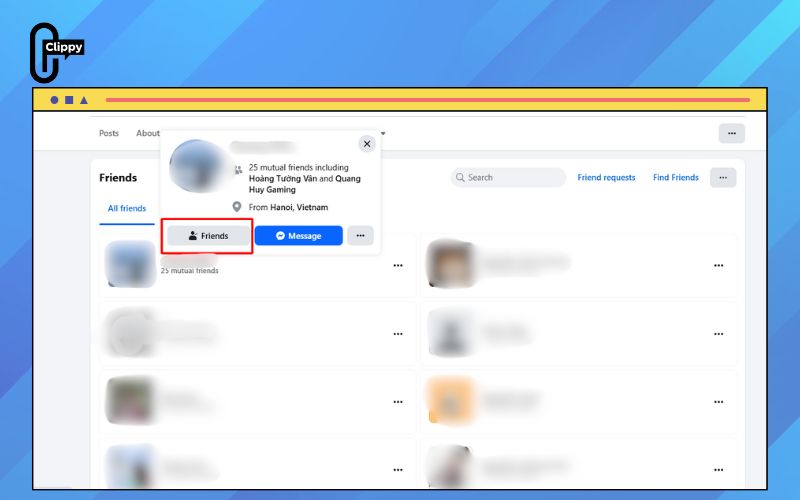
To check from your Friends list, follow these steps:
Step 1: Log in to Facebook on your browser.
Step 2: Click your profile picture or name in the top-right corner to open your profile.
Step 3: Select Friends from your profile menu.
Step 4: Use the search bar at the top of the Friends page and type the person’s name.
- If their profile appears in the results → you’re still friends.
- If their name does not show up → they likely unfriended you.
Note: The only exception is if they deactivated or deleted their account. In that case, their profile will also disappear from your Friends list.
>>> See Also: How to block someone on Facebook without them knowing 2025
Method 2: Check their Facebook profile
If you want a quick way to confirm whether someone has removed you, checking their profile directly is one of the most telling methods. A few simple actions can reveal whether you’ve been unfriended, blocked, or if their account is no longer active.
Follow these steps:
Step 1: Type the person’s name into the Facebook search bar.
Step 2: Open their profile from the search results.
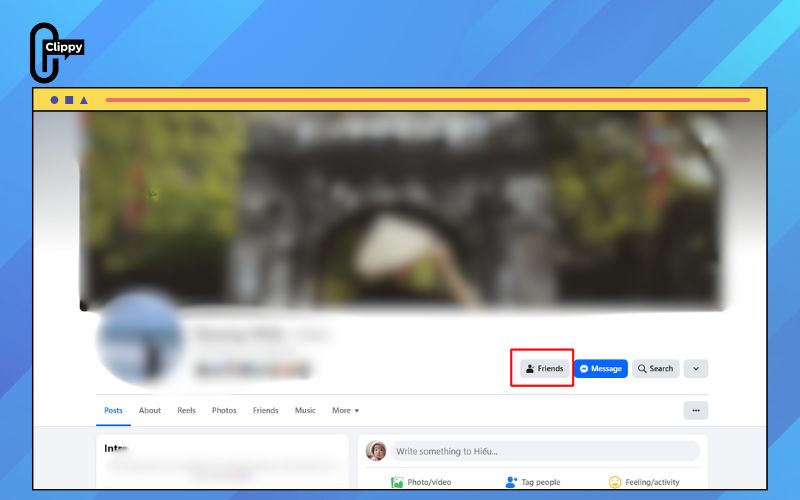
Step 3: Look for the status under their name:
- If you see “Add Friend” → they’ve unfriended you.
- If their profile doesn’t appear at all → they may have blocked you or deactivated their account.
Use this method when you have a specific person in mind who no longer appears in your Friends list.
>>> See Also: How to unfriend someone on Facebook without them knowing
Method 3: Check your timeline interactions
You can also gather clues by checking your own timeline.
Scroll through old tags, comments, or posts involving that person and try clicking their name to view their profile.
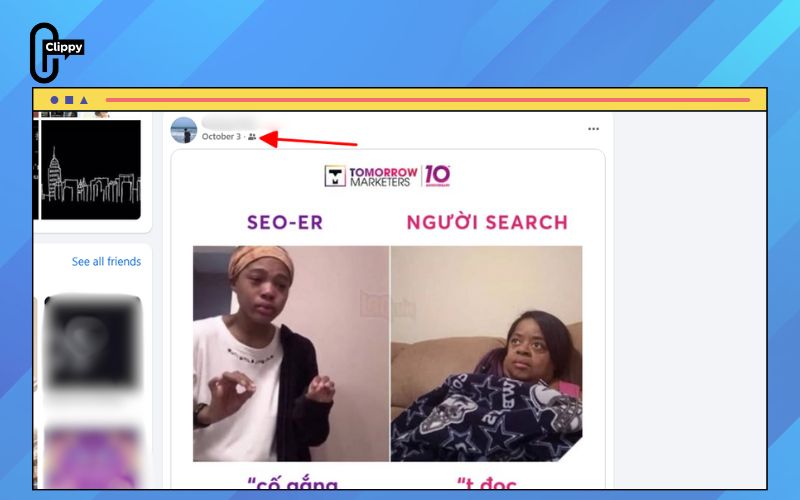
Pay attention to the post icons:
- Public posts (globe icon): Anyone can view these, even if you’re not friends.
- Friends-only posts (two-person icon): Only visible to people on their Friends list.
If you now see only public posts from them and friends-only posts have disappeared, it’s a strong sign that you’ve been unfriended.
Method 4: Download your Facebook data
Facebook also lets you export a copy of your account data, including your full Friends list. This can help you spot who has disappeared over time.
Here’s how to download your data:
Step 1: Log in to Facebook and click your profile picture to open the menu.
Step 2: Go to Settings & Privacy, then choose Settings. In the left sidebar, open Accounts Center.
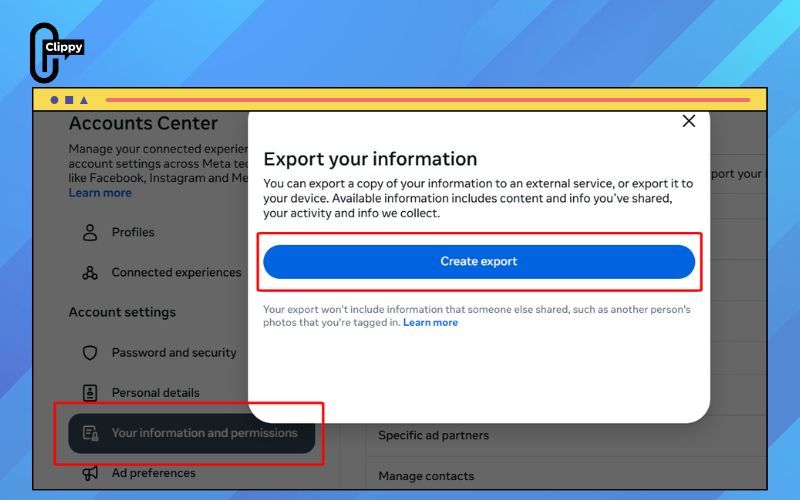
Step 3: Select Your Information and Permissions.
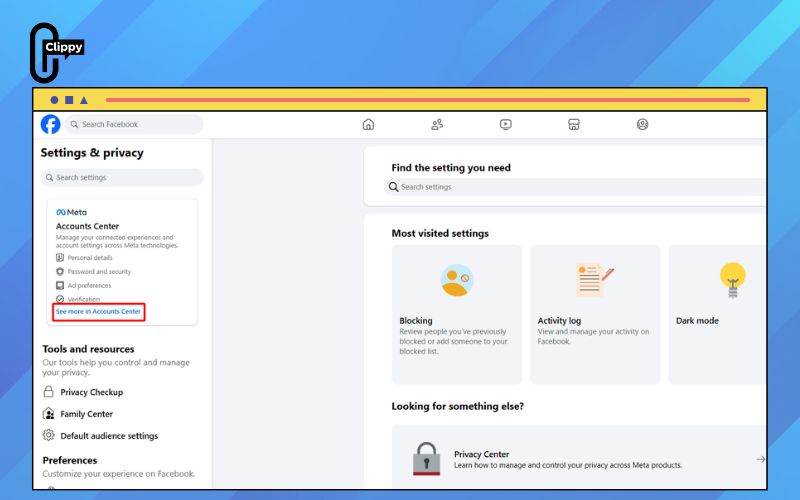
Step 4: Choose Download Your Information, then pick a date range (or select All time for a complete backup).
Step 5: Pick your preferred file format – HTML is usually the easiest to read.
Step 6: Make sure Friends is included in the items you want to download.
Step 7: Click Create File, wait for Facebook to prepare it, then download and open the “Friends” section.
By comparing this new file with an older backup, you can quickly see which names have disappeared. For the most accurate tracking, save a copy of your Facebook data every few months.
Method 5: Use third-party tools (Not Recommended)
Even though a few third-party tools still claim they can notify you when someone unfriends you, using them is strongly discouraged. Many of these apps were removed from major app stores because they violated Facebook’s privacy policies. Those that remain online often require access to your account, which can put your data and even your entire Facebook profile at risk.
Some tools are inaccurate, while others may misuse your login information, leading to problems like spam, data leaks, or even account hacking. For these reasons, it’s best to avoid relying on third-party apps for tracking unfriends.
Reasons why someone might unfriend you
Sometimes being unfriended has nothing to do with you personally, people have their own reasons for cleaning up their social circles on Facebook. Understanding these motives can help you avoid taking it too hard and see the situation more objectively.
Common reasons someone might unfriend you:
- Different political or religious views: Heated topics can create tension, and some people prefer to remove opposing voices from their feed rather than engage in conflict.
- You post too frequently: If your updates appear too often on their timeline, they might feel overwhelmed and choose to reduce the noise by unfriending.
- They’re trimming their Friends list: Many users periodically remove acquaintances, old contacts, or people they no longer speak to, it’s often nothing personal.
- Low interaction over time: If you rarely like, comment, or message each other, they may see the connection as inactive and decide to remove it.
- Personal disagreements: Arguments, misunderstandings, or past conflicts can prompt someone to cut ties digitally, even if the issue happened offline.
>>> See Also: How to Facebook friend request super fast in just 3 seconds

Tips to keep your Facebook account safe
Keeping your Facebook account secure is just as important as finding out who may have unfriended you. Before using any tool or method, it’s essential to protect your personal data and avoid actions that could put your profile at risk.
- Stay away from apps that ask for excessive permissions: Any tool that wants to read your messages, manage your posts, or control parts of your profile is a red flag. Tracking unfriends never requires that level of access, so avoid apps that request it.
- Check credibility before installing anything: Look up reviews, ratings, and feedback from trusted sources before using a third-party service. If users report security issues, data leaks, or suspicious behavior, it’s best to steer clear.
- Remove permissions you no longer need: After trying an app, go to your Facebook Settings and review which services are connected to your account. Revoke access for anything you don’t use to prevent apps from continuing to collect your data in the background.
FAQs about how to know who unfriended you on Facebook
If you’re still unsure about how Facebook handles unfriending, you’re not alone – this topic raises a lot of common questions.
Is it possible to unfriend someone on Facebook without them knowing?
Yes. Facebook doesn’t alert people when they’re removed from your Friends list. The only way they might figure it out is if they check your profile, search for your name, or notice the “Add Friend” button. Aside from that, they receive no notification.
Will Facebook notify me if someone unfriends me?
No. Facebook never sends alerts when someone removes you. The only way to confirm it is to look for their name in your Friends list or visit their profile to see if the “Add Friend” option appears.
I accidentally unfriended someone. Can I tell who it was?
Unfortunately, Facebook does not provide a record of who you removed. The only hint is if you visit someone’s profile and see the “Add Friend” button, this usually means you may have unfriended them by mistake.
Now that you know how to know who unfriended you on Facebook, you can quickly spot changes in your social circle without relying on guesswork. Whether it’s checking your Friends list, reviewing old interactions, or inspecting profiles directly, the clues are all there.
Facebook won’t give you a notification, but you don’t need one to find the answers yourself. At the end of the day, let unfriends go and keep meaningful relationships close.

