


Facebook Reels quickly fills your feed with videos you’ve watched and interacted with, but sometimes you need a fresh start. Knowing how to delete Facebook Reels history helps you reset recommendations, protect your privacy, and clean up your Activity Log. Facebook doesn’t make it clear where your history is saved, so many people get confused when they want to delete it. Learn how to do it in just a few simple steps with Video Download Free.
Key Takeaways
- Deleting your Reels history helps reset Facebook’s recommendations and improves the relevance of videos you see.
- Most Reels history is stored under Videos you’ve watched in your Activity Log, not in a separate Reels tab.
- You can delete either the entire watch history or individual Reels manually.
- Clearing your app cache does not delete Reels history — it only removes temporary files on your device.
- Facebook web and mobile have slightly different menus, so steps may vary depending on the platform you’re using.
Why should you clear your Facebook Reels history?
Clearing your Facebook Reels history isn’t just about privacy, it also helps refresh your feed and improve how Facebook recommends content. Below are the key reasons why regularly deleting your Reels viewing activity can be beneficial.
- Protect your viewing privacy: Removing your Reels history prevents others from seeing the types of videos you watch if they access your device. It also reduces the amount of personal behavioral data stored in your account.
- Reset and improve your content recommendations: Your Reels feed is shaped by what you watch, pause on, or replay. Clearing your history helps reset the algorithm so you receive fresher, more relevant videos.
- Declutter your activity log: Over time, your viewing activity becomes long and cluttered. Deleting your Reels history helps keep your Activity Log clean, organized, and easier to manage.
- Prevent unwanted or repetitive Reels from appearing: If Facebook keeps suggesting similar content you no longer enjoy, clearing your watch history helps break the pattern and diversify your feed.
- Enhance account security: Less stored data means fewer insights available to anyone who gains unauthorized access. Clearing history reduces the amount of behavioral information tied to your profile.
How to delete Facebook Reels history
Deleting your Facebook Reels history is quick and helps reset what the algorithm shows you. Follow these simple steps to remove your watch activity and refresh your feed instantly.
How to delete Facebook Reels history on phone
To remove your Facebook Reels history, you’ll need to access the Activity Log from the app’s main menu. From there, open the Videos you’ve watched section and choose either Clear video watch history to wipe everything at once or delete individual Reels manually using the three-dot menu beside each item.
Step 1: Open the Facebook app and tap your profile icon or the three-line menu.
Step 2: Go to Settings & Privacy, then select Settings.
>>> See Also: How to add music to Reels on Facebook and go viral instantly
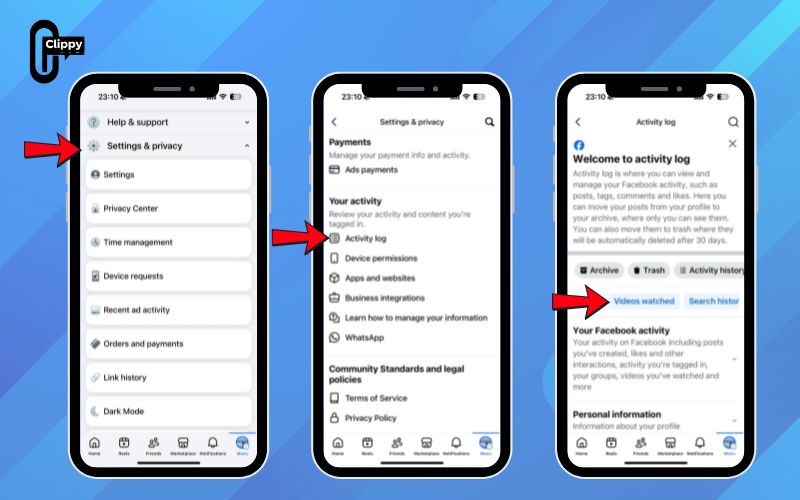
Step 3: Scroll to the Your activity section and tap the Activity log. You now have two options:
- Delete all history: Swipe through the top tabs until you find Videos you’ve watched, tap it, then choose Clear video watch history and confirm. This removes all watched videos, including Reels.
- Delete specific videos: Open Videos you’ve watched, locate the Reel you want to remove, tap the three dots next to it, and select Delete.

How to delete Facebook reels history on computer
Managing your Reels watch history on the Facebook website is just as simple as on the app. With a few quick clicks, you can review, delete specific videos, or clear your entire watch history to refresh your recommendations.
Step 1: Open facebook.com on your Mac or Windows computer.
Step 2: Click your profile photo in the top-right corner and select Settings & privacy > Settings.
Step 3: In the left sidebar, scroll down and choose Activity log.
>>> See Also: How to post videos on Facebook without losing HD quality

Step 4: From the list of activity categories, click Videos you’ve watched. You now have several options:
- To delete a single item, click the three dots next to the video and choose Delete.
- To erase everything, use the Clear Video Watch History button to remove your full list of watched videos.


To view older activity, select a year and month from the Date filter to locate and delete videos from a specific period. (Note: Unlike the mobile app, the web version does not allow selecting a custom time range.)
Common problems when viewing your Reels history and how to fix them)
Even though checking your Reels history should be straightforward, it doesn’t always go smoothly. If you’re having trouble locating past Reels you’ve watched, here are the most likely reasons and what you can do to resolve them:
- Reels don’t appear in your Activity Log: Facebook frequently updates its interface, so the Reels filter may not always be visible. Try checking under “Videos you’ve watched” or use the Activity Log’s search bar to locate your watch history.
- App bugs or outdated Facebook version: Missing options often happen when the app hasn’t been updated. Installing the latest version from the App Store or Google Play usually restores the full set of features.
- Corrupted cache or stored data issues: Over time, cached files can cause certain sections of the app to load incorrectly. Clearing your Facebook app cache or reinstalling the app can fix display and syncing problems.
- Reels watched without being logged in: Any videos viewed while browsing as a guest or in private/incognito mode won’t appear in your history because Facebook cannot save activity without an active account session.

Quick troubleshooting checklist
- Update the Facebook app to the newest version available.
- Clear the app cache using your device settings.
- Ensure you’re logged into the correct Facebook account.
- Remember: Reels viewed from shared links or as a guest may not be saved.
FAQs about how to delete Facebook Reels history
Deleting your Facebook Reels history can be confusing, especially when settings, menus, and features keep changing. These FAQs clear up the most common questions so you know exactly what gets deleted, what stays, and how to manage your watch history safely.
Does clearing Facebook cache delete my Reels history?
No. Clearing your cache only removes temporary files stored on your device to help the app run smoothly. Your Reels watch history is saved on Facebook’s servers and will stay intact unless you delete it manually from your Activity Log.
I can’t find the Reels I watched yesterday. Where did they go?
Reels may disappear if the creator deletes them, makes them private, or if the content expires. In some cases, Facebook may also delay updating your Activity Log. As a backup, check your Saved Reels to see if you added them earlier.
Is there a way to export my Facebook Reels history?
You can download your Facebook data through Settings > Your Facebook Information, but Facebook does not provide a dedicated “Reels watch history” file. Reels may appear under the broader Videos Watched category in your data export.
Why doesn’t Facebook show a separate tab for Reels history?
Facebook groups Reels under the general “Videos you’ve watched” section instead of creating a standalone Reels tab. This is because Reels are treated as short-form videos rather than a separate content type within Activity Log.
Can I recover deleted Reels from my watch history?
No. Once you remove a Reel from your Activity Log or the creator deletes the content, it cannot be restored. The only exception is if you previously saved the Reel – in that case, it may still appear in your Saved section unless the creator removes it.
Learning how to delete Facebook Reels history gives you full control over your viewing activity and helps reset what Facebook recommends to you. With just a few steps, you can clear your entire watch list or delete individual Reels to keep your feed fresh and relevant. Remember that clearing cache won’t remove your Reels history – only deleting it through the Activity Log will. By managing your history effectively, you can maintain a cleaner, more personalized Facebook experience.

