


If you’ve ever wondered “Does TikTok notify when you save a video?”, you’re not alone. Many users love saving videos to watch offline or to share later—but also worry if the creator will know about it. To clear up all confusion, let’s explore what actually happens when you save a TikTok video, what privacy settings mean for this feature, and how you can save videos safely. Let’s dive in and learn together withVideo Download Free.
Understanding TikTok’s Saving Feature
TikTok allows users to interact with videos in many ways liking, commenting, sharing, and saving. The Save feature (the download button) lets you keep a copy of a public video directly on your device. You can watch it later, even without an internet connection.
However, because of privacy concerns and intellectual property rights, not every TikTok video can be downloaded. Some creators disable downloads on their content to protect their work. When this happens, you can only save it inside TikTok as a “Favorite” rather than downloading it to your device.
But the big question remains: Does TikTok notify when you save a video?
>>> See Also: How to save videos on TikTok without watermark free, full HD
The Simple Answer: No, TikTok Doesn’t Notify
Let’s clear things up: TikTok does not notify creators when someone saves their video. This means if you download a video directly using the official TikTok download feature, the creator won’t receive any alert, message, or notification about it.
This is the same as many other actions on TikTok that are not tracked publicly. For example:
- Watching a video multiple times doesn’t notify the creator.
- Taking a screenshot doesn’t notify the creator.
- Saving a video privately on your device doesn’t notify the creator either.
In short, you can save a TikTok video without worrying that the creator will find out. TikTok values privacy for both creators and viewers, which is why this information remains hidden.
What Happens When You Save a TikTok Video?
Even though TikTok doesn’t notify anyone, there are still a few things happening behind the scenes:
- Your app logs the action locally – meaning TikTok knows you downloaded it, but that data stays private and is used mainly for analytics.
- The creator can control permissions – they can choose whether others can download their videos.
- The saved file includes a watermark – when you download directly from TikTok, the app adds the TikTok logo and username watermark to protect creators.
So while saving is allowed and private, it’s still designed with respect for both the platform and the creator’s content.
>>> See Also: Suggest 5+ free tools to save TikTok video without username
Save TikTok Videos Safely with Clippy
When you want to save TikTok videos—but without watermarks or restrictions – Clippy is your best solution. It’s a multi-platform downloader that supports TikTok, Douyin, Facebook, Instagram, YouTube, and more. With Clippy, you can download any public video without the creator being notified, and without worrying about watermarks or quality loss.
Why Choose Clippy?
- 100% secure and private — no login required.
- Supports all major social platforms.
- Ultra-fast download speed with HD quality.
- Works perfectly on both iOS and Android devices.
Whether you’re saving videos for study, inspiration, or entertainment, Clippy ensures your downloads stay completely anonymous and hassle-free.
>>> See Also: How to download TikTok videos without watermark high quality
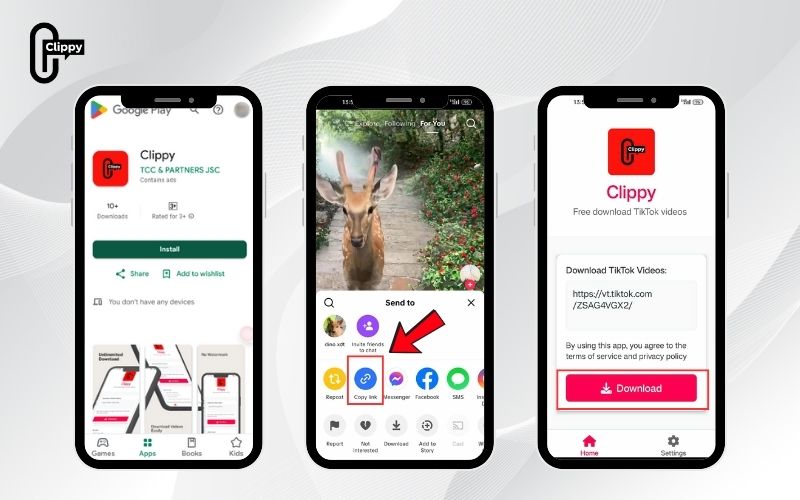
How to Download TikTok Videos with Clippy (4 Easy Steps)
Follow these simple steps to download TikTok videos safely and quickly:
Step 1: Copy the TikTok Video Link
Open TikTok, tap the Share icon, and choose Copy Link from the options. The video URL will be saved to your clipboard.
Step 2: Open Clippy
Launch the Clippy app (available on both Android and iOS). You don’t need to log in or connect your TikTok account—Clippy works instantly.
Step 3: Paste the Link
In Clippy’s main interface, paste the copied TikTok link into the search bar. Then tap Download.
Step 4: Choose Quality and Save
Select the desired video quality—HD, Full HD, or original—and hit Download again. Your video will be saved to your phone’s gallery, watermark-free and completely private.
That’s it! You’ve just downloaded your favorite TikTok video securely, with no risk of the creator being notified.
Frequently Asked Questions
Can TikTok creators see who saved their videos?
No. TikTok doesn’t show a list of users who downloaded or favorited a video. This information is private.
Does TikTok notify when you screenshot a video?
No, it doesn’t. TikTok doesn’t notify screenshots or screen recordings, either.
Can I turn off the download option for my videos?
Yes. Go to Settings → Privacy → Downloads, and toggle off “Allow your videos to be downloaded.”
Is it safe to use third-party downloaders like Clippy?
Yes, as long as you use trusted apps like Clippy that don’t require login credentials and keep your data secure.
>>> See Also: How to download TikTok video high quality without watermark
So, does TikTok notify when you save a video? The answer is no — TikTok doesn’t alert the creator when someone saves, favorites, or downloads their content. This means you can freely enjoy your favorite videos offline without worrying about privacy concerns.
However, if you want to download videos without watermarks, restrictions, or notifications, the Clippy app is your best choice. Fast, safe, and completely anonymous — it gives you full control over your video collection.
Download Clippy today and enjoy saving TikTok, Douyin, Facebook, Instagram, and YouTube videos effortlessly!

