


How to download Instagram Reel with music — learn simple, safe ways to save Reels to your device. Let’s explore with Video Download Free to find the best options and step-by-step instructions. This guide explains multiple methods (screen recording, online downloaders, browser tools) and why you might choose each. Read on for an easy Clippy app walkthrough that gets the job done in four clear steps.
Quick answer: How to download Instagram Reel with music?
If you need a short answer: yes, you can save many Instagram Reels with music for offline viewing using lawful, privacy-respecting methods like screen recording, approved third-party downloaders, or apps such as Clippy. Below we cover practical options, pros and cons, and a clear 4-step Clippy tutorial so you can start saving Reels right away.
Why people ask “How to download Instagram Reel with music”
Instagram Reels are short, engaging clips often paired with licensed tracks. Creators post great content you may want to watch offline, include in personal collections, or study for inspiration. Because Reels often stream music from Instagram’s catalog, not all download routes keep the original audio intact — so it helps to know which methods preserve both picture and sound.
Method 1 – Screen recording (fast & universal)
How to download Instagram Reel with music using screen recording:
- iPhone: Open Control Center → tap Screen Record → play the Reel. The phone captures the screen and system audio. Stop recording and trim the clip in Photos.
- Android: Many phones have a built-in screen recorder (swipe down quick settings). Start recorder with “record audio” enabled, play the Reel, then stop and trim.
>>> See Also: Learn how to download Instagram videos with music quickly
Method 2 – Online downloader websites
How to download Instagram Reel with music via an online tool:
- Copy the Reel link (Share → Copy Link in the Instagram app).
- Paste the URL into a reputable Instagram Reel downloader website and follow on-screen prompts to download video (some let you choose video-only or video+audio).
Method 3 – Browser extensions and desktop tools
How to download Instagram Reel with music using browser tools:
- Chrome/Firefox extensions can add “Download” buttons to Instagram pages.
- Desktop apps and developer tools (Inspect Element) let advanced users fetch the raw video file and save it.
Method 4 – Third-party mobile apps (introducing Clippy)
Among mobile apps designed for saving social videos, Clippy stands out for reliability and ease. If you want a purpose-built solution, Clippy lets you download Instagram Reels with music quickly and keeps the audio intact when possible.
>>> See Also: How can I download Instagram video fast & easily?

What is Clippy?
Clippy is a user-friendly video downloader app that supports Instagram Reels and other social platforms. It focuses on privacy, fast downloads, and preserving original audio tracks when the source makes them accessible.
Clippy features
- Simple URL paste or Share-to-Clippy workflow.
- Option to choose video resolution and include or exclude audio.
- Built-in file manager so you can rename and organize saved Reels.
Batch download support to queue multiple Reels. - No login required for public Reels — you only need to paste the Reel link or share from Instagram.
>>> See Also: How to download audio from Instagram online free in seconds
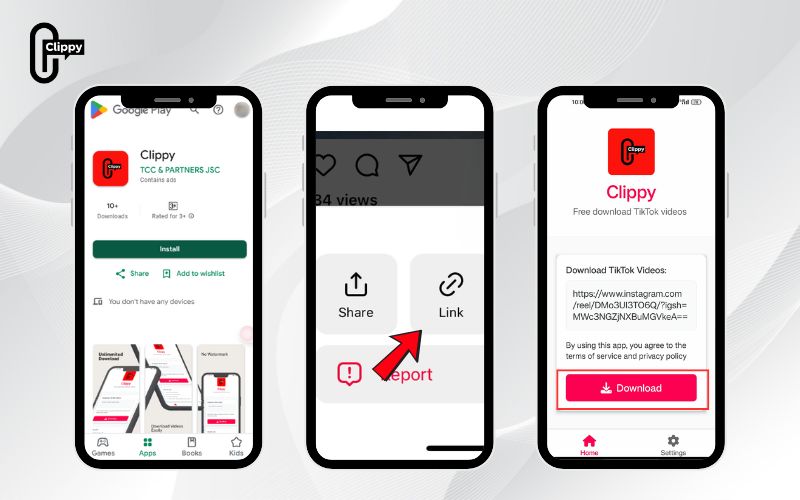
4 easy steps: How to download Instagram Reel with music using Clippy
Follow these four steps to save a Reel with audio:
Step 1 – Get the Reel link
Open Instagram, tap the Reel you want, then use Share → Copy Link.
Step 2 – Open Clippy and paste/share
Launch Clippy, tap “Paste Link” or use the Android/iOS Share menu and choose Clippy.
Step 3 – Select options
Clippy will parse the Reel. Choose the resolution and make sure “Include Audio” (or similar toggle) is enabled to preserve the music.
Step 4 – Download and manage
Tap Download. The Reel saves to Clippy’s library and your device’s gallery (if enabled). Use Clippy’s file manager to rename, move, or share the saved video.
Tips to make downloads cleaner and safer
- Always respect creators’ rights: obtain permission before reposting content publicly.
- For highest audio fidelity, pick the highest resolution that Clippy offers and ensure the “Include Audio” option is on.
- Use Do Not Disturb while screen recording to avoid notification sounds appearing in your saved clip.
- Keep the Clippy app updated for best performance and security.
If you’ve been searching for How to download Instagram Reel with music, this guide has shown you multiple safe options: screen recording, online downloaders, browser tools, and the convenient Clippy app. For the fastest, most consistent results (including the best chance of keeping the music intact), try Clippy’s simple paste-or-share workflow and the four-step process above. Ready to save your favorite Reels? Download Clippy now to get started and enjoy offline viewing with original audio.

