


Instagram is no longer just a photo-sharing platform; it has evolved into a hub for short, engaging videos. If you are wondering how to find saved reels on Instagram, you are not alone. Many users struggle to locate their favorite saved content. In this guide, Video Download Free’ll walk you through all the steps so you can access, manage, and enjoy your saved reels effortlessly.
Why You Should Save Instagram Reels
Saving Instagram reels is more than just bookmarking content; it helps you quickly access your favorite videos without endless scrolling. How to find saved reels on Instagram starts with understanding the benefits of saving them.
- Easy access to content: Saving reels ensures you can watch them later, even if they disappear from your feed.
- Track creative inspiration: Reels provide trends, editing ideas, and aesthetic inspiration for your own content.
- Store helpful tutorials: From fitness to cooking or photography, saved reels act as a personal tutorial library.
- Share with friends: Saved reels make it easier to share content you love with others.
- Revisit favorites: Enjoy your most entertaining or inspiring videos anytime without relying on Instagram’s algorithm.
>>> See Also: How to download Instagram videos to phone easily in minutes
Saving reels is simple, but knowing how to find saved reels on Instagram is what truly maximizes the feature’s value.
How to find saved reels on Instagram using mobile
Instagram mobile app makes it straightforward to access your saved reels. Whether you have an iPhone or Android device, follow these steps to locate your favorite videos.
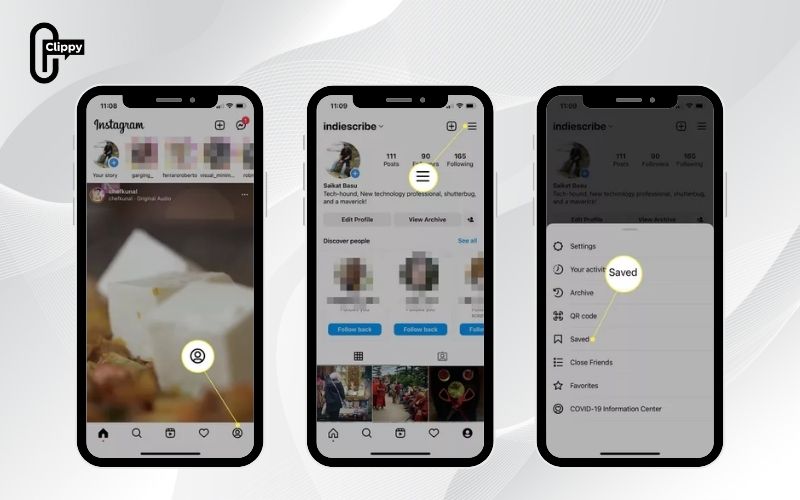
Step 1: Open Your Profile
Start by opening the Instagram app and tapping your profile icon located at the bottom right corner of the screen. This brings you to your main account page where you can access settings and saved content.
Step 2: Access the Saved Section
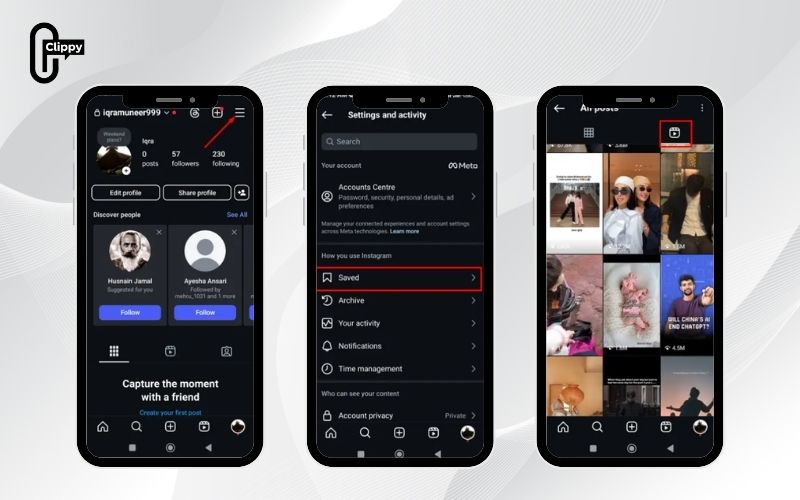
Tap on the Hamburger Menu (three horizontal lines) at the top right corner. From the dropdown, select Saved to open all your saved content collections, including posts, reels, and other media.
Step 3: Locate the Reels Folder
Once inside the saved section, tap All Posts. Here, you will find all saved items, but to focus only on reels, select the clapperboard icon. This filters your saved content and displays only the reels.
Step 4: Play and Manage Saved Reels
Scroll through your collection and tap on any reel to watch it. You can like it, share it with friends, or remove it from your saved list if needed. Following these steps ensures you always know how to find saved reels on Instagram without any hassle.
How to find saved reels on Instagram using desktop
If you prefer browsing Instagram on a desktop or laptop, you can also find your saved reels easily using the web version. This is useful for users who do not check Instagram frequently on mobile.
Step 1: Log in to Instagram
Visit www.instagram.com and log in with your Instagram credentials. Ensure you are accessing your main profile to see all saved content.
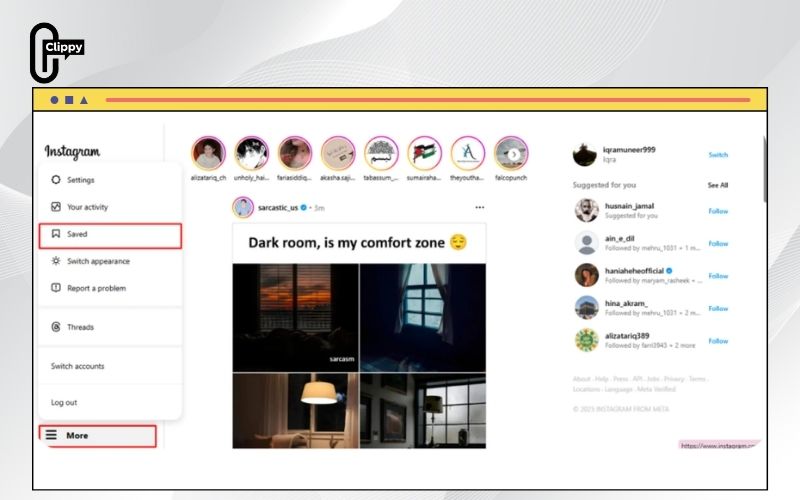
Step 2: Access the Saved Section
Click on More at the bottom left of your profile page, then select Saved from the options. This opens all the content you have previously saved, including images and reels.
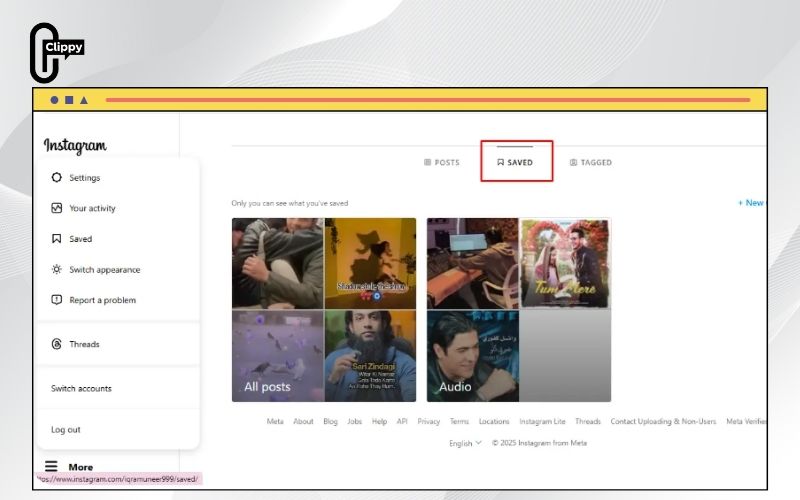
Step 3: Filter for Reels
Click on All Posts, then use the filters to focus on reels. You can now view, play, and interact with any saved reel directly from your desktop. Knowing this process is essential if you want a cross-device strategy for how to find saved reels on Instagram.
>>> See Also: Why cant I save videos on Instagram? Problem solved fast
How to find saved draft reels on Instagram
Sometimes, you might save a reel as a draft to edit and post later. Locating these drafts can be confusing if you are new to Instagram.
Step 1: Open Profile and Create Reel
Open your Instagram profile and tap the “+” (plus icon) to create a new reel.
Step 2: Access Drafts
Select Reel and then tap Drafts. Here, you will see all your saved drafts. Tap on any draft to continue editing or posting it.
Knowing how to find saved reels on Instagram includes understanding how to manage drafts effectively, as these often contain your planned or unfinished content.
>>> See Also: Does Instagram notify when you download a video or reel?
How to remove saved reels on Instagram
Just as saving reels is important, sometimes you may want to remove them to declutter your collection. Follow these simple steps to delete saved reels.
- Step 1: Open Instagram and tap the Hamburger Menu → Saved → All Posts.
- Step 2: Tap the Reel icon to filter saved reels.
- Step 3: Select the reel you want to remove.
- Step 4: Tap the Three-dot menu → Saved again, and the reel will disappear from your collection.
Although Instagram does not allow mass deletion of saved reels, these steps make managing your collection easier and help you maintain a tidy saved folder.
Tips to organize your saved reels
With hundreds of reels saved, finding a specific video can get tricky. Organizing your reels properly makes access faster and keeps your saved section clutter-free.
- Create themed collections: Group reels into categories such as travel, fashion, fitness, or tutorials.
- Use clear titles: Give collections descriptive names to identify content quickly.
- Regularly clean up: Remove outdated or irrelevant reels to maintain a focused collection.
- Sort by date: Keep track of trends or remember when a reel was saved.
- Mark favorites: Prioritize frequently used reels in a special collection or at the top.
>>> See Also: How to download a photo from Instagram quickly and easily
These strategies enhance your Instagram experience and ensure that you never waste time figuring out how to find saved reels on Instagram.
Finding and managing your Instagram reels doesn’t have to be confusing. By following the steps outlined in this guide, you can easily locate saved reels on mobile or desktop, manage drafts, and keep your collection organized. Now that you know how to find saved reels on Instagram, you can enjoy your favorite videos anytime without scrolling endlessly.
To enhance your Instagram experience further, download the Clippy app to save Instagram videos directly to your device and enjoy them offline. Start managing and watching your reels today with ease!

