


Adding a mention on an Instagram Story is one of the easiest ways to tag people, credit creators, or collaborate with brands. When you mention an account, Instagram sends them a notification and turns the username into a clickable link, helping increase interaction and visibility. This feature is widely used by personal users, creators, and businesses to boost engagement and connect audiences.
In this guide on Free download video App, you’ll learn exactly how to add mentions on Instagram Story using the @Mention sticker, how to tag multiple accounts clearly, whether mentions can be added after posting, and why mentions sometimes don’t work. The article also answers common questions so you can use Instagram Story mentions correctly and confidently.
Key Takeaways
- Instagram Story mentions notify tagged users and link directly to their profiles
- The @Mention sticker is the clearest and most effective way to tag someone
- You can add multiple mentions in one Story if they are placed clearly
- Mentions can be added after posting, but media content cannot be edited
- Most mention issues are caused by privacy settings, blocks, or app problems
How to Add Mention on Instagram Story Using the @Mention Sticker
The @Mention sticker is one of the most effective ways to tag someone in an Instagram Story because it makes the username visually prominent and clearly clickable. This method is commonly used for brand partnerships, shoutouts, collaborations, and content credits where visibility and interaction are important.
Step-by-step process:
- Open Instagram and swipe right to access the Story camera
- Take a new photo or video, or select an existing one from your gallery
- Tap the sticker icon at the top of the screen to open the sticker menu
- Select the @Mention sticker from the available options
- Type the username of the account you want to mention
- Choose the correct account from the suggestion list to ensure proper tagging
- Resize, reposition, or change the sticker color to match your Story design
- Tap “Your Story” or “Close Friends” to publish the Story
>>> See more: How to Collab Post on Instagram: The Complete Guide
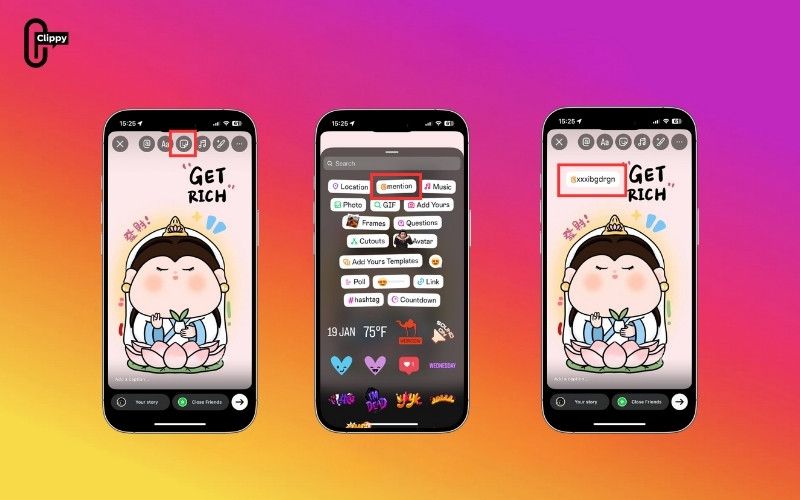
Differences between sticker and text mentions:
- Sticker mentions are visually distinct, making them easier for viewers to notice and tap
- Text blends more naturally into captions or graphic designs
- Both sticker and text mentions notify the tagged user and create a direct link to their profile
Visibility and interaction behavior:
- The mentioned username appears as a clickable link for viewers
- The tagged account receives a notification that they were mentioned
- Depending on account settings, the mentioned user may be able to reshare the Story to their own profile
This method ensures your mention is clear, interactive, and optimized for engagement, especially when collaborating or giving public credit.
How to Add Multiple Mentions on One Instagram Story
Instagram allows you to mention multiple accounts in a single Story, making it ideal for group photos, event highlights, brand partnerships, or collaborations. Although Instagram does not publish an official limit, using multiple mentions effectively requires thoughtful placement and clear presentation.
Best practices and limits for multiple mentions:
- You can typically add up to around 10 mentions in one Story without issues, though fewer mentions often improve clarity and engagement
- Avoid overlapping usernames, as stacked or hidden mentions may become difficult or impossible for viewers to tap
- Space is evenly across the screen so each username remains clearly visible and accessible
- Adjust text size or sticker size to ensure all mentions are readable on both small and large screens
- Place mentions against a contrasting background to improve visibility and avoid blending into images or videos
- If the Story starts to look crowded, split mentions across multiple Stories instead of forcing them into one frame
>>> See more: Can People See Who You Follow on Instagram?
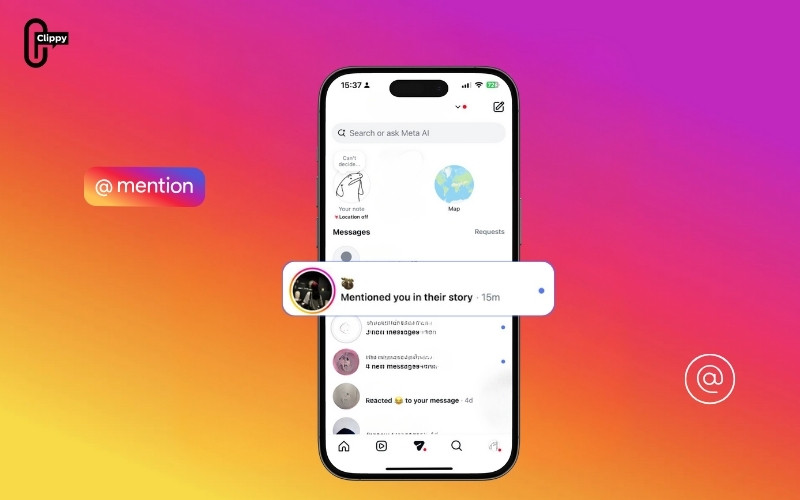
Using multiple mentions strategically helps ensure that every tagged account receives proper visibility and that viewers can interact with each mention without confusion.
Can You Add a Mention After Posting an Instagram Story?
Yes, you can add a mention after posting an Instagram Story, but this feature comes with certain limitations. It is especially helpful if you forget to tag someone before sharing your Story and want to notify them without reposting the content.
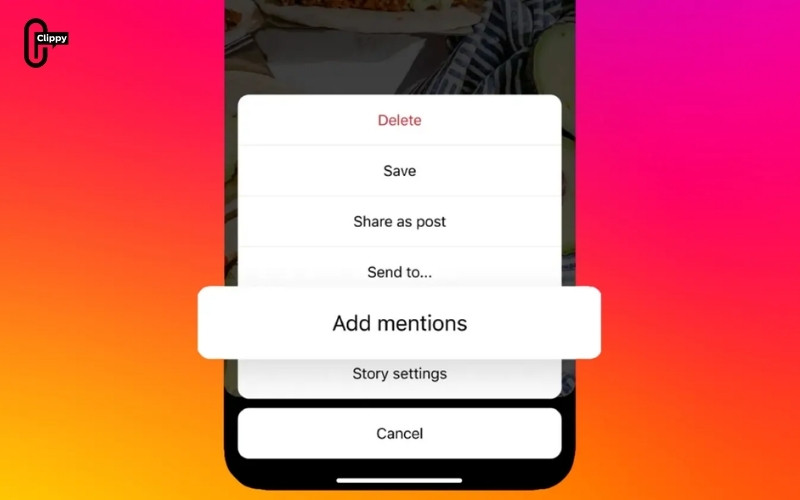
How to add mentions after posting:
- Open your active Story by tapping your profile picture at the top of your feed
- Tap the Story options menu while viewing the Story
- Select the option to add mentions to the Story
- Search for the account you want to tag using their username
- Select the correct account and confirm to apply the mention
What happens to notifications:
- The mentioned user receives a notification that they were tagged in your Story
- The username becomes tappable, allowing viewers to visit the tagged profile directly
What cannot be changed after posting:
- You cannot edit, replace, or crop the original photo or video
- You cannot change applied filters, stickers, music, or effects
- You cannot edit or remove the original text added before posting
If you need to make visual or content changes beyond adding a mention, the only option is to delete the Story and repost it with the correct tags and edits applied.
Why Can’t I Mention Someone on Instagram Story?
If you’re unable to mention someone on an Instagram Story, the issue is usually related to account restrictions or app settings rather than a technical error. Below are the most common reasons mentions don’t work and what they mean.
- The account is private with restricted mention settings: Some private accounts limit who can mention them in Stories. If the user has set their account to only allow mentions from people they follow, your tag may not appear or be selectable when typing the username.
- You have been blocked or restricted by that user: If someone has blocked or restricted your account, their username will not show up in the mention search results. In this case, Instagram prevents the mention entirely, and the user will not receive any notification.
- The username has recently changed: When an account changes its username, the old handle may no longer be searchable. Trying to mention an outdated username will fail, even if the account still exists.
- The Instagram app is outdated: Older versions of Instagram may contain bugs or lack newer Story features, which can cause mentions to malfunction or not appear correctly.
- Temporary glitches or account limitations are active: Short-term issues such as app glitches, weak internet connections, or temporary account restrictions due to unusual activity can interfere with adding mentions.
- Cache or background app errors: Accumulated app cache or background processes can sometimes prevent interactive elements like mentions from loading properly during Story creation.
In most cases, these problems can be resolved by updating the Instagram app to the latest version, restarting the app, checking your internet connection, and trying again after a short wait.
>>> See more: How to add a link to Instagram Bio (Step-by-Step Guide)
Frequently Asked Questions About Instagram Story Mentions
How many people can you mention on an Instagram Story?
You can mention multiple people in one Story, commonly up to about 10 accounts. For better engagement, fewer well-placed mentions are recommended.
Can someone remove a mention from your Story?
No. Only the Story owner can delete or edit the Story. The mentioned user cannot remove the tag.
Can you mention private accounts on Instagram Story?
Yes. Private accounts can be mentioned and will receive a notification, but only their approved followers can view the Story.
Do mentions work the same on Android and iPhone?
Yes. The steps, notifications, and interaction behavior are the same on both platforms, with only minor interface differences.
Conclusion
Knowing how to add mention on Instagram Story helps you communicate more effectively, give proper credit, and increase engagement with minimal effort. Whether you’re tagging friends, collaborating with creators, or promoting a brand, using mentions correctly ensures your Story reaches the right people and remains interactive.
By following the step-by-step methods, understanding limitations, and applying best practices, you can avoid common errors and make the most of Instagram Story mentions. Used strategically, mentions are a simple but powerful tool to strengthen connections and improve visibility on Instagram.
>>> See more: How to Add a Location on Instagram: Posts, Stories, Reels, and Profile

