

f you’re looking for a simple way how to download YouTube video audio, the Clippy app is a fantastic choice. Developed by Video Download Free, Clippy allows users to save high-quality audio from YouTube videos directly to their mobile devices. Whether you’re interested in music, podcasts, or other audio content, Clippy simplifies the process, making how to download YouTube video audio accessible to everyone.
What is Clippy app?
Clippy is a free video downloader application available on the Google Play Store. It supports multiple platforms, including TikTok, Instagram, Facebook, and YouTube. With its user-friendly interface, Clippy enables users to download videos and audio without watermarks, ensuring a clean and professional result.
>>> See Also: 15 tips on how to download YouTube videos to phone easily
Why choose Clippy for downloading YouTube audio?
When searching for the best solution on how to download YouTube video audio, Clippy stands out as a reliable and efficient option. Unlike many online tools that come with ads or limited quality, the Clippy app provides a seamless, ad-free experience with excellent audio clarity. It’s designed for users who value speed, simplicity, and top-notch performance when converting videos into audio files.
- User-Friendly Interface: Clippy’s design ensures that even first-time users can navigate the app with ease.
- High-Quality Downloads: Experience superior audio quality with every download.
- No Watermarks: Enjoy clean audio files without any distracting overlays.
- Multi-Platform Support: Download content from various platforms, including YouTube.
- Free to Use: Access all features without any hidden costs.
>>> See Also: Why some YouTube videos cannot be downloaded? Easy guide here
How to download YouTube video audio using Clippy
With Clippy, turning your favorite YouTube videos into high-quality audio files takes just a few simple steps. Follow the guide below to start downloading and enjoying your audio instantly.
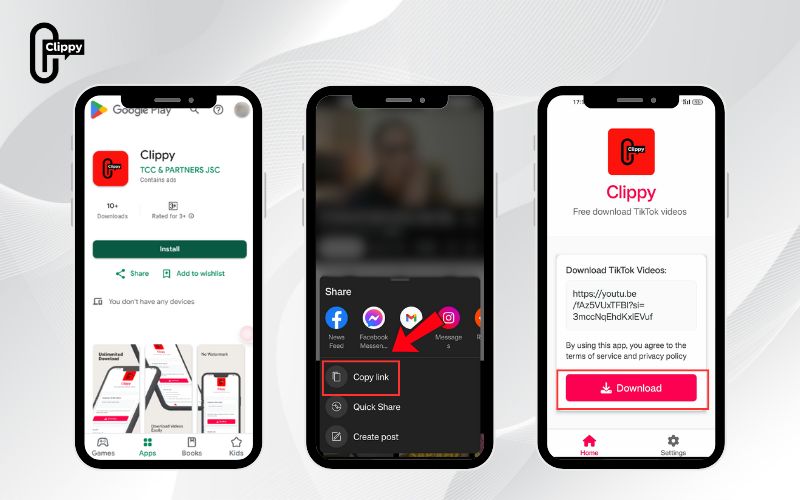
Step 1: Install Clippy App
- Open the Google Play Store on your Android device.
- Search for “Clippy” in the search bar.
- Locate the app developed by Video Download Free.
- Tap on Install to download and install the app on your device.
Step 2: Copy the YouTube Video Link
- Open the YouTube app or website.
- Navigate to the video from which you wish to extract audio.
- Tap on the Share button.
- Select Copy Link to copy the video’s URL to your clipboard.
Step 3: Paste the Link into Clippy
- Open the Clippy app on your device.
- Paste the copied YouTube link into the input field provided.
- Clippy will automatically recognize the video and prepare it for download.
Step 4: Select Audio Format and Download
- Choose your preferred audio format, such as MP3.
- Select the desired audio quality.
- Tap on the Download button.
- Wait for the download to complete.
- Access the downloaded audio file in your device’s storage.
Tips for optimal use of Clippy
To get the best results when you download Facebook video MP3 with Clippy, it’s essential to use the app’s features effectively. Follow these simple tips to ensure smooth performance and the highest audio quality every time.
- Stable Internet Connection: Ensure you have a reliable internet connection for uninterrupted downloads.
- Storage Space: Verify that your device has sufficient storage space to accommodate the downloaded audio files.
- Regular Updates: Keep the Clippy app updated to benefit from the latest features and improvements.
>>> See Also: How to download short YouTube videos on phone easily

Alternatives to Clippy for downloading YouTube audio
While Clippy is an excellent choice, there are other tools available for downloading YouTube audio:
- ClipGrab: A free downloader that supports various formats and is available for Windows, macOS, and Linux.
- 4K Video Downloader: Allows downloading of entire playlists and channels in high quality
- YTMP3: An online converter that extracts audio from YouTube videos in MP3 format.
>>> See Also: How to download YouTube video from YouTube free no watermark
It’s essential to be aware of the legal implications when downloading content from YouTube. Downloading videos or audio without proper authorization may violate YouTube’s terms of service and copyright laws. Always ensure that you have the right to download and use the content. For personal use, consider utilizing YouTube Premium, which offers offline viewing and audio playback features.
How to download YouTube video audio has never been easier with the Clippy app. Its straightforward process, combined with high-quality downloads and a user-friendly interface, makes it a top choice for Android users. If you’re still wondering how to download YouTube video audio safely, just remember to respect copyright laws and use downloaded content responsibly.

