


If you’ve ever asked how to see Facebook Stories archive, this guide is for you. Facebook quietly stores your Stories without clearly telling users. That’s why many think they’re lost. Let Video Download Free walk you through it in this News article.
Quick Guide
To see your Facebook Story Archive, go to the Menu (three lines), tap your name to your profile, then tap the three dots to find “Activity Log,” select “Archive,” and choose “Story Archive” to view your saved memories, ensuring “Save to archive” is enabled in your Story Settings for future posts.
How to see Facebook Stories archive
Facebook Stories you post are visible to your chosen audience for just 24 hours. However, you can enable the Story Archive feature to automatically save your stories after they expire. This archive is private and only accessible to you, and you can turn the feature on or off at any time in your settings.
On the Facebook Mobile App (iPhone & Android)
If you want to view your archived Facebook Stories, you can access them directly from your profile settings in just a few taps. The Story Archive stores your expired stories privately, allowing you to revisit or reshare them anytime.
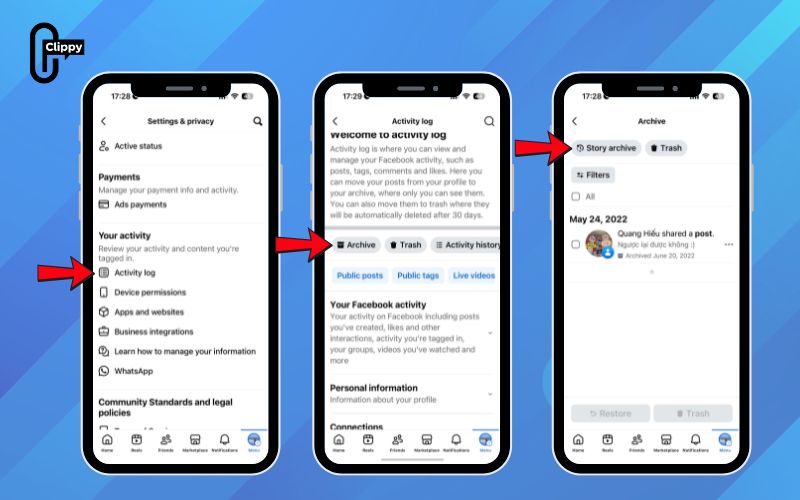
Step 1: Open the Facebook app and tap the Menu icon (three horizontal lines) in the top-right or bottom-right corner.
Step 2: Tap your name or profile picture at the top to open your profile.
Step 3: Select the three-dot menu (…) next to Edit profile.
Step 4: Scroll to Your activity and tap Activity Log.
Step 5: At the top of the Activity Log, select Archive.
Step 6: Tap Story Archive to view all of your saved stories.
On the Computer
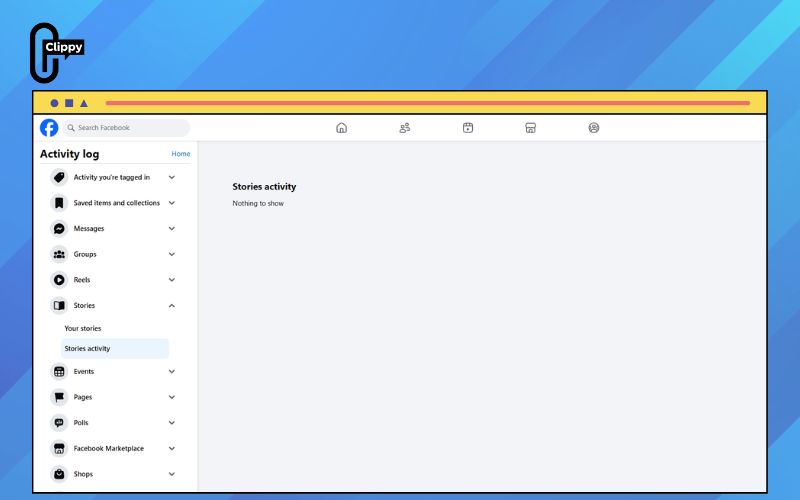
If you want to review or manage your past Facebook Stories on a computer, accessing the Story Archive from your profile is the easiest option. The Story Archive automatically saves your stories after they expire, allowing you to revisit, download, or reshare them later – unless they were deleted before the 24-hour period ended.
Step 1: From your Facebook News Feed, look to the left-hand column and click your profile picture or name to open your profile page.
Step 2: On your profile, find and click the Options button (usually represented by three dots).
Step 3: From the menu that appears, select Story Archive. This will open a private archive where all your expired stories are stored.
Step 4: Browse through your archived stories to view, download, or reshare them as needed.
Important notes If stories aren’t showing up
If your Facebook Stories don’t appear in the Story Archive, it’s usually related to settings or how the story was handled. The notes below will help you identify common issues and make sure your stories are saved correctly going forward.
- Check if Story Archive is enabled: Go to the main Menu, open Settings, then tap Stories and Story Archive. Make sure Save to archive is turned on so stories are saved automatically after 24 hours.
- Stories deleted early won’t be archived: If you delete a story before it expires, Facebook won’t save it to your archive. Only stories that reach the 24-hour limit are archived automatically.
- Archive visibility is private: Story Archive is only visible to you. If you’re logged into a different account or profile, archived stories may not appear.
- App version can affect Story Archive: An outdated Facebook app may hide or limit archive features. Updating to the latest version can restore missing options.
- Manual archiving is required in some cases: If you want to keep a story before deleting it, you must archive it manually. Otherwise, it will be permanently removed and unrecoverable.
FAQs about how to see Facebook Stories archive
The Facebook Stories Archive is a private feature that helps you store and revisit expired stories. Below are common questions users often ask, with clear explanations to help you understand how the archive works and how to access it properly.
Where can I find my Facebook Stories Archive?
You can access your Story Archive through your profile by opening the Activity Log and selecting Archive, then Story Archive. Only you can view this section.
Why don’t I see my stories in the archive?
This usually happens if the Story Archive feature is turned off or the story was deleted before it expired. Check your settings to ensure “Save to archive” is enabled.
Can other people see my archived Facebook stories?
No. Your Story Archive is completely private and visible only to your account. Friends and followers cannot access or view your archived stories.
How long are stories kept in the Facebook Story Archive?
Stories remain in your archive indefinitely unless you manually delete them. Facebook does not automatically remove archived stories over time.
Can I reshare or download stories from the archive?
Yes. You can reshare archived stories to your feed or story, and in some cases download them, depending on your device and app version.
Understanding how to see Facebook Stories archive proves that Facebook rarely deletes your memories. Stories vanish from view, not from storage. Once you know where to look, access becomes effortless. Don’t let hidden settings stop you again.

