

Choosing the right photo size Instagram is essential if you want your images to stay sharp, avoid cropping, and display correctly across the feed, Stories, and Reels. Because Instagram automatically compresses and resizes uploads, using the wrong dimensions can make even high-quality photos look blurry or poorly framed. This guide explains all recommended Instagram image sizes for 2025 so you can post with confidence and ensure your content appears exactly as intended.
Choosing the correct Instagram photo size is one of the most important steps in creating content that performs well on the platform. Whether you’re a brand, creator, marketer, or casual user, understanding Instagram’s image dimensions can prevent blurry uploads, awkward cropping, and reduced engagement. Since Instagram’s algorithm increasingly prioritizes high-quality visuals, using the recommended sizes ensures your posts appear clear and optimized across every device.
This long-form guide of Free App Download Video covers every Instagram photo format, including feed posts, carousels, profile pictures, Stories, Reels, and ads, so you can prepare content confidently and maintain consistent quality across your account.
What Is the Best Photo Size Instagram?
Instagram accepts multiple aspect ratios and resolutions depending on the type of content you upload. The platform automatically compresses images that don’t meet its size standards, which can lead to softness, pixelation, or distorted framing. To avoid this, creators often follow Instagram’s recommended width of 1080 pixels, adjusting height based on the orientation.
The table below summarizes the most important formats at a glance:
| Instagram Format | Recommended Size | Aspect Ratio | Notes |
| Profile Photo | 320 × 320 px | 1:1 | Displays as a circle; center key subjects |
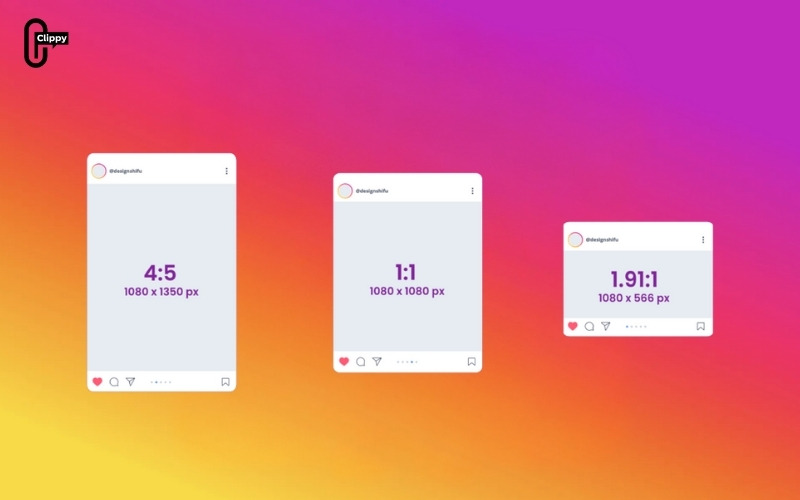
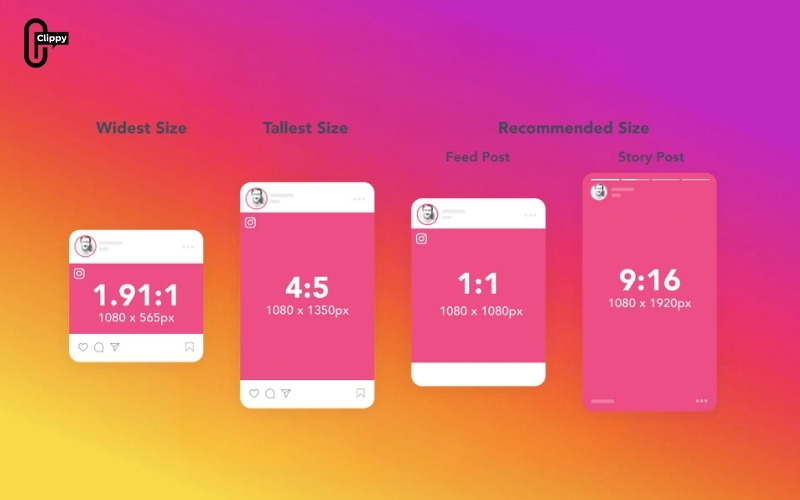
| Square Feed Post | 1080 × 1080 px | 1:1 | Most stable, universally supported |
| Portrait Feed Post | 1080 × 1350 px | 4:5 | Best vertical visibility in feed |
| Landscape Feed Post | 1080 × 566 px | 1.91:1 | Ideal for wide images or scenic shots |
| Carousel Post | Follows feed sizes | 1:1, 4:5, or 1.91:1 | All images must share the same orientation |
| Instagram Stories | 1080 × 1920 px | 9:16 | Full-screen vertical display |
| Reels Cover Photo | 420 × 654 px | 1:1.55 | Ensures clarity on grid and reel feed |
| Story/Reel Ads | 1080 × 1920 px | 9:16 | Matches organic story/reel format |
| Feed Ads | 1080 × 1080 or 1080 × 1350 px | 1:1 or 4:5 | Best for product and branded content |
Profile Photo Size Instagram
The Instagram profile image is small but plays a critical branding role. The recommended upload size is 320 × 320 pixels, but the platform displays the photo inside a circular frame. Because of this cropping style, it’s important to keep faces, logos, or important visuals centered. Even though the file itself is small, using a high-resolution image helps ensure clarity across different screen sizes and devices.
Feed Photo Size Instagram
Feed posts are the heart of Instagram, and each format has a specific advantage. Selecting the correct photo size ensures the platform doesn’t resize your image in a way that affects quality or composition.
Square Posts
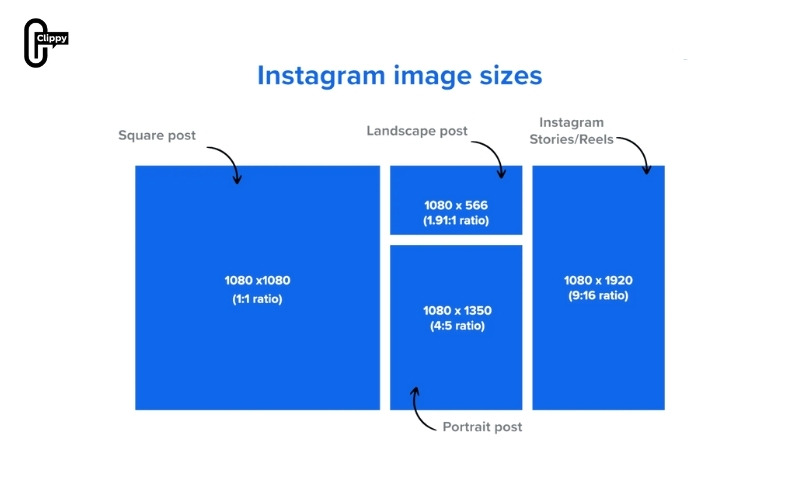
The square format remains one of the most reliable choices due to its visual balance and consistency across the platform. With a recommended size of 1080 × 1080 pixels, this ratio maintains sharpness and is ideal for content that needs symmetrical framing or clean layouts.
>>> See more: How to Repost From Instagram: Posts, Reels, and Stories
Portrait (Vertical) Posts
Portrait images have become increasingly popular because they take up more vertical screen space, helping posts stand out in the feed. The recommended size is 1080 × 1350 pixels with a 4:5 aspect ratio. This orientation showcases full-body photos, fashion shots, infographics, and lifestyle content more effectively without overwhelming the feed.
Landscape (Horizontal) Posts
Landscape photos work best for wide environments or group scenes. Instagram recommends 1080 × 566 pixels, maintaining an aspect ratio close to 1.91:1. This orientation avoids forced cropping while highlighting panoramic views or cinematic compositions.
Carousel Posts and Their Recommended Sizes
Carousel posts allow users to share multiple images or graphics in a single swipeable set. The important rule is that every image in the carousel must follow the same orientation. Mixing square, portrait, and landscape images will cause Instagram to automatically crop the rest to match the first slide.
To maintain design consistency, creators commonly use one of the following sizes:
- Square carousel: 1080 × 1080 px
- Portrait carousel: 1080 × 1350 px
- Landscape carousel: 1080 × 566 px
Carousels perform well for step-by-step tutorials, product highlights, comparison posts, and storytelling sequences where consistent formatting improves readability.
>>> See more: What is a carousel on Instagram? A Complete Guide
Stories Photo Size Instagram
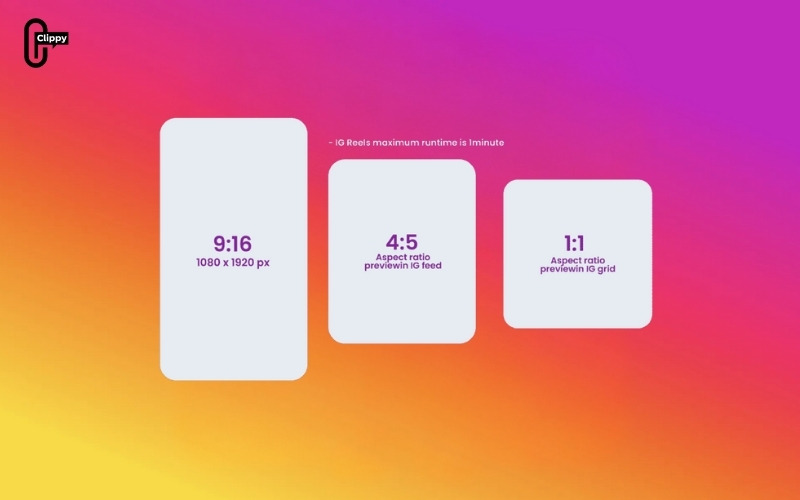
Instagram Stories use a full-screen vertical canvas with a recommended size of 1080 × 1920 pixels, following a 9:16 aspect ratio. Since Stories cover the entire screen, it’s important to design with the “safe zone” in mind. Content positioned too close to the top or bottom may be obstructed by interface elements such as usernames, caption overlays, and interactive buttons.
To achieve the best results, creators typically:
- Keep essential text and visuals within the center region
- Use high-contrast images so text remains legible
- Avoid stretching images to fit the format; instead, resize properly
Stories are particularly useful for behind-the-scenes content, promotions, announcements, and interactive elements like polls or questions.
Instagram Reels Photo and Cover Sizes
Reels share the same full-screen vertical format as Stories, requiring 1080 × 1920 pixels for videos or still images. Since Reels autoplay vertically and fill the full display, proper cropping helps preserve high visual quality.
The cover photo (or thumbnail) requires a separate size consideration. Instagram recommends 420 × 654 pixels, which displays correctly on both the grid and the Reels feed. Ensuring the subject is centered prevents it from being cropped awkwardly when shown as a smaller square on your profile.
Instagram Ads Image Sizes
Instagram ads must adhere to strict size guidelines to display correctly across different placements. Using the recommended sizes helps prevent layout issues and ensures clarity.
Feed Ads
Feed ads follow the same dimensions as organic posts, making them simple to repurpose. The most common options include:
- Square: 1080 × 1080 px
- Portrait: 1080 × 1350 px
These formats fit naturally into the feed, allowing ads to blend seamlessly with user-generated content.
Story & Reel Ads
For vertical ad placements, the recommended size is 1080 × 1920 pixels. Since ads often contain call-to-action elements, proper spacing is crucial. Brands should avoid placing text too close to the edges, ensuring the message remains visible across devices.
>>> See more: How to Go Live Instagram: The Full Guide
Common Mistakes When Uploading Instagram Photos
Uploading images without considering Photo Size Instagram requirements often leads to visual issues. Some of the most frequent mistakes include:
- Ignoring aspect ratios: Incorrect ratios force Instagram to crop important parts of a photo, especially at the edges. Preparing the image in the correct ratio prevents unexpected framing problems.
- Using insufficient resolution: Low-resolution files may look fine on a local device but appear blurry after Instagram compresses them. Starting with a minimum width of 1080 pixels helps preserve clarity.
- Designing too close to the border: In full-screen formats, interface elements can cover essential text or graphics. Keeping important content away from the top and bottom edges maintains visibility.
- Mixing orientations in carousel posts: Inconsistent orientations disrupt visual flow and can reduce engagement. Choosing a single format before designing the carousel prevents forced cropping.
By avoiding these mistakes, creators maintain a professional appearance and ensure their content matches Instagram’s display standards.
Conclusion
Understanding the correct Photo Size Instagram is a foundational step in building a visually compelling account. Whether you’re posting a simple square image, designing a multi-slide carousel, or preparing high-impact Stories and Reels, following Instagram’s recommended dimensions ensures your content appears crisp, well-framed, and optimized for user engagement. As visual quality continues to influence reach and performance on the platform, using the correct sizes is one of the easiest ways to strengthen your content strategy.
>>> See more: How to Collab Post on Instagram: The Complete Guide

