


Are you wondering how to change username for Instagram? Maybe you want a fresh start, a more professional handle, or a username that better reflects your brand. Whatever the reason, updating your Instagram username is quick, easy, and can be done directly from your mobile app or computer. In this guide, App download video free will show you step-by-step instructions, tips, and things to consider before making the change so you can maintain your online identity without losing your followers.
Key Takeaways
- You can change your Instagram username from Edit Profile on mobile or desktop; the update is immediate unless your account triggers a brief review.
- Usernames must be unique and can include letters, numbers, periods, and underscores; spaces and special symbols aren’t allowed.
- Accounts that reach many people may have username changes reviewed before they appear publicly, and you’ll be notified when complete.
- Your profile URL changes with your new handle, so update links on your website, email signatures, Linktree, and other social profiles.
- Old mentions and tags using your previous handle generally won’t auto-redirect to announce the change, so followers recognize your new
Why do you change your Instagram username?
Your Instagram username is more than just a label; it’s your identity on the platform. Therefore, changing your username is a simple step that can have a big impact on how people perceive your account.
There are several reasons users decide to update their Instagram handles:
- Rebranding Your Profile: Whether for personal growth or business, a new username can reflect your current image or business identity.
- Professional Appearance: A clean and memorable username is easier for potential clients or followers to remember.
- Correcting Errors: If your old username has typos, confusing numbers, or unnecessary symbols, it’s time for a change.
- Trend or Style Updates: Maybe your old handle feels outdated; a new username can make your profile look fresh and trendy.
>>> See more: What Is Bio on Instagram? Full Guide for Beginners

What do you consider before changing your Instagram username?
Changing your Instagram username may seem simple, but there are several important factors to keep in mind to ensure a smooth transition and avoid potential issues. Taking the time to plan your new username can help maintain your online identity, keep your followers engaged, and improve discoverability.
Your Username Must Be Unique
Instagram requires that every username be unique. This means you cannot use a handle that someone else already owns. If your preferred username is taken, consider adding small variations such as underscores (_), periods (.), or numbers.
For example, if @JaneDoe is taken, you could try @Jane_Doe or @Jane.Doe123.
Choosing a unique username not only avoids conflicts but also makes it easier for followers to find and remember your profile.
Allowed Characters
Instagram usernames can only include letters, numbers, periods, and underscores. Spaces and special symbols are not allowed. While this may seem restrictive, it encourages clean, easy-to-read usernames that are easy to type. Avoid using unusual characters, as they can make your profile harder to find or remember.
For example, instead of @Jane!Doe$, stick to @Jane_Doe or @Jane.Doe.
Profile URL Will Change
Your Instagram username is directly tied to your profile URL. Changing your handle will update your URL.
From instagram.com/oldusername to instagram.com/newusername.
This is an important consideration if you’ve shared your profile link on websites, social media platforms, business cards, or marketing materials. Make sure to update all instances of your old link to prevent confusion or broken links.
Old Username Availability
Once you change your Instagram username, your previous handle may become available for others to claim. If your old username is highly recognizable, there is a risk that someone else might take it. If you think you may want to revert to it later, check periodically to see if it’s still available. Alternatively, consider using a variant of your old username to maintain some continuity.
Impact on Followers and Engagement
While Instagram does not notify your followers when you change your username, sudden changes can still affect engagement. A username that is drastically different from your previous one may confuse existing followers. If you’re rebranding, it’s a good idea to inform your audience through a post or story so they recognize your new handle.
Frequency of Changes
Instagram does not impose strict limits on how often you can change your username, but frequent changes can hurt recognition and trust. Choose a handle that you are confident will last at least a few months, if not longer. A stable username makes your account more memorable and helps with search visibility.
Branding and Consistency
If you use Instagram for business, branding, or professional purposes, ensure your new username is consistent across platforms. Using the same handle on Instagram, Twitter, TikTok, or YouTube helps your audience recognize your brand easily and improves your overall digital footprint.
Creativity vs. Clarity
While creativity is important, clarity should be your priority. A clever or humorous username is great, but if it’s hard to spell or remember, it may drive potential followers away. Strive for a balance between uniqueness, creativity, and readability.
For example, @TechGuru101 is clear and easy to remember, while @xXTechyTornadoXx may confuse or frustrate new followers.
How to change username for Instagram on Mobile (iOS & Android)
Changing your username on mobile is quick and intuitive. Here’s how to do it step by step:
Step 1: Open the Instagram App
Launch Instagram on your smartphone.
Step 2: Go to Your Profile
Tap the profile picture at the bottom-right corner to access your profile.
Step 3: Tap Edit Profile
You’ll find the Username field at the top of the screen.
Step 4: Enter Your New Username
Delete your old handle and type the new one. Make sure it follows Instagram’s rules and is unique.
Step 5: Save Changes
Tap Done (iOS) or the checkmark (Android) to confirm the change.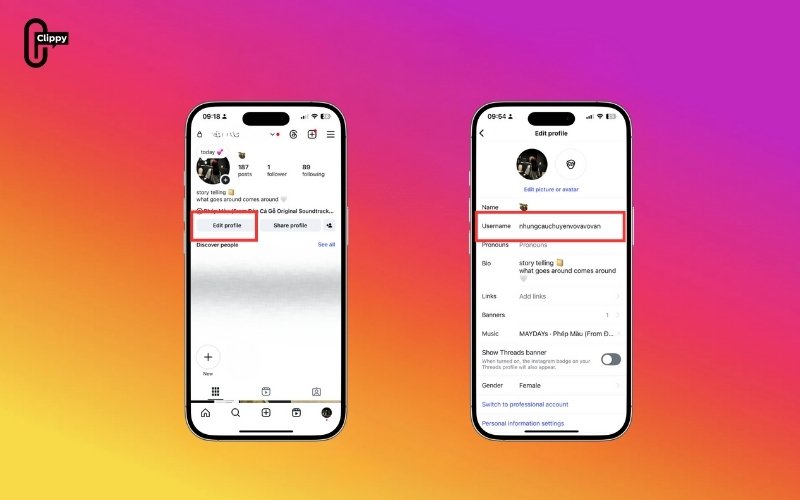
Pro Tip: If Instagram says the username is already taken, try variations with dots, underscores, or numbers until you find an available option.
>>> See more: What is close friends Instagram? How to use it
How to change your username for Instagram on Web
You can also update your username from a computer browser. Here’s the process:
Step 1: Log In to Instagram
Go to Instagram.com on your preferred browser and sign in with your username and password. Ensure you’re logged into the correct account where you want to change your username.

Step 2: Click Settings and Privacy
Once logged in, click your profile icon in the top-right corner, then select Settings and Privacy from the dropdown menu. This will open your account management options.

Step 3: Choose Personal details
In the left-hand sidebar, click Personal details.

Here, you’ll find sections related to your account information, including your name, email address, and username.

Step 4: Change Username
Locate the Username field, delete your current handle, and enter your new one. Make sure your new username follows Instagram’s rules; only letters, numbers, periods, and underscores are allowed, and it must be unique.
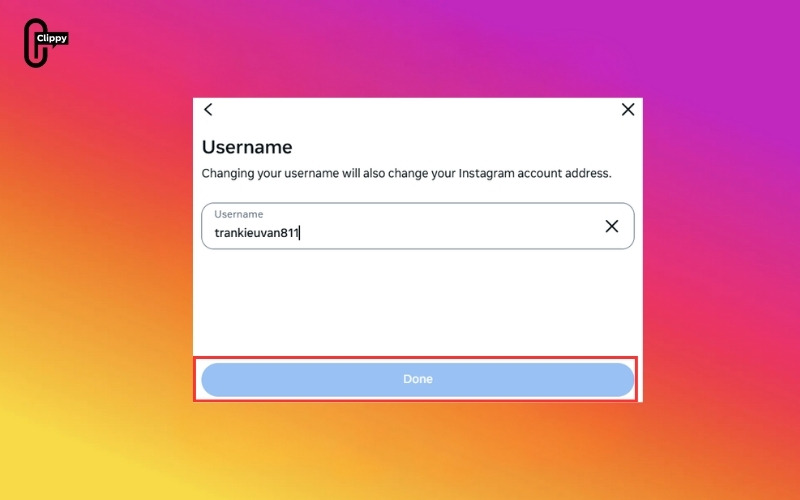
Step 4: Submit Changes
Scroll down and click Submit to save the new handle.
This method is ideal for those who prefer a larger screen and keyboard when making profile updates.
Tips for Choosing the Perfect Instagram Username
Choosing a username isn’t just about picking something available; it’s about creating a memorable, searchable identity. Here are some expert tips:
- Keep It Short & Memorable: Short usernames are easier to type, remember, and share.
- Reflect Your Brand or Personality: Your username should represent your style, niche, or business identity.
- Avoid Numbers & Special Characters: Unless essential to your branding, numbers or symbols can confuse followers.
- Check Availability Across Platforms: Consistency is key. Using the same handle on other social media channels strengthens your brand identity.
- Consider SEO-Friendly Keywords: If you are a business or content creator, including relevant keywords in your handle can make your profile easier to discover. For example, @TravelWithAmy or @HealthyEatsBlog.
- Future-Proof Your Username: Choose a handle that can grow with your brand or personal profile, avoiding trends that may become outdated.
>>> See more: Top 1000+ Instagram Username Ideas by Niche [New Edition]
Frequently Asked Questions (FAQs)
How often can I change my Instagram username?
Instagram doesn’t enforce a strict limit, but frequent changes can confuse followers.
Will my followers be notified if I change my username?
No, Instagram does not notify your followers when you update your handle.
Can I revert to my old username?
Only if nobody else has claimed it after your change.
Can I include emojis in my Instagram username?
No, usernames only support letters, numbers, periods, and underscores.
What happens to my Instagram URL when I change my username?
Your profile link will update to reflect the new username. Update any external links pointing to your old username.
Conclusion
Changing your Instagram username is a simple yet powerful way to refresh your online identity. Whether you’re a business, creator, or casual user, a well-chosen handle can improve discoverability, make your profile memorable, and strengthen your brand. By following this guide and keeping our tips in mind, you can confidently update your username while maintaining your followers and presence on Instagram.
Start today, pick the perfect username, and make your Instagram profile truly yours!
>>> See more: What is Instagram Note? A Step-by-Step Guide for Beginners

