

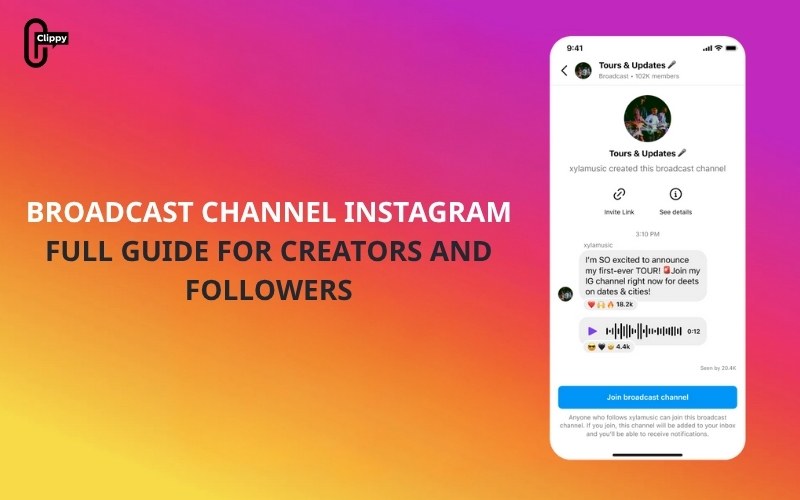
As Instagram continues evolving into a platform centered around community and private engagement, one feature stands out as a breakthrough communication tool: the Broadcast Channel Instagram. Launched to help creators reach their audience more directly, broadcast channels offer a powerful, algorithm-free way to connect with followers inside the Instagram DM inbox.
Whether you’re a creator, brand, influencer, or marketer, understanding how broadcast channels work and how to use them strategically can give you a major advantage. This comprehensive guide’s Video download free covers everything from how broadcast channels function, eligibility requirements, detailed steps to create one, and the benefits and limitations you should consider.
What is a broadcast channel Instagram?
A broadcast channel Instagram is a one-to-many messaging tool that allows creators to send updates, content, and announcements directly to followers who voluntarily join the channel. Unlike public posts or Stories that rely on algorithmic distribution, messages sent through a broadcast channel appear straight inside followers’ DM inboxes, significantly increasing visibility.
Only the creator (and any added co-admins) can send messages. Followers cannot reply or send their own messages, creating a structured, distraction-free environment. However, followers can participate through lightweight interactions such as:
- Emoji reactions
- Poll voting
- Viewing shared content
- Responding to question prompts
This design ensures the channel remains organized and focused while still fostering meaningful audience interaction.
>>> See more: What’s Instagram Direct? How DMs Work, Features, and Tips (Full Guide)
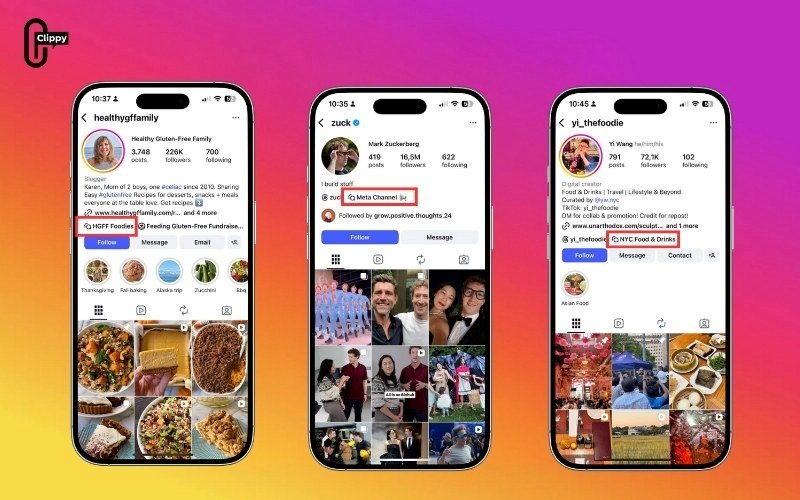
Broadcast Channel Instagram was created to meet this need by giving creators a dedicated “community hub” inside the inbox. In this place, they can reach their most loyal audience without competing with the feed, Stories, or Reels algorithms. The feature combines the intimacy of a group chat with the reach and structure of a subscriber community, making it especially useful for creators who want to maintain consistent engagement and strengthen audience loyalty.
Key Features of the Broadcast Channel Instagram
Instagram Broadcast Channels come equipped with a robust set of tools designed to help creators engage their audience more directly and creatively. As of the latest updates in late 2024 and early 2025, Broadcast Channels support multiple content types, interactive features, and customization options that enhance communication and strengthen community-building. Below is an in-depth look at the most significant features available.
Text Updates
Text is the foundation of communication within the Broadcast Channel Instagram. Creators can send short reminders, lengthy announcements, or detailed project breakdowns. These text-based messages are perfect for:
- Sharing daily or weekly updates
- Announcing product launches or event schedules
- Providing behind-the-scenes descriptions that don’t require photos or videos
- Giving personal notes or deeper thoughts that may not be suitable for a public post
Because text messages appear directly in followers’ inboxes, they offer unmatched visibility and immediacy, ensuring important updates don’t get lost in the feed.
>>> See more: How to Change Instagram Username: The Complete Guide
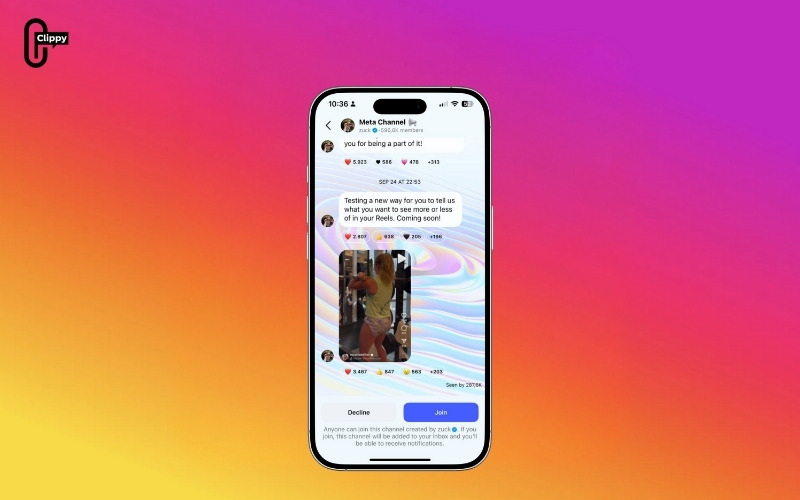
Photos and Videos
Broadcast channels support high-quality photos and videos, making it possible for creators to deliver visually engaging content right inside DMs. This feature is especially valuable for:
- Exclusive previews or teasers
- Step-by-step tutorials
- Product demonstrations
- Visual storytelling
- Event highlights or recap videos
By sharing images and videos, creators can give channel members an exclusive first look at new content or provide added value through visual insights that feel more personal than public posts.
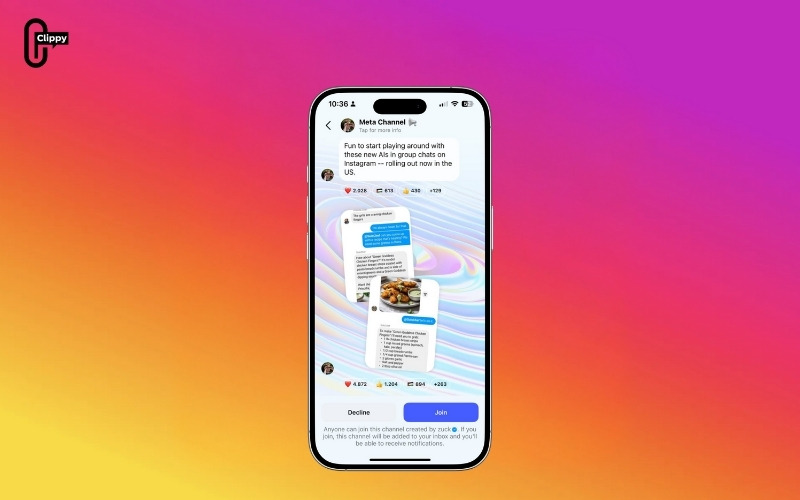
Voice Notes
Voice notes add a human touch to the Broadcast Channel Instagram. With a simple tap, creators can record and send voice messages of varying lengths. This feature is ideal for:
- Personalized greetings
- Quick updates without typing
- Sharing ideas or thoughts in a conversational tone
- Behind-the-scenes audio snippets
- Emotion-driven messages that feel more intimate
Voice notes help creators build stronger emotional connections with their audience, as listeners can hear their tone, energy, and personality in a way text may not capture.
>>> See more: What is Instagram Note? A Step-by-Step Guide for Beginners
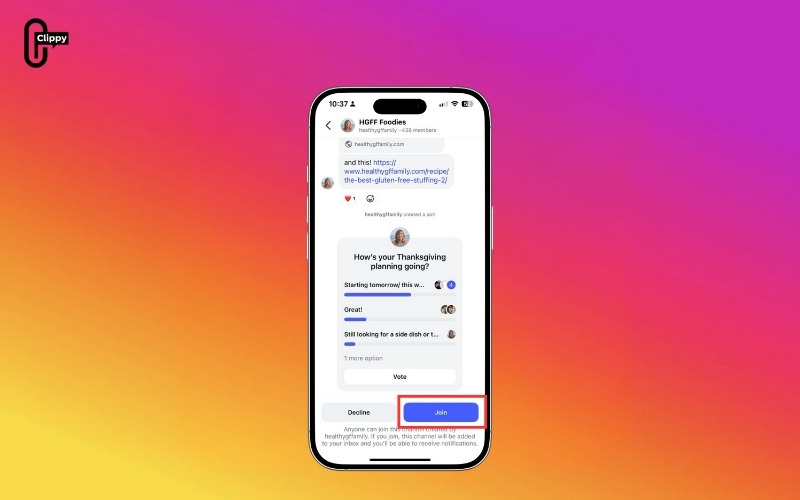
Polls and Question Cards
Interactive tools like polls and question cards make broadcast channels more collaborative. These features allow creators to gather feedback and encourage participation:
- Polls: Perfect for voting on new content ideas, product decisions, livestream timings, or community preferences. Poll results can influence creative decisions and give followers a sense of involvement.
- Question Cards: Help creators host Q&A sessions within the channel, collect user-generated ideas, or spark deeper conversations. They promote engagement without requiring open messaging.
These tools transform broadcast channels from one-way communication spaces into dynamic, community-driven environments.
GIFs and Links
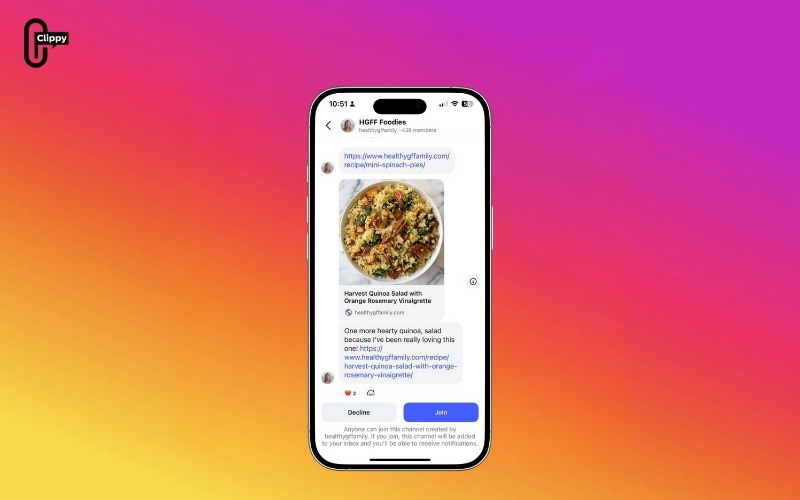
GIFs add emotion and humor to broadcast messages, making updates feel more expressive and relatable. Meanwhile, links allow creators to drive traffic outside Instagram, which is crucial for business growth. Links can direct followers to:
- Sign-up pages
- Blog posts or newsletters
- E-commerce product pages
- Affiliate links or collaborations
- YouTube videos or podcast episodes
The ability to include GIFs and links makes broadcast channels both fun and functional, balancing personality with utility.
Interactive Prompts
Instagram has been expanding the interactivity of broadcast channels, introducing new features that encourage active participation. These include:
- Multi-option polls that allow more detailed feedback
- Quick reaction buttons for instant responses
- Structured prompts that invite followers to vote, choose, or respond through pre-set options
- Temporary prompts designed to boost engagement during important announcements
Interactive prompts help creators keep their Broadcast Channel Instagram lively and immersive, making followers feel included without overwhelming the chat with replies.
How to Create a Broadcast Channel Instagram
Setting up a Broadcast Channel Instagram is a quick and easy process, but understanding the full setup options helps you create a polished, well-structured channel from the start. While the creation process takes less than a minute, optimizing each step ensures your channel is engaging, professional, and aligned with your content strategy.
Below is a fully detailed, expanded guide to help you create your Instagram Broadcast Channel effectively.
Step 1: Open the Instagram App
Begin by launching the Instagram app on your mobile device. Broadcast channels are primarily designed for mobile, so some features may not be available on desktop.
Step 2: Access Your Direct Messages (Inbox)
Tap the Direct Messages icon located in the top-right corner of the screen. This is where Instagram centralizes all one-on-one and group conversations, and also where broadcast channels live.
Step 3: Tap the Pencil Icon to Start a New Message
In the upper-right area of the inbox, you’ll find the pencil (compose) icon. Tap it to open various messaging options, including the option to create a broadcast channel.
Step 4: Select “Create Broadcast Channel”
From the menu that appears, choose “Create broadcast channel.”
If you do not see this option, your account may not meet Instagram’s eligibility requirements (such as follower count or account type), or the feature may not yet be available in your region.
Step 5: Customize Your Broadcast Channel
Instagram provides several customization options during setup. Taking a moment to configure these details helps followers understand the purpose of your channel.
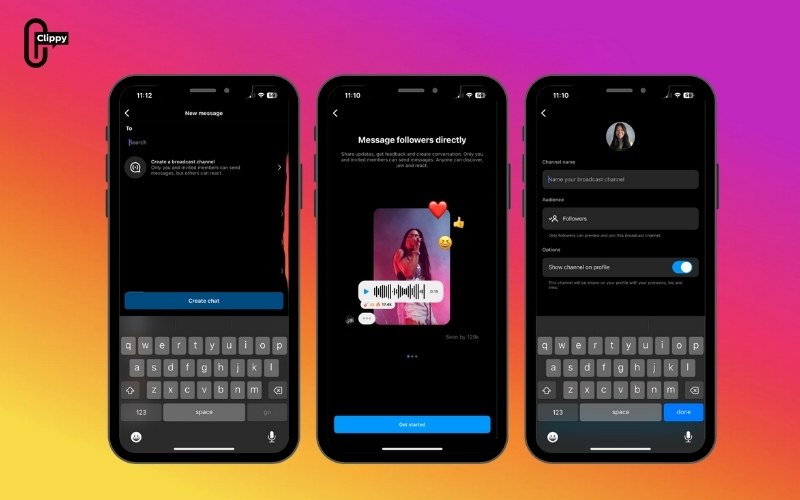
Here’s what you can customize:
Channel Name
This is the first thing followers will see. Choose a name that is clear, descriptive, and aligned with your brand.
Examples:
- “Daily Fitness Tips with Anna”
- “Tech Deals & Updates”
- “Behind the Scenes – Studio XYZ”
Target Audience
Creators can choose whether the channel is open to all followers or restricted to paying subscribers, or a specific group. This helps tailor content based on your engagement goals.
Expiration Date (Optional)
If your Broadcast Channel Instagram is for a limited-time event such as a product launch, challenge, or campaign, you can set an expiration date. Instagram will archive the channel once the period ends.
Display Channel on Profile
You can enable an option to showcase your broadcast channel on your profile page. When activated, Instagram adds a visible link at the top of your profile for higher discoverability. This is strongly recommended because it increases organic traffic.
Step 6: Tap “Create Broadcast Channel”
After customizing the settings, tap the button to officially launch your broadcast channel.
Step 7: Instagram Sends a One-Time Notification to Followers
Once the channel is created, Instagram automatically sends a notification to your followers announcing your new broadcast channel. This notification appears directly in their inboxes and significantly boosts early subscriber numbers.
Because this is often the moment you will get the largest wave of new members, creators commonly use their first message to:
- Welcome followers
- Introduce the purpose of the channel
- Explain what kind of content they will receive
- Set expectations for posting frequency
- Encourage reactions or participation
This onboarding message helps set the tone and makes followers feel included from the start.
>>> See more: Can People See Who You Follow on Instagram?
How Followers Can Join a Broadcast Channel Instagram
Joining a Broadcast Channel Instagram is designed to be as simple and intuitive as possible. Instagram offers multiple entry points to ensure users can find and join a creator’s channel easily, whether through their profile, a shared link, or promotional content.
Below is a detailed explanation of all the ways followers can join.
Method 1: Join Directly from the Creator’s Profile
This is the most common and visible method.
- Visit the creator’s Instagram profile.
- If the creator has enabled the display option, a bold link to the broadcast channel will appear near the top of the profile, above the “Follow/Following” button.
- Tap the broadcast channel link.
- Follow the prompts to join the channel.
Once joined, the channel will appear instantly in the follower’s DM inbox, just like any other message thread.
Method 2: Join Through Story Stickers
Creators can promote their broadcast channel through Stories using a dedicated “Join Channel” sticker. Followers can simply tap the sticker to access and join the channel. This method is especially effective because Stories are highly visible and interactive.
Method 3: Join Through Shareable Channel Links
Instagram allows creators to copy a direct link to their broadcast channel. These links can be shared:
- In Stories
- In Reels
- In bio links
- In captions
- On other platforms (TikTok, YouTube, Facebook, emails, websites)
When followers tap the link, they’re taken directly to the channel join page.
Method 4: Join Through In-App Notifications
When a new broadcast channel is created, Instagram automatically sends a one-time notification to all of the creator’s followers. This notification appears in the user’s inbox and offers them the option to join the channel instantly.
Method 5: Join from Posts Promoting the Channel
Creators often publish feed posts announcing their broadcast channel launch. These posts may include instructions, call-to-action text, or pinned comments with the channel link.
After joining the Channel, once a follower joins:
- The broadcast channel appears in their DM inbox
- They can view all previous messages sent by the creator
- They will receive notifications for new messages (unless they mute the channel)
- They can react to messages, participate in polls, and interact with content
Followers cannot send messages, ensuring the channel remains organized and strictly one-way, with optional lightweight interactions.
How to Find Instagram Broadcast Channels
Finding Instagram Broadcast Channels is simple once you know where to look. These channels give you direct access to updates, announcements, and exclusive content from your favorite creators. Whether you want to discover new channels or join those recommended based on your interests, Instagram offers multiple ways to explore them.
Below is a clear step-by-step guide to help you get started.
Step 1: Open the Instagram app on your phone.
Step 2: Go to your Direct Messages (DM) inbox.
Step 3: Tap the search bar at the top.
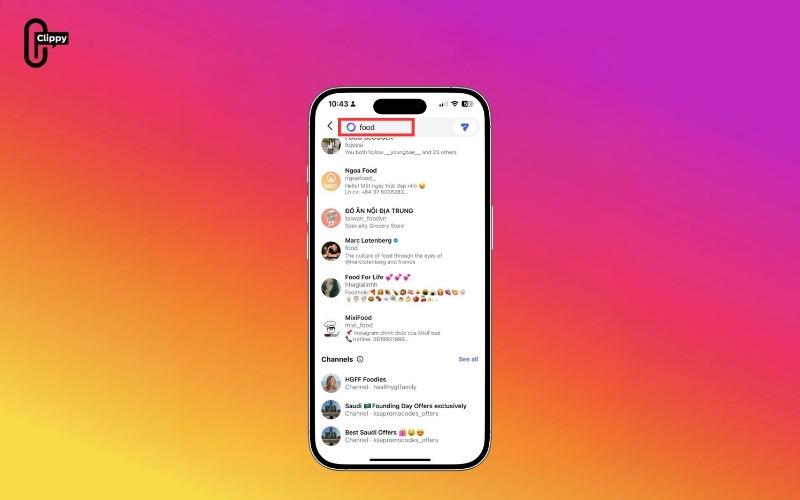
Step 4: Type in keywords to find specific Broadcast Channels or browse Instagram’s suggested channels based on your interests and the accounts you follow.
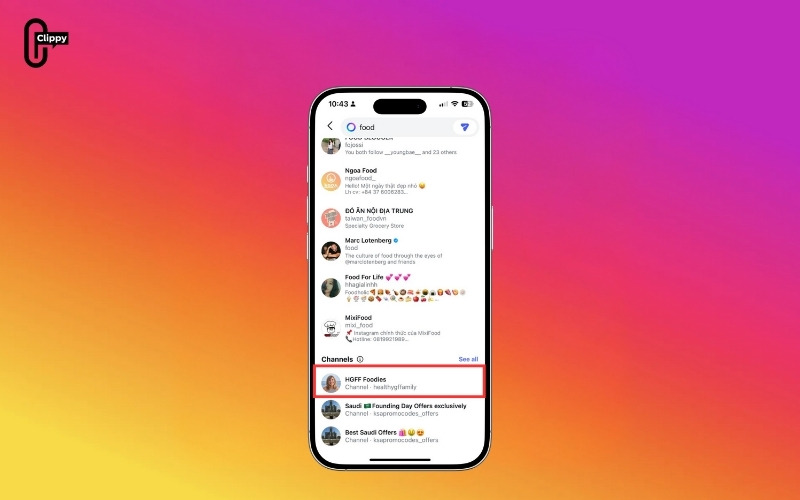
Step 5: Additionally, open any creator’s profile to check if they have enabled Broadcast Channels. If they have, you’ll see the channels displayed right below their bio.
Limitations and Considerations
Before relying heavily on the Broadcast Channel Instagram, keep these limitations in mind:
- Limited Analytics: Instagram does not currently provide detailed performance metrics, making it difficult to track growth or optimize content.
- No Audience Segmentation: All followers in the channel receive the same messages, regardless of interests or demographics.
- Instagram Ecosystem Dependence: Broadcast channels exist entirely within Instagram. If the platform changes its policies or algorithms, your channel may be affected.
- Potential for Over-Messaging: Because messages appear in DMs, posting too frequently may annoy followers. It’s important to maintain a balanced posting schedule.
Conclusion
The broadcast channel Instagram feature is one of the most impactful tools for creators and brands in 2025. It provides direct access to followers through the DM inbox, encourages higher engagement, and helps build a stronger sense of community. Although it has limitations such as minimal analytics and a lack of segmentation, the benefits far outweigh the drawbacks for most creators.
If used strategically, broadcast channels can become a core part of your audience engagement and content distribution strategy.

