


Struggling to figure out how to find my Facebook Messenger username when someone asks for it on the spot? You’re not alone – millions of users overlook this tiny detail that actually makes chatting faster, smoother, and way more convenient. Your username is the shortcut that lets people reach you instantly without searching your full profile. In this guide, Video Download Free will show you exactly where to find it in seconds so you never get stuck again.
Quick Guide
To quickly find your Messenger username, open the Messenger app, tap your profile icon, and go to Settings → Accounts Center → Username. On desktop, visit Facebook.com, open your profile, and check the text after facebook.com/ in the URL. That’s your unique username for sharing and chatting.
Why having a Messenger username helps you connect more easily?
A Facebook Messenger username might seem like a small detail, but it can make sharing your contact incredibly quick and frustration-free. Instead of digging through phone numbers or searching for profiles with similar names, a username gives people a direct way to reach you. It acts as your personal shortcut for smoother conversations whether you’re chatting with friends, joining group discussions, or connecting with colleagues.
A unique Messenger username also helps you stay organized and maintain privacy, since you can share it without exposing your full Facebook profile. It streamlines how others find you and keeps messaging fast and efficient. Once you know where your username is located and why it matters, sharing it becomes completely effortless across casual chats, events, communities, or work-related conversations.
How to find my Facebook Messenger username on the app
Finding your Facebook Messenger username is simple once you know where to look. Whether you need to share it quickly or just want to confirm what it is, you can access it in just a few taps.
Here’s how to find your Messenger username step by step:
Step 1: Open the Messenger app on your phone and tap the Menu icon — this may appear as your profile picture or the three horizontal lines in the top corner.
Step 2: Select Settings to access your Messenger preferences.
Step 3: Scroll down until you see Accounts Center, then tap See more to expand the options.
>>> See Also: How to delete Facebook messenger and erase your data fast
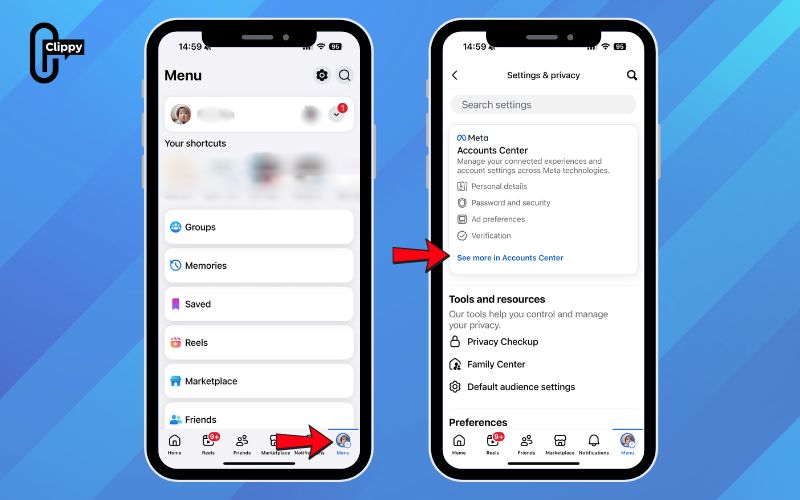
Step 4: Choose your profile from the list of connected accounts.
Step 5: Tap Username to view your current Messenger username. Here, you can confirm the exact spelling, copy it to share with others, or update it if you want something more memorable.’
>>> See Also: How to unrestrict someone on Facebook Messenger fast 2026
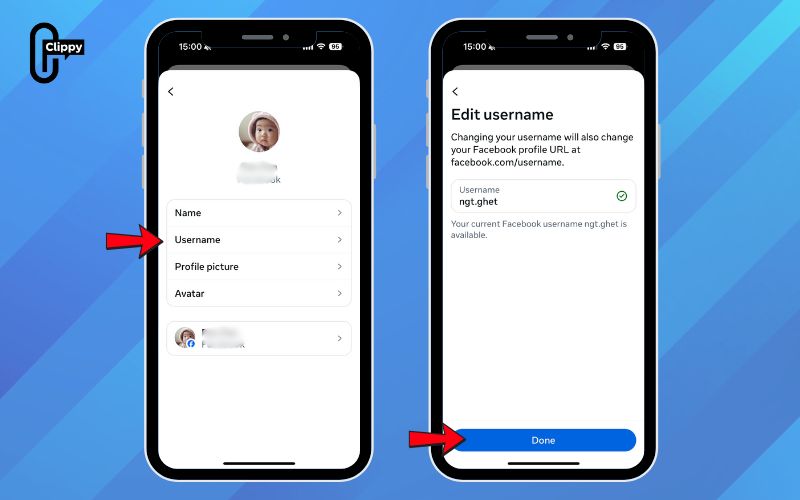
These steps give you quick access to your personal Messenger identifier, making it easier for people to find and message you without searching your full Facebook profile. Once you know where your username lives in the app, sharing it becomes effortless anytime you need it.
How to find my Facebook Messenger username on the website
Finding your Facebook Messenger username on the desktop version of Facebook is even simpler than on mobile. With just a quick look at your browser’s address bar, you can locate the exact username you need to share.
Follow these steps to find your username on Facebook.com:
Step 1: Open your browser and go to Facebook.com, then log in if you haven’t already.
Step 2: Click on your profile, you can do this by selecting your name or profile picture at the top of the page. This will take you to your personal Facebook profile.
Step 3: Look at the URL displayed in the browser’s address bar. Every Facebook profile has a unique link, and this link contains your username.
Step 4: Identify the text that appears right after facebook.com/. That part of the URL is your Facebook username.
Example: If your profile link is https://www.facebook.com/zuck/, then your username is “zuck”.
>>> See Also: How to play Facebook messenger games without any extra apps
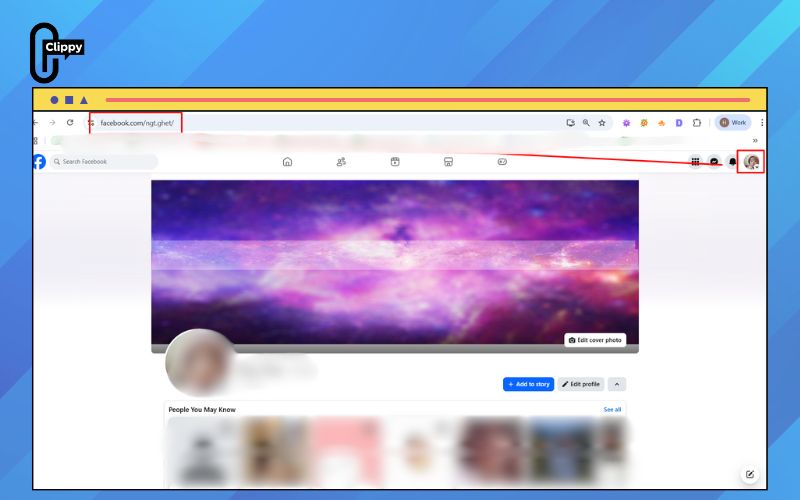
This method is especially helpful when you’re sharing your username for Messenger, business communication, or quick profile access. Since the URL never hides your username, you can easily confirm it, copy it, and send it to others without navigating through any menus. Once you know where to look, finding your username on desktop takes only a second.
Common username-sharing errors and how to avoid them
Sharing your Messenger username should be quick and effortless, but many users still stumble over a few common mistakes. Knowing these pitfalls helps you share your contact accurately and avoid confusion during conversations.
- Sharing your full Facebook URL instead of your username: This often sends people to your main profile instead of opening a direct chat, creating unnecessary steps and confusion. Always provide the username, not the entire profile link.
- Using an outdated username: If you recently changed your username but keep sharing the old one, others won’t be able to reach you. Make sure to double-check your current username before sending it out.
- Typos or extra characters: A small misspelling or an accidental symbol can break search results or cause your username link to fail. Review the spelling carefully before sharing to keep things smooth.
- Not setting a username at all: Without a username, Messenger has no quick way for others to find you directly. Setting it up ensures you’re visible and easy to connect with.
By staying aware of these issues and verifying your username before sharing, you’ll make sure every contact request reaches you without any hassle.
>>> See Also: How to create group chat in Facebook Messenger for Beginners
FAQs about how to find my Facebook messenger username
Your Messenger username plays a key role in how people find and contact you, so it’s normal to have questions about how it works. Whether you want to change it, locate it, or manage who can see it, understanding these basics helps you stay in control of your privacy and communication.
Can I update my Messenger username in the future?
Yes, you can change your username anytime directly in Messenger’s settings or the Accounts Center. Just remember that frequent changes may make it harder for people to recognize or find you.
Is my Messenger username automatically the same as my Facebook username?
Not necessarily. Messenger allows you to set a dedicated username for chats, while your Facebook username is linked to your profile URL and broader account identity.
What should I do if my Messenger username doesn’t appear anywhere?
Start by updating the Messenger app and ensuring your account is fully configured. If no username exists yet, you can create one manually in the Accounts Center under your profile settings.
How can I keep my Messenger username private or limit who can use it?
You can manage who can find or message you by adjusting privacy controls in Messenger and Facebook’s Accounts Center. Avoid posting your username publicly if you prefer more restricted visibility.
>>> See Also: How to change Facebook Messenger background with hot topics
Now that you know how to find your Facebook Messenger username, sharing your contact becomes quicker, cleaner, and far more professional. Whether you’re connecting with friends, joining group chats, or handling business communication, your username gives others a direct line to you. Just follow the simple steps we covered, and you’ll never waste time searching again. Master this small detail today and make every conversation start effortlessly.

