


How to find saved Reels on Facebook becomes a real struggle when your saved clips mysteriously disappear into Facebook’s menu jungle. Whether you’re bookmarking cooking hacks, travel tips, or funny pets, knowing where to look is essential. This guide of Video Download Free breaks down every method to locate them instantly.
Key Takeaways
- How to find saved Reels on Facebook (mobile & desktop)
- How to access saved Reels from your profile’s Reels tab
- How to locate saved Reels using the Watch tab
- How to view your liked Reels on Facebook
- What to do if a saved Reel disappears
- FAQs about saved Reels & downloading options
How to find saved Reels on Facebook app?
If you’ve ever saved a Reel and then spent way too long digging around the Facebook app trying to find it again, you’re definitely not alone. The good news? The mobile app actually makes it super quick to locate your saved Reels – once you know exactly where to look.
How to find saved Reels on Facebook mobile
The Facebook mobile app is where most of us spend our scrolling time yet your saved Reels can be surprisingly tricky to locate if you don’t know where Facebook hides them. This quick method helps you pull them up instantly whenever you need them.
How to do it:
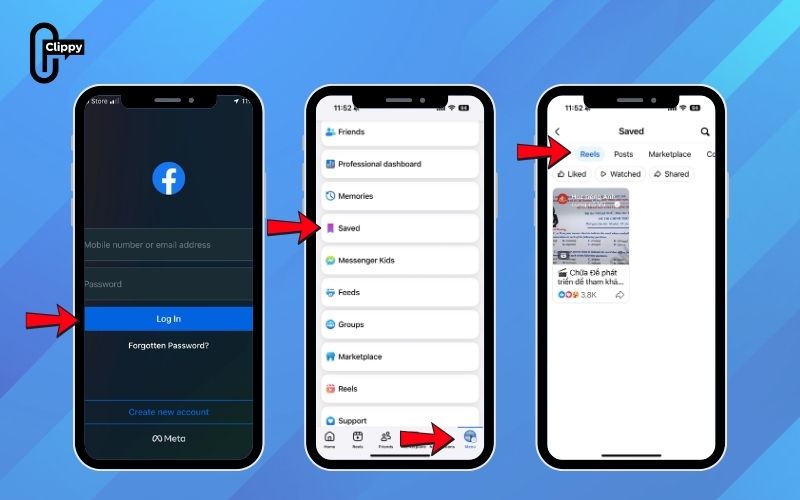
Step 1: Open the Facebook app on your iPhone or Android device and make sure you’re logged in.
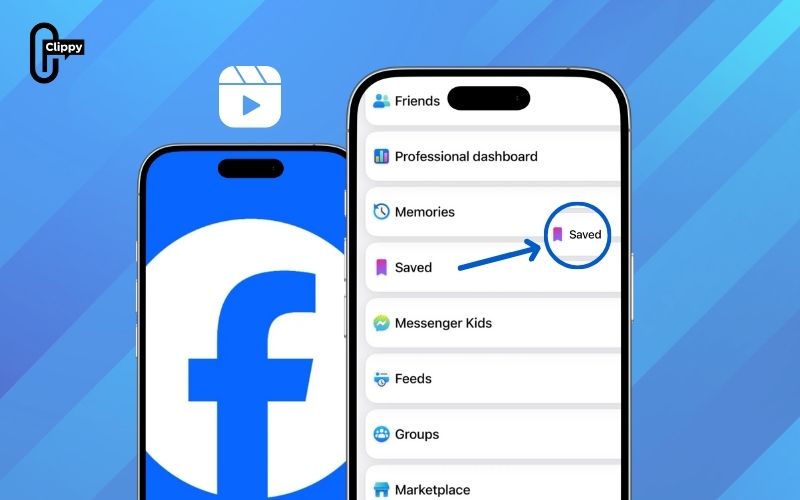
Step 2: Tap the menu icon on the three horizontal lines found in the top-right corner on Android or bottom-right corner on iOS.
Step 3: Scroll through the menu until you see “Saved“. If it’s not showing right away, tap “See More” to expand the list. Select “Saved” to open all your saved content.
Step 4: At the top, tap “All” then choose “Reels” to filter your view. Now you should see only your saved Reels. Tap any Reel to watch it instantly.
>>> See Also: How to delete Facebook Reels history and wipe all data 2025
Pro Tips:
- Keep everything organized by creating themed collections (like Recipes, Travel Ideas, or Gym Motivation). Just tap “Create New Collection” inside the Saved section.
- To remove a Reel from your saved list, tap the three dots beside it and select “Unsave”.
- Make sure your app is updated and outdated versions sometimes hide or delay the Saved menu.
I tried this on my iPhone to retrieve a cooking Reel I saved earlier, and once I filtered by Reels, it appeared in under 10 seconds. Funny enough, I completely overlooked the “See More” button at first and thought my saved videos had disappeared!
How to find saved Reels on Facebook PC
If you’re using a MacBook or PC, the Facebook website makes it incredibly simple to track down your saved Reels. The desktop layout is clean and organized, so you can jump straight to what you’re looking for without wasting time.
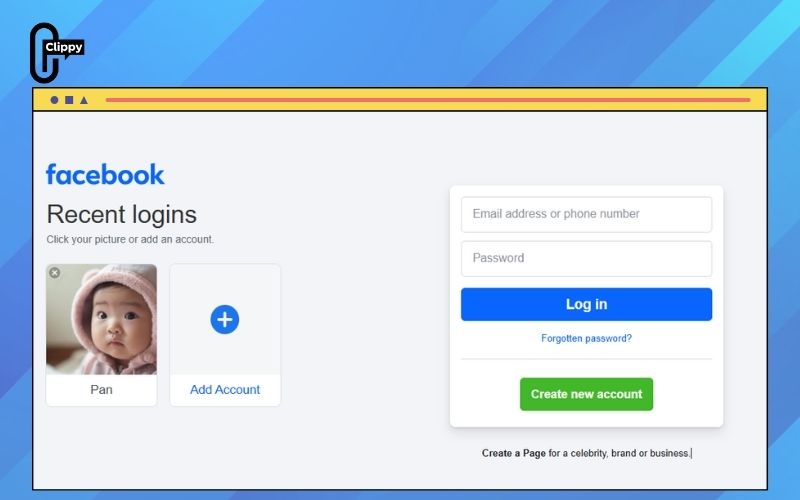
Step 1: Open your browser (Chrome, Safari, Edge,…), go to facebook.com, and log into your account.
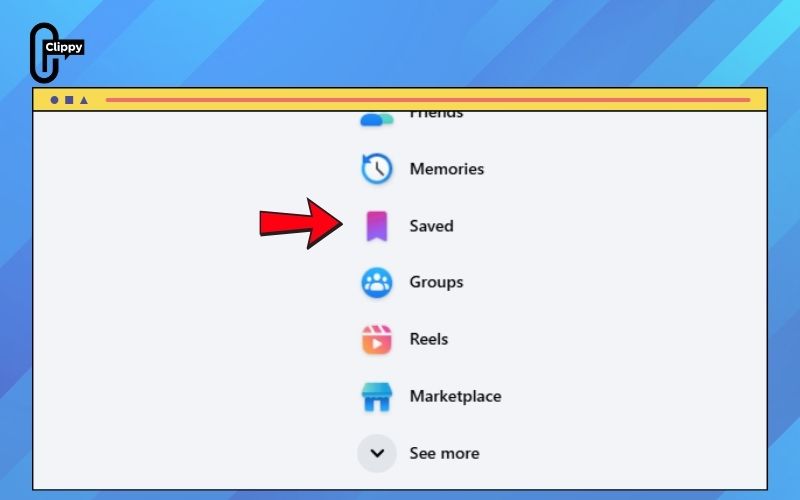
Step 2: On the left-hand sidebar, find the “Saved” section. If it doesn’t appear right away, hit “See More” to reveal additional options.
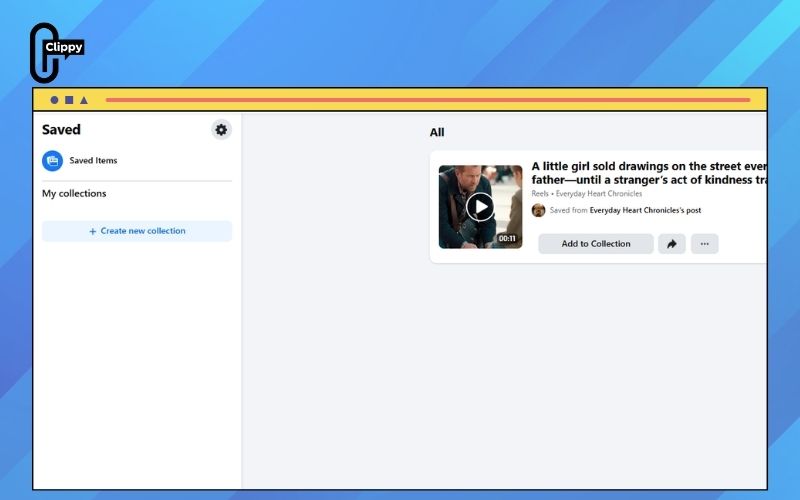
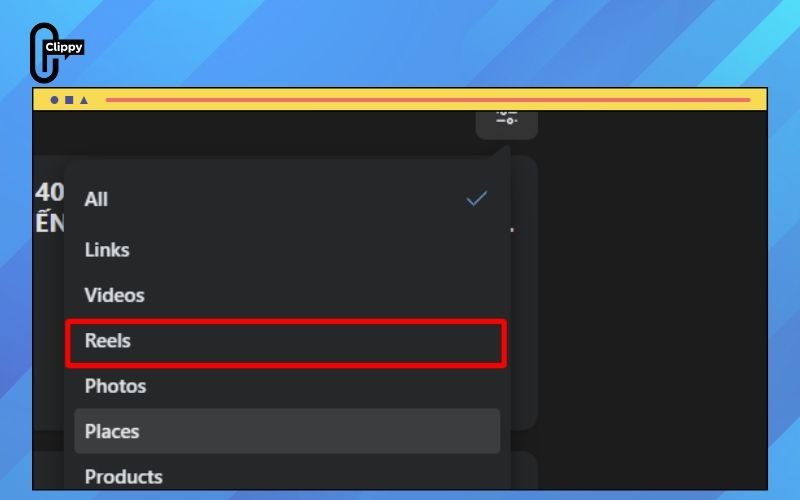
Step 3: At the top-right of the Saved page, click the filter icon (the one that looks like two sliders).
Step 4: Select “Reels” to filter out everything else and view only your saved Reels. Click any Reel to watch or share it instantly.
Tips:
- For better organization, create themed collections like Travel Vibes, DIY Hacks, or Cooking Ideas using “Create New Collection.”
- To remove a Reel from your list, click the three-dot menu beside it and choose “Unsave”.
- A solid internet connection will help your saved Reels load smoothly and quickly.
How to find saved Reels through your profile’s Reels tab
If you’re already exploring Reels, you can quickly jump to your saved ones straight from the Reels tab on your profile – it’s a fast shortcut without digging through menus.
Step 1: Open the Facebook app or visit facebook.com, then head to your profile by tapping or clicking your profile photo.
Step 2: Under your cover photo, select the “Reels” tab.
Step 3: Tap or click “Saved” to pull up every Reel you’ve bookmarked in one place.
Step 4: Choose any Reel to watch, like, or share instantly.
>>> See Also: How to add music to Reels on Facebook and go viral instantly
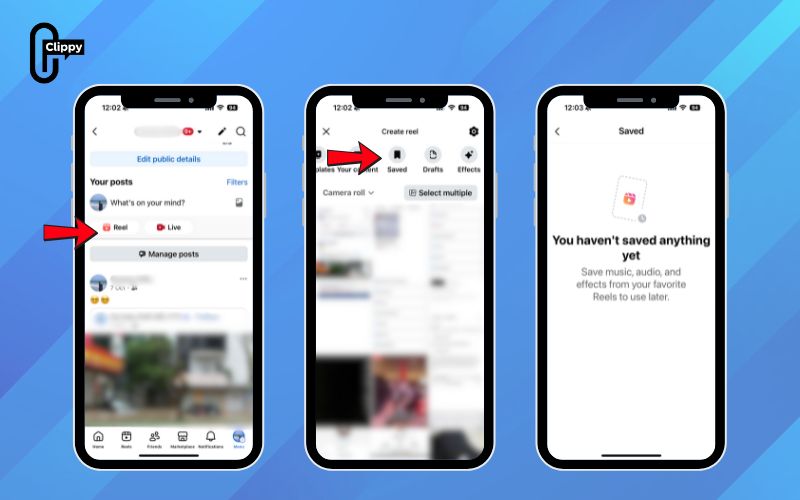
Tips: This route is ideal when you’re already in Reel-viewing mode and want a quick way to revisit your favorites. If “Saved” doesn’t appear, make sure your app is updated or refresh your connection. You can share saved Reels straight from here too.
I once rediscovered a hilarious comedy Reel through this method — it took seconds and saved me from browsing endless menus. It’s definitely my favorite shortcut when I’m already deep in the Reels feed.
How to find saved Reels from Facebook watch tab
If you’re already browsing Reels, you can quickly jump to your saved ones straight from your profile – it’s one of the fastest shortcuts you can use.
Step 1: Open the Facebook app or visit facebook.com, then head to your profile by tapping or clicking your profile picture.
Step 2: Under your cover photo, select the Reels tab.
Step 3: Choose Saved to display every Reel you’ve bookmarked in one place.
Step 4: Tap or click any Reel to watch, react, or share it instantly.
Tips: This method is ideal when you’re already in the Reels section and want a quick look at what you’ve saved. If the Saved tab isn’t visible, update your app or check your connection. You can also share your saved Reels directly from this page.
I tried this method one day while checking my profile updates, and I instantly found a travel Reel I’d saved earlier – all without opening any menus or navigating through extra tabs. Whenever I’m already in the Reels mindset, this is the quick-access trick I always fall back on.
How to see liked Reels on Facebook
If you’re curious about the Reels you’ve previously liked, Facebook makes it easy to revisit them. Here’s how you can quickly access every Reel you’ve ever tapped the “Like” button on:
Step 1: Launch the Facebook app and tap your profile picture or your name at the top. This brings you to your personal profile page.
Step 2: On your profile, scroll until you spot the Reels tab. Tap it to open a dedicated section showing all your Reels activity including the ones you’ve created, saved, and interacted with.
Step 3: Inside the Reels page, you’ll see different categories. Look for Liked, then tap it. This will pull up every Reel you’ve ever reacted to with a thumbs-up.
Step 4: You’ll now see your full library of liked Reels. Scroll through and rewatch any clip you found funny, helpful, inspiring, or worth keeping on your radar.

What to do if you can’t find a saved Reel
If a Reel you previously saved seems to have vanished, don’t panic—there are a few possible explanations. Sometimes the creator deletes their Reel, which removes it from everyone’s Saved folder automatically. In other cases, Facebook may take the video down if it violates community rules.
Another possibility is that you (or anyone with access to your account) might have accidentally unsaved it. If that’s the case, you can try searching for the Reel again on Facebook and save it once more if it’s still available.
FAQs
Can I share my saved Reels with friends on Facebook?
Yes! You can share saved Reels with friends through collections. Go to Saved in the left sidebar, choose Add to Collection, select your collection, and invite your friends. They’ll be able to view every Reel inside that collection.
How do I remove a Reel from my saved list?
Easy, just open the Reel and tap the bookmark icon again. This instantly removes it from your saved items.
Can I download a Reel from Facebook?
Facebook doesn’t offer a built-in feature to download Reels directly from the platform. However, you still have options.
If you want to save Reels to your device, you can use a trusted third-party downloader. One of the easiest solutions is Clippy app – a simple, fast, and reliable tool for downloading Facebook videos, including Reels.
Just head to CH Play, search for Clippy, and install the app. Within seconds, you can paste a Reel link and download it effortlessly. It’s a great workaround since Facebook doesn’t provide native downloading support.
How to find saved Reels on Facebook becomes a smooth process once you understand where Facebook places saved videos. Thanks to several built-in shortcuts, accessing your saved content takes only moments. Combine these methods with collections for better organization. Now you’re fully equipped to manage and reuse your favorite Reels.

