


Switching to a personal account on Instagram is a simple way to return to a more private and streamlined experience. Many users choose this option when they no longer need professional tools such as analytics, ads, or promotional features and want to focus on sharing content with friends, family, or a smaller audience.
In this guide of Free Download App Video, you’ll learn how to switch to a personal account on Instagram step by step using both the mobile app and a web browser. The article also explains what changes after switching, common issues users may encounter, and when a personal account is the right choice for your needs.
Key Takeaways
- Switching to a personal account on Instagram removes access to professional tools such as insights, ads, and the professional dashboard.
- The switch can be completed quickly through the Instagram mobile app and, in some cases, through a web browser.
- Your posts, followers, messages, and content history remain unchanged after switching to a personal account.
- Historical analytics data from business or creator accounts is permanently lost once you switch.
- Personal accounts allow you to set your profile to private, offering greater control over who can view your content.
- You can switch back to a business or creator account at any time if you need analytics or promotional features again.
- If the option to switch does not appear, updating the Instagram app or using the mobile version usually resolves the issue.
- A personal account is best suited for users who prioritize privacy, simplicity, and non-commercial use of Instagram.
What Is a Personal Account on Instagram?
A personal account is the default account type on Instagram, designed for everyday users who want to share content without professional or marketing tools. This account type focuses on ease of use and privacy rather than performance tracking.
With a personal account, you can still post photos, videos, Stories, and Reels. However, features such as analytics, ads, branded content tools, and shopping options are not available. This makes personal accounts ideal for casual users or those who no longer use Instagram for business or creator purposes.
>>> See more: Types of Instagram Accounts: Which One Is Right for You?
Why Switch to a Personal Account on Instagram?
Many users choose to switch to a personal account after deciding they no longer need insights or promotional features. This is often the case for users who stop managing a brand, pause content creation, or simply want a less commercial experience.
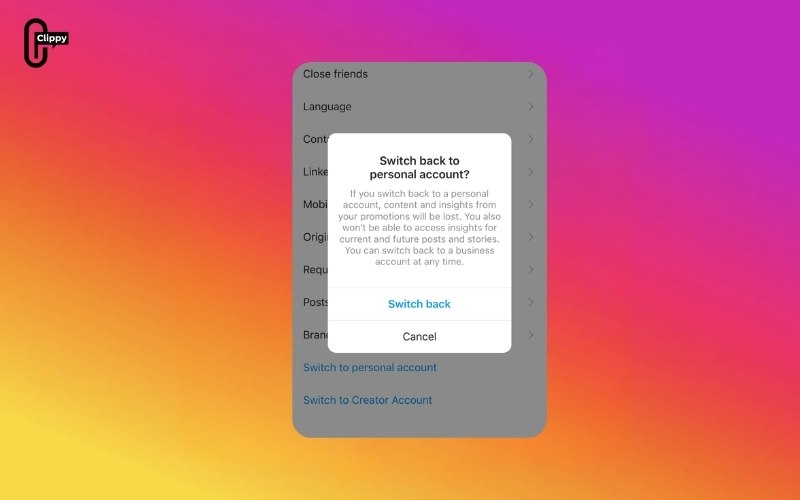
Another common reason is privacy. Personal accounts can be set to private, which is not possible with business accounts. Switching also reduces notifications related to ads, promotions, and performance metrics, helping users enjoy Instagram more casually.
How to Switch to a Personal Account on the Instagram App
The Instagram mobile app is the most reliable way to switch account types. The exact wording may differ slightly depending on whether you currently have a business or creator account, but the steps are generally the same.
Step by step:
- Step 1: Open Instagram and go to your Profile (tap your profile picture in the bottom-right).
- Step 2: Tap the Menu (three lines) in the top-right.
- Step 3: Tap Settings and privacy.
- Step 4: Scroll down to For professionals (or search for “account type” in the settings search bar).
- Step 5: Tap Business tools and controls (for Business accounts) or Creator tools and controls (for Creator accounts).
- Step 6: Tap Switch account type.
- Step 7: Choose Switch to personal account.
- Step 8: Tap Switch (or confirm) when Instagram asks you to confirm the change.
If you don’t see “For professionals,” try:
- Searching in settings for “Switch account type.”
- Updating the app, then reopening Instagram
>>> See more: How to Turn On Dark Mode on Instagram (Full Guide)
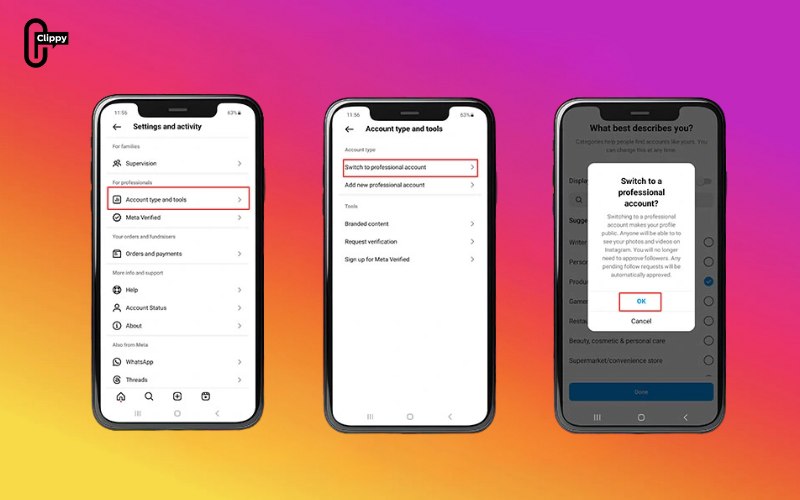
How to Switch to a Personal Account on the Instagram Browser
If you’re using Instagram on a desktop browser, you may be able to switch account types from your settings. However, depending on your region and Instagram updates, some accounts may not see the full “account type” options on the web. If the option isn’t available, the mobile app method above will work.
Step by step:
Step 1: Go to instagram.com and log in.
Step 2: Click your Profile in the left menu (or bottom-left on some layouts).
Step 3: Click Settings (usually under the menu or your profile options).
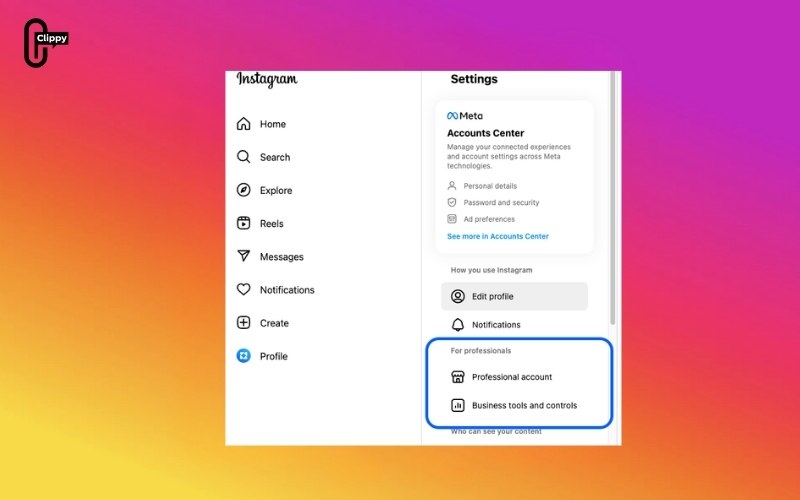
Step 4: Look for an option like Account type and tools or Professional account settings.
Step 5: Select Switch account type.

Step 6: Choose Switch to personal account.
Step 7: Confirm the change when prompted.
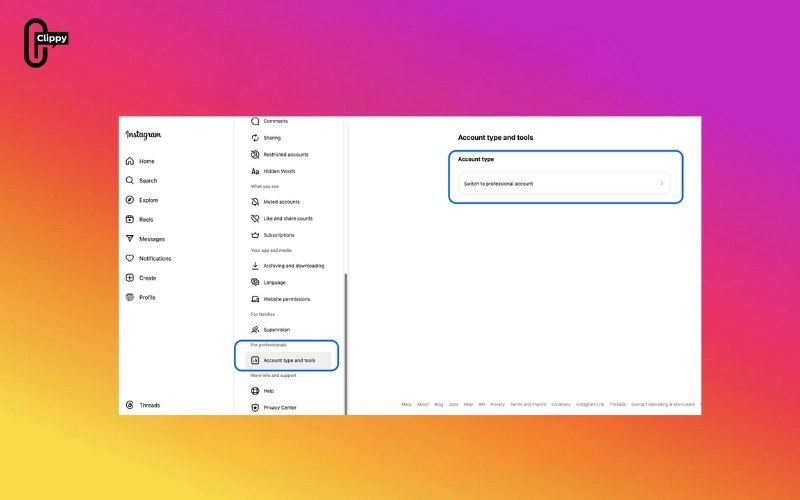
If you can’t find the switch option on browser:
- Use the app steps (Instagram often shows more account controls in the mobile app)
Conclusion
Knowing how to switch to a personal account on Instagram gives you full control over how you use the platform. The process is quick, reversible, and does not affect your followers or content. If you want more privacy, fewer professional features, and a simpler experience, switching to a personal account is a practical and user-friendly choice.
If your needs change in the future, Instagram allows you to switch account types again at any time, making this decision flexible and low risk.
>>> See more: How to Unsync Facebook and Instagram: Fast & Easy Methods
>>> See more: What’s Instagram Direct? How DMs Work, Features, and Tips (Full Guide)

