


How to deactivate Facebook account is a question many users ask when they need a break from social media. Whether you want more privacy, fewer distractions, or simply time offline, Facebook offers a temporary deactivation option. This feature lets you step away without losing your data. Let’s learn with Video Download Free how to do it correctly and safely.
Key Takeaways
- Reasons why people deactivate Facebook
- How to deactivate Facebook account temporarily
- How to deactivate Facebook on iPhone
- How to delete Facebook account on the web
- Pros & cons of temporarily deactivating Facebook
- Differences between deactivating vs deleting
- How to download your Facebook account data
- FAQs about deletion, Messenger access, data, and recovery
Reasons why people deactivate Facebook
People choose to deactivate Facebook for several reasons, often tied to personal comfort, online safety, and overall well-being. Below are the most common reasons why users decide to step away from the platform:
- Privacy concerns: Many users worry about how Facebook collects and uses their personal data, prompting them to deactivate their accounts for greater control and security.
- Too much personal exposure: Some people feel uncomfortable with the amount of personal information they’ve shared, so they deactivate Facebook to reduce their digital footprint.
- Fear of scams and fraud: With the rise of phishing links, fake giveaways, and Facebook Marketplace scams, users may deactivate their accounts to avoid security risks.
- Mental health considerations: Constant comparison, social pressure, and anxiety can negatively impact mental health. Studies show that taking a break from Facebook can improve overall well-being.
- Social media addiction: Facebook’s addictive nature makes it easy to spend more time online than intended. Deactivating the account helps users break the habit and regain balance.
- Ad overload: Too many ads can quickly make the platform feel overwhelming or irritating, pushing some users to deactivate their accounts.
>>> See Also: How to make Facebook private and hide all your info easily
How to deactivate Facebook account temporarily
Deactivating your Facebook account temporarily is a simple way to take a break without losing your profile, friends, or data. This option keeps your information intact while letting you step away from the platform whenever you need.
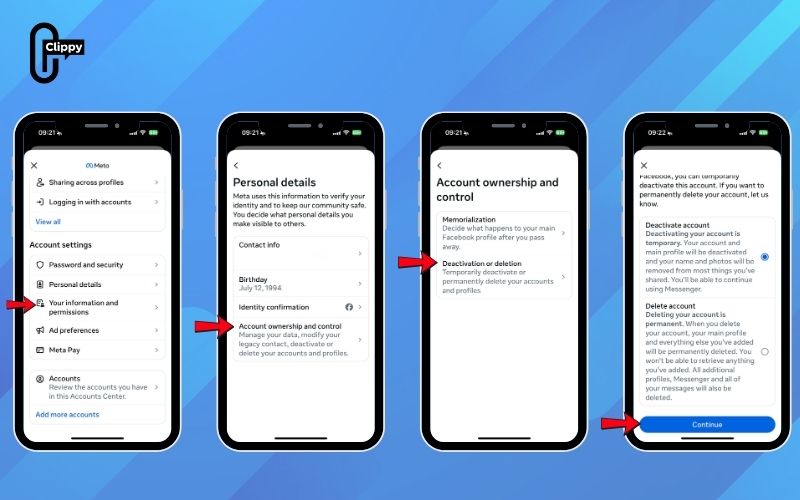
How to deactivate Facebook account on phone
Deactivating your Facebook account on iPhone only takes a few taps, and you can reactivate it anytime by logging back in. Follow the steps below to temporarily disable your profile while keeping all your data safe.
Steps on how to deactivate Facebook account:
Step 1: Open the Facebook app and tap the Menu icon (three lines).
Step 2: Go to Settings & privacy → Settings.
Step 3: Tap See more in the Accounts Center.
>>> See Also: [Updated 2025] How to sign in Facebook safely on any device

Step 4: Select Personal details → Account ownership and control.
Step 5: Choose Deactivation or deletion, then select your account.
Step 6: Tap Deactivate account → Continue, and follow the on-screen prompts.
>>> See Also: How to sign up to Facebook: Secure, Quick, Step-by-Step
How to deactivate facebook account on computer
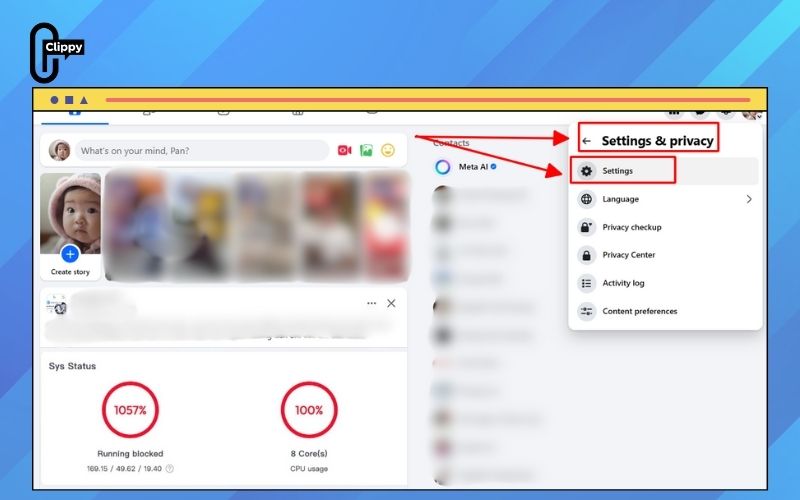
If you prefer to delete your Facebook account on the web, you can follow the steps below. The process is identical on both Mac and PC, and closely mirrors the steps in the mobile app.
Step 1: Visit Facebook.com. Click your profile picture in the top-right corner.
Step 2: Select Settings & privacy → Settings.
>>> See Also: How to lock Facebook profile to stop stalkers immediately
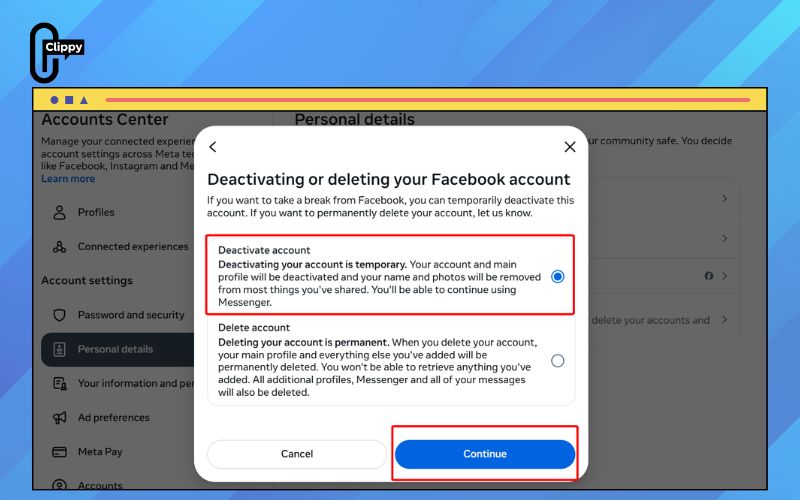
Step 3: Go to Meta Accounts Center → Personal details → Account ownership and control.


Step 4: Choose Deactivation or deletion and pick the account you want to remove.

Step 5: Select Delete account → Continue. Enter your password and follow the remaining prompts to confirm.
Advantages and disadvantages of temporarily deactivating your Facebook account
Temporarily deactivating your Facebook account can be a helpful way to step back from social media without losing your profile or personal content. Before you decide, it’s important to understand what you gain and what limitations you might face while your account is inactive. The table below breaks down the key advantages and disadvantages to help you make an informed choice.
Pros | Cons |
|
|
Key differences between deactivating and deleting a Facebook account
Understanding the difference between deactivating and deleting your Facebook account is essential before making a decision. While both options limit your activity on the platform, they have very different effects on your data, privacy, and overall account visibility. The table below breaks down the key distinctions to help you choose the option that fits your needs.
Criteria | Deactivating Facebook | Deleting Facebook |
Duration & Reversibility | Temporary – you can reactivate anytime by logging in. | Permanent – once deleted, you cannot restore your account. |
| Data Storage & Privacy | Facebook continues storing all your personal data, offering little improvement in privacy or cybersecurity. | Your photos, posts, videos, and profile information are permanently removed, reducing exposure to data leaks. |
| Messenger Access | You can still use Facebook Messenger even when your profile is hidden. | Messenger is also deleted, and all related content is removed. |
| Visibility to Others | Your profile becomes hidden from other users, but existing messages remain visible in their inboxes. | Your profile disappears completely, though messages you’ve sent may still remain in others’ chats. |
| Backup & Retention by Facebook | Your account stays inactive but fully stored on Facebook servers. | Facebook keeps backup copies for up to 180 days before permanently erasing them. |
If you only want a break from social media or prefer to hide your profile without losing your data, deactivation is the better option. But if you want full privacy and permanent removal of your personal information, deleting your account is the more secure choice.
How to download your Facebook account data
You can create a backup of your Facebook information before deleting your account to ensure you don’t lose important content such as photos, videos, posts, and interactions. The process is the same on both desktop and mobile, and only takes a few minutes.
Step 1: Click your profile picture on desktop, or tap the three-line menu on mobile.
Step 1: Go to Settings & privacy → Settings.
Step 3: Select Accounts Center, then choose Your information and permissions.
Step 4: Tap Export your information → Create export.
Step 5: Pick the profile you want to export and tap Export to device.
Step 6: Select Start export. Enter your password and click continue
Step 7: Follow the on-screen prompts to complete the download or transfer.
>>> See Also: How to log out of Facebook on all devices 2026

FAQs
Before deleting or deactivating your Facebook account, it’s helpful to understand what actually happens to your data, Messenger access, and recovery options. Below are some of the most common questions users ask along with clear, straightforward answers.
How long does it take for a Facebook account to be fully deleted?
Facebook gives you a 30 day window in case you change your mind after requesting deletion. During this period, you can still cancel the process. After 30 days pass, your account and all associated data are permanently erased.
Can I continue using Messenger if my Facebook account is deactivated?
Yes. Deactivation only hides your Facebook profile, it doesn’t remove Messenger access. You can still send and receive messages normally. However, deleting your Facebook account will permanently remove Messenger as well.
What happens to my data once I delete my Facebook account?
After the 30 day grace period expires, Facebook permanently deletes all your content, including photos, posts, and most messages. Once this process begins, your information cannot be recovered.
Do I need to download my Facebook data before deleting my account?
It’s optional, but highly recommended if you want to keep copies of your photos, posts, messages, or any other personal information. Once deletion is finalized, your data is gone forever.
Can a deleted Facebook account be recovered later?
No. After the 30 day recovery window ends, the deletion becomes permanent. You won’t be able to restore your account, access your data, or reactivate it in any way.
>>> See Also: How to change Facebook profile picture for a fresh look

How to deactivate Facebook account is a simple yet effective way to take control of your digital well-being. Whether you’re stepping back for privacy, focus, or mental clarity, this feature gives you the freedom to pause without losing your data. Now that you know the full process, you can comfortably manage your account. Use this option whenever you need a break.
If you regularly manage content or want to optimize your Facebook experience, try Clippy – a tool that supports data management and super-fast video downloading. In addition, Clippy’s Facebook Video Downloader allows you to download high-quality Facebook videos in just a few seconds. Experience this utility to save time and upgrade your work performance.

